
How to Choose Pergola Black Friday Bundles: Screens, Lighting & Extras
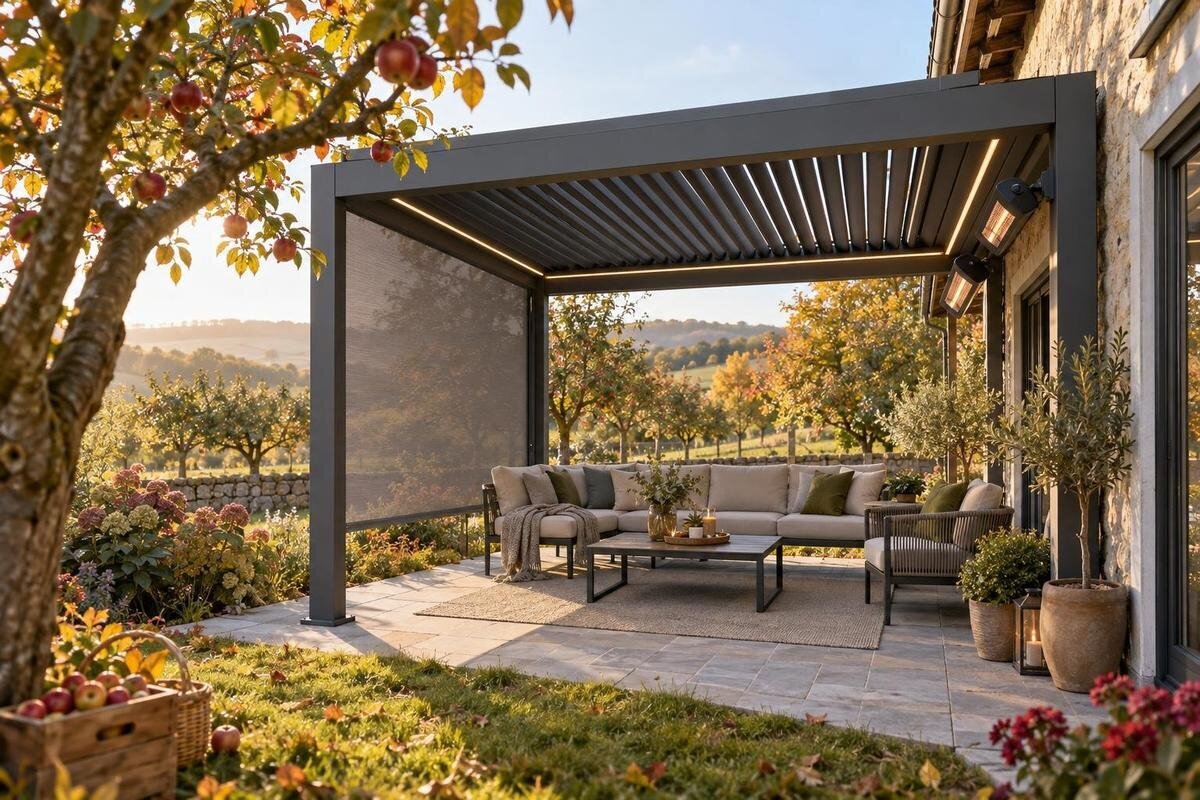
Pergola buying guide
Pergola Black Friday bundles can make a purchase look like one simple choice, but packages may differ in which screens, lights, and other accessories they include, how many items they contain, and what costs extra. A styled photo or broad bundle label is not an inventory. This guide focuses on comparing those add-ons: what job each should do, how to check compatibility and controls, and how to judge a package against buying items separately. No particular seasonal price or discount is assumed; use the product details and offer terms available when you shop.

Compare the items included in each bundle
A Black Friday label does not tell you whether a pergola package includes side screens, lighting, or only a selection of optional extras. Treat the bundle as an itemized list, not a promise based on its name or a styled photo. Record the exact pergola configuration, each accessory, the quantity, and whether it is included, optional, or sold separately. If the listing does not clearly answer one of those questions, mark it as unknown rather than filling in the gap yourself. For a comparison sheet, a Bloomcabin pergola listing can be one candidate entry; record only the components its current product details explicitly identify.
Give each candidate the same set of columns: main pergola, screen type and quantity, lighting components, other extras, and any costs or requirements stated separately. Add a column for the exact option or variant selected, since that is the version your notes must describe. Look closely at the selected options as well as the main description; a package may change when you choose a different configuration. At checkout, compare the final item lines with your notes so an optional accessory has not been mistaken for an included one. This simple inventory also helps when two packages use similar photos but list different items, or when one offer describes a group of products without explaining exactly what is in the group.
Compare the total cost, not the bundle label
A discount badge or bundle name is not enough to establish that one package offers better value. Compare the total for the same pergola configuration and the same set of accessories. Use separately listed prices only when they are available, and include any additional amounts shown during checkout, such as taxes or shipping. If the offer has a code, an eligible product variant, or exclusions, read the stated terms before comparing totals. No particular Black Friday discount or offer is assumed here; use the prices and conditions shown when you shop.
Separate useful extras from items you would not choose on their own. A package with more accessories can have a higher total without being a better fit, while a smaller package may leave you paying separately for something you genuinely need. Put another Bloomcabin pergola listing in its own row and compare only what the current page and offer terms actually specify. Note the date and selected configuration beside each total, because a comparison is only useful when every figure refers to the same choices. If separate accessory pricing is not shown, do not estimate a saving from the bundle label. Your comparison should distinguish confirmed costs from questions you still need answered.
Choose screens for the job they need to do
Start by deciding what you want a screen to change. Depending on its design, a screen may be intended to limit insects, soften direct sun, increase privacy, or provide some combination of those functions. Those goals can involve tradeoffs: a more opaque panel may reduce the view, while a more open material may provide less privacy. Look for the stated purpose and material details instead of assuming that every product described as a screen performs alike. Consider the direction of neighboring views and sunlight at the times you expect to use the space.
Check how many sides are covered and whether the listed screen is full-width or partial. A package may include a single panel rather than screening every open side, so the number and placement matter as much as the word screen. Think about which side receives the strongest sun or faces the closest neighboring property, rather than assuming each opening has the same priority. Confirm any stated measurements and the pergola configuration the accessory is designed for. When reviewing a Bloomcabin pergola product page, keep the screen decision separate until the product details explicitly identify a screen and its coverage; the page name alone does not confirm that one is included.
Check how screens operate and fit
If the listing describes a fixed, removable, or retractable screen, consider how that operation would work with your furniture and everyday movement. A screen that changes position may offer more flexibility, but only if its operation suits the way you use the space and the stated product details support that choice. Check whether the screen can be opened from the side you will approach, whether it would conflict with a doorway or seating area, and whether removable pieces need somewhere to be stored. Do not infer the operating style from a photo.
Compatibility needs to be specific to the pergola configuration, not just the general category. Look for stated model or fit information, the parts supplied for attachment, and any requirements for a particular side or opening. It is also worth confirming whether adding one screen affects the space available for another accessory you want to use. If you may add screens later, ask whether the exact compatible accessory is available separately and whether it needs additional parts. On the Bloomcabin pergola page, use only the compatibility information the seller publishes; if a detail is missing, ask rather than assuming a screen will fit. Keep any response with your purchase notes.

Choose lighting for the way you use the pergola
Think about what the light needs to help you do. Lighting over a dining area may need to illuminate the table, while softer light may be more appropriate for conversation. If people will walk between the pergola and a door after dark, consider whether the planned lighting reaches that route too. These are different needs, so compare the stated placement and output of the options rather than counting fixtures. A product photo can suggest an atmosphere, but it does not establish brightness, color, or whether the light can be adjusted.
Look for the exact lighting components named in the package, including their number and intended positions. Check whether the listing describes integrated lights or a separate kit, and whether any dimming, color selection, or grouping controls are actually included. Consider whether the stated positions correspond to the places where you need light, rather than treating a larger fixture count as automatically better. Do not assume a pergola comes with lighting just because a photo shows an illuminated scene. Use a Bloomcabin pergola product listing as a base entry in your comparison, then add a light only when the current product details identify it as part of the package or a separately selected accessory.
Verify lighting components, controls, and power needs
A lighting package can involve more than the visible fixtures. Check the item list for any stated power supply, cables, control components, or other parts needed for the described setup. Look for the lighting’s stated suitability for outdoor use and the instructions or specifications provided for it. If a detail that matters to your site is missing, request clarification before buying rather than treating it as standard. Avoid choosing on appearance alone: an image cannot tell you what is supplied, how it is controlled, or what connection it needs.
Controls also affect day-to-day use. Check whether the listing identifies a switch, remote, app, dimming function, or another control method, and whether those functions apply to all the lights in the package. Consider how accessible the controls will be and whether any components might be difficult to maintain or replace. Record any stated requirements for the control system separately from the fixtures themselves, so the package contents remain clear. For another Bloomcabin pergola page, look only for explicit lighting details; do not infer that lights are included from an image. If the proposed setup requires electrical work, confirm the connection requirements with a qualified electrician before ordering or making changes.
Assess other accessories by their purpose
Look beyond screens and lights only when another extra solves a real problem for you. A package might list a cover, side panels, a privacy accessory, hooks, or another attachment, but these are examples to check for, not assumed parts of any pergola offer. Ask what each item is intended to do and which parts of the structure it covers or attaches to. If a cover is listed, for instance, check its stated coverage rather than assuming it protects the entire pergola. An accessory that duplicates a screen’s function may add little value to your particular setup.
Consider practical details as well as the immediate use: whether a removable item needs storage, whether care guidance is provided, and whether the accessory is compatible with the exact configuration you are considering. Think about when the accessory would be installed or removed during your normal use of the outdoor area; convenience can matter as much as its listed purpose. Note any separately listed parts or requirements, and compare their costs with the whole package only when the information is available. If this Bloomcabin pergola option is on your shortlist, evaluate each extra as its own line item and verify its inclusion on the current page. The product name or a bundle photograph does not establish which accessories come with it.
Match add-ons to your outdoor routine
Think about when and how you expect to use the pergola before ranking accessories. Afternoon sun, nearby sightlines, insects, and existing patio lighting may matter differently depending on your space and schedule. A screen selected for privacy may not be the one you want if preserving an open view is more important. Likewise, lighting that suits a dinner table may not serve the same purpose as light near an entrance. Write down the two or three problems you most want to address; that makes it easier to judge the package by function rather than by the number of extras.
Give every accessory a simple status: essential, useful, or unnecessary. That makes tradeoffs clear if one bundle includes an extra you would not otherwise buy, or if another leaves room to choose a different accessory. You can also identify items that solve the same problem, which prevents counting overlapping extras as separate benefits. On a second pergola listing from Bloomcabin, apply the same criteria as to every other candidate; do not give a package extra credit merely for naming more items. Include storage and upkeep in your thinking for removable accessories, and confirm that any item you value is actually available in the configuration you are considering.

Read the offer terms before checkout
Before treating a seasonal price as final, read the published conditions for the specific bundle. Check whether the offer applies to the exact configuration selected, whether a code or other stated condition is required, and whether any listed accessory is excluded. If the promotion explains a time window or limits, rely on those written terms rather than assumptions about how Black Friday offers usually work. The point is not to chase a deadline; it is to understand what the price covers and what you must select to receive the stated package.
Review the store’s current return, cancellation, and warranty information for both the pergola and its accessories. A package may have terms that differ from buying individual items, so see whether the policy explains how bundled components are handled. Check what the order summary names before submitting it, especially if you selected variants or added accessories separately. If a bundle description and the order summary appear to differ, resolve that difference before placing the order. Keep a record of the item list and the offer terms you relied on, so you can compare them with your confirmation without depending on memory or a promotional image.
Build a side-by-side shortlist
A compact comparison grid is often clearer than switching repeatedly between product tabs. Give each candidate one row and record the exact pergola configuration, screens and their stated coverage, lighting and its controls, other extras, and the total shown for the chosen package. Add separate columns for compatibility information and unanswered questions. Mark a detail as confirmed only when it appears in the product information or written offer terms. This format makes it easier to spot whether two bundles genuinely contain the same items or merely use similar descriptions.
Then compare the shortlist against your essential, useful, and unnecessary categories. Remove any package whose key accessory or compatibility detail remains unresolved until you can get an answer. For the rest, compare like-for-like totals and decide whether the included extras justify the price for your needs. Give more weight to confirmed information than to an appealing photo, a broad package name, or an accessory you may never use. If no bundle matches your priorities, a basic configuration with separately chosen accessories may be easier to evaluate, provided the relevant prices and compatibility details are available. The best Black Friday bundle is the one whose confirmed contents suit your space and routine, not the one with the longest list of extras.
Frequently asked questions
Does a pergola bundle always include screens and lighting?
No. A bundle might include one type of accessory, several items, or none of the extras shown in a promotional image. Check the itemized description and selected configuration to see what is included, optional, or sold separately.
How can I tell whether a screen suits my needs?
Decide whether your priority is visibility, privacy, shade, or limiting insects, then compare the screen’s stated design and coverage. Check which sides it covers and how it operates. Do not assume every screen delivers the same combination of benefits.
Can I buy screens or lights after I buy the pergola?
Possibly, but compatibility and future availability should not be assumed. Confirm that the accessory is made for the exact pergola configuration, ask whether any required parts are included, and check whether the seller states that the accessory can be purchased separately.
Is a Black Friday bundle better than buying accessories separately?
It depends on the itemized contents and the total for the same configuration. Compare the bundle with the pergola and equivalent accessories priced separately, where those prices are available. An extra you do not need may not make a package the better choice.
What should I check before choosing pergola lighting?
Look for the included fixtures and other components, stated light output and controls, and the lighting’s stated suitability for outdoor use. Confirm the power and connection requirements. If electrical work is needed, ask a qualified electrician about the requirements before ordering.
A useful bundle begins with clear, confirmed contents. Decide what you want screens to do, choose lighting around how you will use the space, and evaluate other extras one by one. Then compare the same pergola configuration and accessory set across available offers, using the stated terms and total rather than the bundle label. That way, your Black Friday choice reflects the additions you will actually use.
