
Pergola Rain Sensors: What They Detect and Miss
Pergola rain-sensor guide
A pergola rain sensor can automate a roof response, but the label alone does not tell you what gets measured, when a command is sent, or what the roof will do. Those details depend on the sensor, its settings, the controller, and the roof mechanism. A sensor generally reports conditions at its own sensing point; it is not a forecast and does not establish that the patio below will stay dry. This guide explains what to verify in model-specific documentation before relying on automatic operation.
What a pergola rain sensor detects
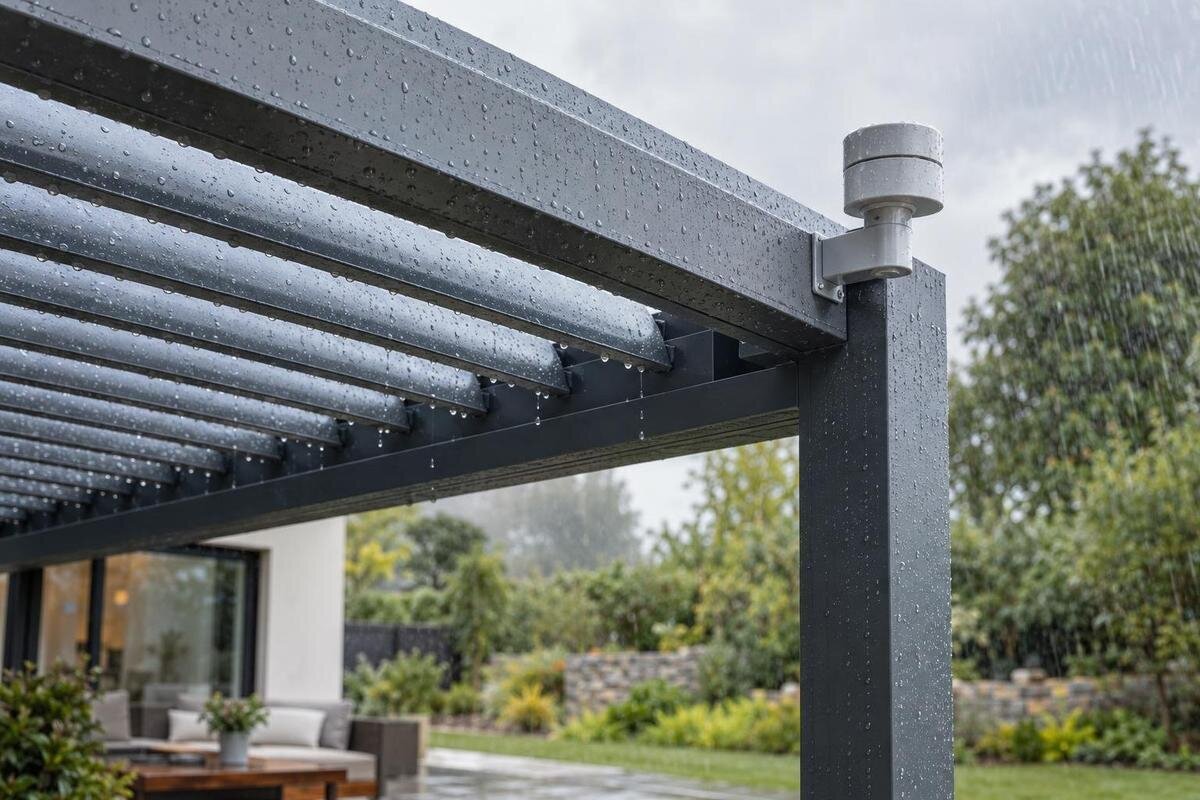
A pergola rain sensor is an input device, not a description of the whole roof system. Depending on its design, it may respond to water reaching a sensing surface or use another documented detection method. It reports conditions at a particular point to a compatible control; it does not survey every part of the roof or the covered area. Unless the specifications identify a calibrated rain gauge, do not interpret a trigger as a measured rainfall total or rate. The word “rain” describes the intended input, but the manufacturer’s documentation must define the physical signal and the point at which the system treats it as rain.
That distinction matters when you compare products. Record the exact model name from the Bloomcabin Pergola model listing, then pair it with the separate manual for the roof controls and any proposed sensor. A product listing is not, by itself, proof that sensing hardware or automatic movement is included. A sensor can report wetness without having authority to move a roof; a controller can also be designed for an input that is not part of the base package. Ask which component is being offered, whether it is optional, and which documents describe the complete chain.
Thresholds, sensitivity, and delay
Three details often get grouped under “sensitivity,” although they do different jobs: the threshold that counts as wet, any delay before the signal is accepted, and the rule that clears it after the sensor dries. A threshold may be fixed or adjustable, and may be described as a sensor state rather than an amount of rain. A delay can screen out brief wetting, but it also means the roof may not react at the first drop. Ask which setting is adjustable, who can change it, and whether the stated delay applies to detection or movement. For comparison, record each setting separately rather than reducing them to a single “sensitive” or “less sensitive” rating. Two descriptions can sound alike while referring to different stages of the response. Ask what an adjustment changes and what remains unchanged, especially if you are trying to address slow detection rather than the roof's movement after a command.
When reviewing the Bloomcabin Bioclimatic Aluminum Pergola listing, keep the model name and controller identity together; a roof-category label does not specify rain-trigger behavior. Request the threshold or stated trigger condition, the adjustment range, and whether changes are saved in the controller or set at the sensor. If the manual gives no numeric value, ask for the documented test procedure and expected response under light, intermittent wetting. Do not assume a dial marked “low” or “high” corresponds to a rainfall amount without an explanation.
Why sensor placement changes the reading
A sensor can only respond to what reaches its own sensing area. An exposed position may become wet before a sheltered part of the patio; an eave or screen may shelter the sensor even while rain reaches the roof edge. Roof runoff, splash from paving, irrigation spray, nearby washing, or wind that drives drops from the side can make the sensor's local conditions different from those where you want protection. The diagram should identify the intended mounting location and orientation for that exact sensor. Avoid assuming that a spot that looks convenient is also representative.
Ask for the manufacturer's placement diagram and approved mounting instructions; a qualified installer can confirm whether the planned position follows them. If considering the Bloomcabin Lean-To Pergola listing, include the wall-adjacent exposure in that discussion: a wall or overhang can affect what rain reaches a sensor, while wind-driven rain may wet another edge first. Confirm whether the sensor is part of the roof assembly or a separate device, and whether its specified position represents the exposure you care about. Do not relocate it simply to make it easier to reach.
How a rain signal becomes a roof command
Detection and movement are separate stages. In a system that moves the roof automatically, the sensing element sends an input to a compatible controller, which interprets that input and passes a command to a motor or other mechanism. One possible sequence is a dry reading, a detected wet condition, any qualifying delay, a controller command, and then a separate clear or reset condition. A system may handle one of those stages differently, so ask which stage has a delay. A wet reading alone does not prove that a command was sent or that the roof moved. When reviewing the operating instructions, distinguish the sensor's reported state from the requested roof position and the roof's actual position. Ask how each is shown, if it is shown at all. That distinction makes an explanation such as “the sensor responded” more useful: you can establish whether it means detection, a command, or completed movement.
The manual should state what action follows rain: does the input request a defined roof position, inhibit another operation, or only produce an alert? Do not presume every roof should close, open, or retract when wet; the appropriate action depends on the roof design and its instructions. For a model identified on the Bloomcabin Pergola page, ask for the control diagram or written description that connects the named sensor to the named roof. The description should make clear which component detects rain, which interprets the signal, and which carries out the response.

What rain detection cannot tell you
A rain-only input has a narrow job. It cannot predict a storm, determine how fast weather is approaching, or infer wind speed from raindrops. By itself, it also does not detect snow, ice, hail, temperature, or a blocked drain. A system may offer separate sensors or combine inputs, but each function must be documented; a general “weather” label is not enough to show which conditions are measured. When wind, freezing precipitation, or unattended operation matters, identify the separate protection strategy and its stated limits instead of treating rain detection as a substitute.
When reviewing a bioclimatic pergola model page, distinguish rain detection from any separately described wind sensing or storm mode. Ask whether additional sensors are integrated, optional, or third-party, which controller receives their signals, and what each input is designed to do. A rain sensor also cannot inspect gutters, drainage paths, seams, fasteners, or water entry. It may initiate a response, but the roof's weather performance must be judged from its own documentation, not inferred from the presence of a sensor.
Drizzle and wind-driven rain
Different rain patterns can produce different readings. A brief sprinkle may wet one sensing surface; light drizzle can arrive gradually; a shower may begin at an edge far from the sensor. The control may wait for a threshold or delay before acting, so the timing of its command need not match the first drops on the patio. After the roof moves, rain can still enter from an open side or reach a surface the sensor does not represent. Ask how the documented trigger behaves in intermittent rain and how the control treats a signal that starts and stops repeatedly.
Wind-driven rain is a particular limitation: drops can reach a vertical or sheltered edge while a sensor in a sheltered spot stays comparatively dry, or spray can wet the sensor before the area beneath the roof gets wet. Neither result alone proves a defect; location and detection logic matter. If the Bloomcabin Bioclimatic Aluminum Pergola page is on your shortlist, verify the exact model's roof response and sensor location in its instructions rather than assuming the product name guarantees shelter in every direction. A rain trigger cannot promise dry furniture, flooring, or an adjacent doorway; those outcomes depend on exposure and the full roof and drainage design.
False triggers, missed triggers, and maintenance
An unexpected trigger can come from more than rainfall. For a wetness-based design, dew, condensation, sprinkler spray, washing, or splash may wet the sensor; a sheltered sensor may remain dry during rain. Dirt, residue, insects, mineral deposits, or surface wear can affect readings on some devices, while frost or ice may change the response depending on the design. These are possibilities, not a diagnosis: a sensor using another detection method can behave differently. Compare the event with the manufacturer's troubleshooting table and note the conditions and display state before changing settings. A useful record separates what you observed from what you suspect: whether rain was falling, whether the sensing area appeared wet, what status was displayed, and whether the roof moved. Include recent irrigation or cleaning when relevant. This gives troubleshooting a specific starting point without assuming that every unexpected movement is a sensitivity problem or that every missed response comes from poor placement.
Ask what inspection and cleaning the maker specifies, how the system signals a sensor or communication fault, and whether a fault produces an alert, blocks automatic movement, or causes another defined response. Do not assume that silence means “dry” or that a fault sends the roof to a safe position. When reviewing a wall-mounted pergola listing, include access to the proposed sensor location in the maintenance discussion, alongside its position relative to the wall or any overhang. Follow the supplied cleaning and test method rather than improvising with chemicals, water jets, wiring changes, or unapproved adjustments.
Settings, reset behavior, and manual control
Rain response includes what happens after detection. The controller may keep a wet state until the sensor dries, require a reset, or use a delay before clearing the input; the exact rule matters when showers pass and return. Ask whether it waits for the sensor to dry, uses a timer, or requires a user command, and whether the roof returns to its earlier position or stays where the rain command left it. These are different behaviors. Confirm the specified sequence rather than assuming the roof will automatically reopen when conditions dry. Have the explanation cover a brief shower as well as repeated wetting: what clears the rain input, what permits movement again, and what actually requests that movement? Clearing an input and returning the roof to a previous position are separate questions. Understanding both helps you decide whether the operating routine suits a patio you use intermittently or leave unattended.
Also establish how a person can stop or override the automatic response, which control takes priority, and whether the system resumes automatic mode on its own. Ask what happens if the sensor signal is unavailable or the control loses power; there is no universal fail-safe behavior to infer from “rain sensor.” If your shortlist includes the regular pergola model, use the exact model identification to request the matching operating guide and override instructions. Avoid changing sensitivity or cycling a roof solely to test it unless the manufacturer's procedure permits that test.
Match the sensor to the roof and exposure
Choose by the weather problem you need the system to address, not by the sensor name alone. If you want an automatic response to rain reaching a particular point, ask whether that location represents the vulnerable area and what roof position the system commands. If the concern is wind-driven water, standing water, or objects that must remain dry, those are separate questions about exposure, drainage, enclosure, and the roof's limitations. A sensor cannot compensate for gaps in a roof or unprotected sides. Compare the intended use with the manufacturer's stated weather limits and instructions for the roof's position in different conditions.
The product facts available for this guide identify the Bloomcabin Pergola, Bloomcabin Bioclimatic Aluminum Pergola, and Bloomcabin Lean-To Pergola by model name, but do not document rain sensors, motors, control logic, or sensor options. This article therefore cannot confirm that any of the three includes rain automation; do not infer it from “bioclimatic” or “lean-to.” For a useful comparison, put the model's manual and any separately offered control equipment beside the product listing, then confirm the exact package in writing. This keeps a roof-style choice separate from an unverified automation claim.
What to verify in the product documentation
Useful documents should answer specific questions, not merely promise an “automatic rain response.” Look for the sensor's manufacturer and model, detection method, mounting location, threshold, delay, reset rule, and permitted exposure. Then check the controller and roof manual for compatibility, the action assigned to a rain input, any movement or operating limits, override behavior, fault indications, and maintenance instructions. The documents should name which parts are included and which are optional. If a manual leaves a point unclear, ask the seller or manufacturer to identify the relevant section or provide a written answer tied to the exact model and controller.
Keep the answers tied to a complete system: pergola model, sensor, controller, and actuator or roof mechanism. If an installer is specifying placement or setup, ask them to follow the manufacturer's instructions and explain how the trigger is tested, what the normal status looks like, and what a fault looks like. Request the test result at handover rather than relying on a verbal description of “rain-activated.” Record the settings used for that test and the response you were shown, so the explanation remains useful after installation. Ask where to find the operating and maintenance instructions and which contact handles questions about the sensor versus the roof. If a setting is left at its default, have that identified rather than described simply as “automatic.” The aim is a clear account of the delivered configuration, including any unanswered questions, not an assurance that a successful demonstration covers every weather condition.
Frequently asked questions
Does a pergola rain sensor measure how much rain has fallen?
Not necessarily. Many rain-sensing systems use a trigger state rather than measuring rainfall volume or rate. Check the manual to see what the sensor measures and whether it reports a quantity or simply signals that its trigger condition has been met.
Will a rain sensor automatically close a pergola roof?
Only if the compatible controls are designed and configured to do that. The programmed response could be a particular roof position, an alert, or another action. Confirm the response in the sensor, controller, and roof documentation.
Can a rain sensor detect wind or snow?
A rain-only sensor cannot establish wind or snow conditions. A system may have separate weather inputs, but their presence and function must be documented. Do not treat rain detection as evidence of wind, snow, or ice protection.
Why might a sensor trigger when it is not raining?
Depending on its design, a wetness-based sensor may respond to dew, sprinkler spray, washing, or splash. Placement and surface condition can also affect readings. Compare the event with the manufacturer's troubleshooting guidance before changing settings.
Does a rain sensor guarantee that the patio stays dry?
No. It responds to conditions at its sensing point and may request a roof action, but rain can reach other areas from the side or through parts of the structure. The sensor does not establish the roof's weather limits or drainage performance.
A useful rain sensor is defined by the chain it can actually support: local detection, a documented trigger, a compatible control, and a clearly stated roof response. Its value depends on where it senses and how the whole assembly behaves in the weather at your site. Treat “rain-activated” as a question to verify, not a promise that the patio will stay dry. Understanding the sensor's limits alongside the roof's own limits makes it easier to decide whether automation addresses the problem you actually have.
