
Smart-Home Control for a Pergola: Compatibility Questions
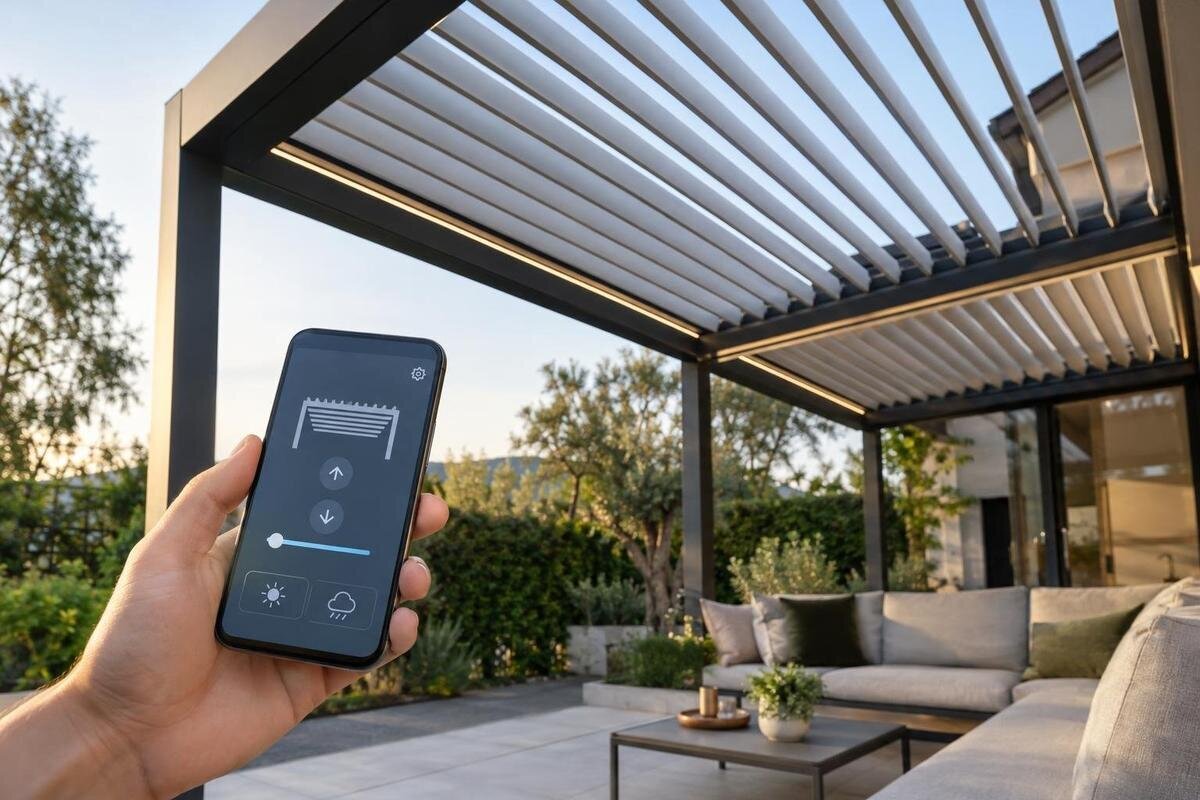
Pergola smart-home guide
Connecting a pergola to a smart-home system takes more than a matching app or wireless logo. The roof mechanism needs a compatible motor and controller, the controller must expose commands to the chosen hub, and you need to know which controls survive a network or cloud outage. Treat every feature as model-specific: a pergola listing or the word “smart” does not establish motorization, protocol support, or automation.
Questions to ask before buying 1
Identify the roof mechanism and control hardware
First determine what “control” means for the roof you are buying. A fixed or open-frame pergola has no moving roof mechanism for an app to operate. A manually adjusted roof stays manual unless the manufacturer offers an approved motorization path. Even a motorized roof may have only a dedicated remote or wall controller; that does not by itself make it part of a smart home. Identify the roof type, whether an actuator is present, the controller, and any included or optional components before comparing ecosystems. Software can issue only commands that an installed, compatible control system exposes; it cannot supply missing hardware or confirm a position it cannot sense. A retractable cover, adjustable slats, and side screens are different mechanisms, so an interface designed for one should not be assumed to operate the others.
The product name on the Bloomcabin Pergola page identifies a pergola listing, but it does not establish motorization, a sensor, a smart-home app, or protocol support. Apply the same distinction to any model: identify the structure from its listing, then match the exact model number and revision to its current manual and automation documentation. Ask whether the motor and control unit are included, separate options, or supplied by another vendor, and who approves that combination. If the seller cannot point to documentation for the specific setup, treat smart-home compatibility as unverified rather than assuming it can be added later. Photographs and broad marketing labels cannot confirm the controller revision or the control method supplied.
Match the motor controller to the integration
Once a motorized mechanism is confirmed, trace every handoff between the movement controller and the smart-home system. The motor’s controller interprets movement commands and may manage travel limits, position, and stop behavior; a hub or gateway has to communicate with that controller in a supported way. Some setups use a bridge to translate commands, while others connect directly to a hub, so identify each link in the path. A matching radio or connector alone does not prove that commands, feedback, or timing are compatible. Ask for the exact motor and controller identifiers, the manufacturer-approved integration method, and any required accessory. Confirm that the components are supported together, not merely that each is advertised as compatible with something.
When comparing the Bloomcabin Bioclimatic Aluminum Pergola product page with an automation proposal, request a compatibility statement covering the exact roof mechanism, actuator, control box, and integration hardware. The product name alone does not establish that a motor or controller is included. A maker may list a brand as compatible while excluding a particular controller generation or movement mode, so compare model numbers and revisions. Ask whether installation or commissioning requires a manufacturer-approved specialist, who supplies any required bridge, and who supports communication problems between components. Do not treat a generic relay, adapter, or DIY connection as approved; an installer should assess any proposed interface against the actual manuals and equipment.
Questions to ask before buying 2
Name the protocol, bridge, and hub
Ask for the protocol by its exact name and find out where it applies in the signal path. “Wireless” is not enough: Wi-Fi may connect a controller to its own cloud service, while a separate hub or bridge may be needed for another ecosystem. Matter support must be documented for the pergola controller or its approved bridge; a Thread connection on its own does not mean that a device is exposed to a Matter controller. Zigbee, Z-Wave, Bluetooth, and proprietary radio systems also depend on the specific device, hub, region, and implementation. Sharing a logo or frequency does not promise shared commands or access to every feature.
Then check which hub, software or firmware version, and regional model are supported, and whether the connection is direct or routed through a vendor gateway. Ask whether the exact pergola control unit appears in the maker’s compatibility information, not just whether the brand is listed. A claim that a product works with a voice assistant may describe only a limited set of commands through a separate app. If you are considering the Bloomcabin Lean-To Pergola page, request documentation that names the proposed controller and its supported hub. Record any required gateway separately from optional accessories so you can compare complete configurations rather than product names or ecosystem logos.
Separate local controls from cloud services
“Local” and “cloud” describe where commands are processed, not simply whether the controller uses Wi-Fi. A local path might run through a home hub or local network; a cloud path sends commands through a service tied to a vendor account. Some systems mix the two: setup or remote access can require an account even if a home automation runs locally. A phone app that works while the internet is available is not proof of local operation. Ask the provider to identify the command path separately for everyday controls, schedules, and status reporting. This distinction helps you understand whether a smart-home routine depends on the home network, an outside service, or both.
Ask for a demonstration that distinguishes local use from remote access. The provider should explain whether your phone must be on the home network for local commands and how access from outside the home is handled. Also ask where schedules are stored and whether a routine is executed by the controller, hub, or vendor service. When evaluating the bioclimatic pergola listing, request this explanation for the proposed control package rather than inferring it from an app screenshot. Document any account connection needed during initial setup, even if later commands are processed locally. Local operation and account-free operation are separate requirements; decide whether you need one or both.
Questions to ask before buying 3
Confirm available commands and status information
Request a command-by-command feature list for the chosen ecosystem. Depending on the mechanism, “open” and “close” may be the only exposed actions; a system with adjustable slats might offer a position command, while another could permit only presets. These are possibilities to verify, not standard features of every pergola. Ask whether a command means a momentary movement, a target position, or a toggle, and whether the controller accepts a stop command. The distinction matters when you build a scene: a toggle can produce an unexpected result if the system’s current state is unknown.
Check what status comes back, too. A dashboard may show the last command sent, an estimated state, or a confirmed position; those are not interchangeable. Ask whether the smart-home interface reports movement, faults, or only an open-or-closed label, and whether that status is available in the app you intend to use. Find out if stale status is identified as such, rather than displayed as a current reading. If the manufacturer’s app exposes more detail than the chosen platform, plan around the smaller documented feature set. Do not infer control of lights, screens, heaters, or weather accessories from a pergola integration; each accessory needs separately confirmed support and an approved control path.
Check zones and overlapping commands
Ask whether a roof is presented as one controllable device or as several independently operated sections. A large-looking roof does not automatically have multiple motors or zones, and two moving sections do not automatically appear separately in an app. If you need one area open while another stays closed, confirm that the exact system supports that arrangement and that the home platform exposes each area independently. For a configuration based on the Bloomcabin Pergola product listing, request a device list or control diagram showing any proposed sections. Check whether each section has its own commands and status information; a single grouped dashboard entry may not give you the individual control you need.
Also clarify how commands from different places interact. If someone uses a wall control while a scheduled scene is running, ask which command takes priority, whether a repeated command stops or restarts movement, and how a person can interrupt an automation. If there are multiple zones, confirm whether a group command can move them together while preserving individual control. Give each area a clear name in the app so a scene does not act on a different section than intended. Have an installer confirm that the proposed grouping matches the actual controller layout and its documented operating instructions.
Questions to ask before buying 4
Clarify accounts, subscriptions, and ownership
Smart-home control can create more than one account relationship: the pergola or motor vendor’s app, the home-platform account, and the hub’s owner profile may all be involved. Ask which account is required for setup, daily local use, remote access, firmware updates, and sharing controls with household members. Find out who can add users, remove access, and transfer or reset a system when a home changes hands. If a contractor creates the initial account, arrange ownership and credentials using the manufacturer’s documented process rather than relying on a personal installer login. It is also useful to know which controls remain available if one account cannot be reached.
Ask what information the service collects and what account protections or access controls are available; consult the provider’s privacy and security documentation instead of assuming every ecosystem handles data alike. Confirm whether any fee or subscription is required for features such as remote access, scenes, history, or voice control, and whether basic operation remains available without it. For a purchase through the Bloomcabin Lean-To Pergola listing, obtain these terms from the provider of the proposed automation package. Separate any one-time hardware or setup costs from recurring service charges, and ask what happens to saved routines and shared access if you cancel a subscription.
Test network coverage and installation conditions
Check communications at the intended controller and hub locations, not just beside the indoor router. Outdoor distance, walls, doors, and the chosen equipment can affect a wireless link; a signal indicator in one room cannot prove reliable coverage at the pergola. Ask the integrator what network the controller uses, whether a bridge or hub needs a separate connection, and where each unit can be placed under its installation instructions. If coverage is marginal, have the installer assess it before relying on remote commands or scheduled scenes. Do not assume that a consumer extender will solve a problem without checking the proposed layout and equipment.
Physical installation can limit which interface is practical. Verify the approved controller location, required power and control components, and whether equipment is suitable for its intended exposure. For a proposed Bloomcabin Bioclimatic Aluminum Pergola setup, give the installer both the pergola documentation and the manuals for any added controls. A qualified professional should review controller mounting, cable routes, and power connections rather than relying on a general protocol guide. Keep the hub and bridge locations in the installation plan, too: equipment that needs service access should not be placed where routine maintenance would require dismantling part of the installation.
Questions to ask before buying 5
Document behavior during outages and reconnection
Treat “offline” as several distinct conditions. An internet outage with local Wi-Fi still working is not the same as a failed router, a disconnected hub, a vendor service outage, or loss of power to the controller or motor. Ask which physical control remains usable in each case and whether an automation can still issue local commands. Get answers for the exact hardware rather than assuming that a working wall control also means the app, status display, or scheduled routines remain available. This comparison is about the complete control path, not just the pergola’s wireless connection.
Then ask how the system behaves when connectivity returns. Does it resume an interrupted command, ignore a queued request, restart a schedule, or require the user to send a new command? What does the app display if it cannot get a fresh position report? These behaviors depend on the controller and software. Check that the instructions explain how to stop movement and regain control after a fault or disconnection; do not rely on an assumed fail-safe position. The useful answer is the response documented for the specific integration, not a generic promise that every pergola moves or stops the same way.
Get a model-specific compatibility answer
Before ordering, ask the seller or manufacturer for a written compatibility answer tied to the exact product identifier and revision. It should name the roof mechanism, motor and control unit if present, approved interface or bridge, required hub, supported protocol, and target ecosystem. It should also state what commands and status are exposed, which features are local versus cloud-dependent, and whether an account or paid service is required. If you are comparing an offer with the Bloomcabin Lean-To Pergola product page, make sure the confirmation identifies the configuration being quoted. Separate included equipment, approved options, and unsupported requests so the order reflects what has actually been confirmed.
Keep the answer with the manuals and installation plan, and have a qualified installer reconcile any proposed add-on with the manufacturer’s instructions. If documentation covers only a remote or an app but not the integration you want, treat the documented controls as the confirmed baseline and future connectivity as uncertain. Compare the convenience you need—remote operation, group commands, or a particular scene—with the supported commands and outage behavior. This gives you a clear basis for choosing an integration without relying on a feature that has not been confirmed.
Frequently asked questions
Does a Wi-Fi-enabled pergola automatically work with my smart-home platform?
No. Wi-Fi describes a network connection, not necessarily integration with a particular platform. Verify that the pergola’s controller or an approved bridge supports your exact system and exposes the commands you need. A manufacturer’s app alone does not confirm third-party control.
Does Matter support guarantee that I can control a pergola?
No. Matter support must apply to the pergola’s actual controller or an approved bridge, and your hub must expose the functions you want. A Thread connection or a Matter logo on a different component does not confirm end-to-end compatibility.
Can I control a pergola through an app without an internet connection?
Only if the controller, local network or hub, and app integration support local commands. Ask separately what happens during an internet outage, a home-network or hub failure, and a vendor-service outage. Wi-Fi or an app does not by itself establish offline operation.
Can I automate a manually operated pergola roof?
Not through software alone. The manufacturer must offer or approve a compatible motorization and control path, and the installed controller must support the smart-home integration. Have the exact setup reviewed before planning automation; do not assume an adapter will work.
What should I get in writing before choosing an integration?
Get the exact model and revision, motor and controller identifiers, supported protocol and hub, any required bridge, exposed commands and status, account or subscription requirements, and local-operation behavior. Include any installation limits or specialist requirements in the confirmation.
Smart-home control is dependable only when the complete chain is documented: roof mechanism, motor and controller, approved interface, hub or platform, account path, and offline behavior. Match answers to the specific model and revision, and verify both the commands you need and the controls available during disruptions. A protocol logo is a starting point for a compatibility check, not proof that a pergola can be operated through your existing smart-home setup.
