
Creating an Outdoor Work Area Under a Pergola
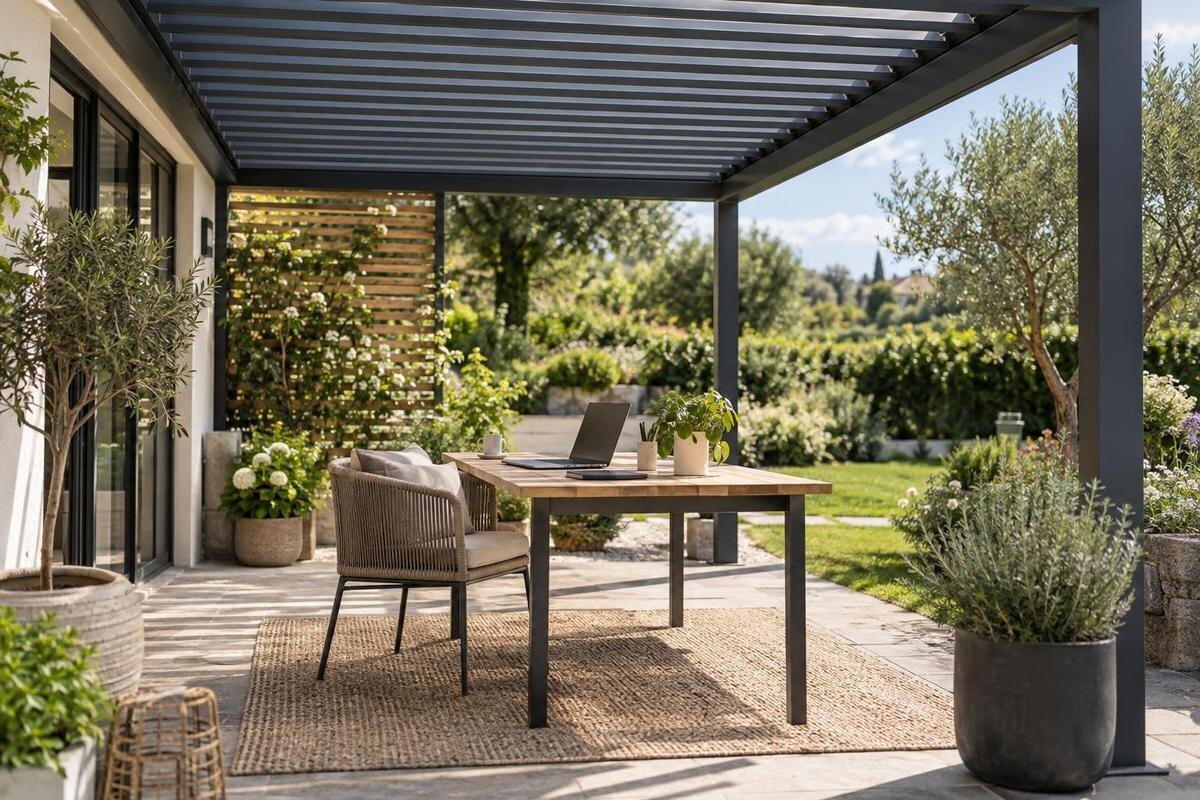
Outdoor workspace planning
Working at a desk under a pergola offers a change of scene, but it does not turn the patio into an office. Sunlight shifts across the screen, a breeze can disrupt papers or a call, and power, internet access and equipment storage all need separate thought. Plan around the tasks you actually do and the site at the hours you will use it. Measure the desk and chair in use, test glare from the seated position and decide where devices go if the weather changes. Then compare pergola layouts against the measured work area.
Before you choose 1
Match the setup to your work
First decide what an outdoor session needs to support: a few emails on a laptop, focused work with a separate monitor, handwritten notes or video calls. The equipment changes the footprint and the conditions. A laptop-only session can be packed away quickly; a monitor, keyboard, mouse and documents need more surface, while calls add camera framing, background noise and privacy. List the tasks you expect to do, how often you will do them, which items you need and what work must move indoors if the weather changes. Separate essentials from items you would only occasionally bring outside. If most sessions involve a laptop but one weekly task needs a second screen and paperwork, decide whether to accommodate that larger setup or keep that task indoors. Also consider how much time you want to spend setting up and packing away. This gives the layout a clear purpose rather than simply recreating your indoor desk outdoors.
If the pergola also serves another household purpose, decide whether work equipment stays set up or comes out only when needed. Occasional sessions may suit portable kit; gear left outside needs a more deliberate storage plan. Allow for a bag, chargers and notes as well as the desk and chair. The Bloomcabin Bioclimatic Pergola is one model to compare once those needs are written down; its listed area range is 9 to 24 m², but that figure alone cannot show whether the work surface, chair, storage and clear route will fit.
Measure the desk, chair and clear space
Measure the desk you intend to use, including its full depth and width, rather than estimating from a photograph. Check how the monitor, keyboard, mouse and regularly used papers fit on that surface. Lay them out as you would during a normal task, including space to use the mouse and read notes beside the screen. Then measure the chair's position while you work, how far it moves when you stand and the space needed to get past it. A desk's dimensions do not include this working clearance. Record these positions separately on your plan so the chair is not shown only tucked neatly beneath the desk. If you want storage beside the desk, measure that too, including the room needed to open it and reach its contents, instead of assuming it can be fitted into leftover space.
Mark the proposed layout on the ground with removable tape, or use boxes to represent the furniture. Sit down, stand up and walk the route you would use from the house. Check that an open door, garden access or another household route does not pass through the chair space. Label any illustrative drawing as a concept and confirm its dimensions on site. The Bloomcabin Wall-Mounted Pergola listing gives a 9 to 24 m² area range; that alone does not confirm furniture clearances or the suitability of an existing wall. Have any proposed attachment assessed by a qualified professional.
Before you choose 2
Test the screen position for glare
Check the display from your normal seated position, using the screen you plan to work with. Bright light can make it harder to see, and reflections from open sky or sunlit surfaces may be as distracting as direct sun. Try the setup at the hours you expect to work, not just when you first draw the plan. Watch for light falling directly on the screen and for bright areas reflected in it. A test in the morning may not tell you how the same position will look later in the day.
Rotate the desk and screen through a few positions rather than relying on a fixed rule. As a starting point, try placing the screen at right angles to the strongest daylight, then compare the view with the light coming from another direction. Adjust the screen angle if its stand allows, and repeat the test while seated. Use the kind of content you normally work with: reading a document and joining a video call may reveal different difficulties. Note which position gives a readable display without making the chair or access route awkward. The Bloomcabin Pergola listing gives a 9 to 24 m² area range. Use your preferred screen position when comparing layouts within that range; an area figure alone does not describe glare control or show whether that desk orientation will fit.
Check how shade changes over the day
Observe the proposed work area at the times you are most likely to use it. Note where shade falls in the morning, around the middle of the day and in the afternoon, and repeat the observations at different times of year if you expect to work outdoors year-round. Nearby trees, buildings and fences can change where light lands. A single site visit or a photo taken at one time is not enough to establish whether the screen and desk will stay shaded during your working hours.
Compare your observations with the exact pergola configuration under consideration. Roof style, orientation and any separately specified screening can affect the shade in a particular area, so ask for details that relate to the planned position rather than inferring performance from a product image. When reviewing the Bioclimatic Pergola listing, identify the configuration you are considering and relate it to your marked desk position. Keep a simple record of which parts of the work surface and chair are shaded at your intended working times. Distinguish between a position that suits a short morning session and one you hope to use for several hours. If your observations suggest that the desk would need to move, include both positions in the layout and check that neither blocks access or complicates the cable route.
Before you choose 3
Plan for wind and rain interruptions
An outdoor work area remains exposed to changing conditions. Depending on the roof design, site and direction of the weather, rain may reach the desk or chair, and wind can move loose papers or disturb a call. Do not assume that a pergola creates the same conditions as an enclosed room. Consider where water could reach the work surface and whether the setup can be cleared quickly if the weather changes. A forecast is useful, but it cannot guarantee that conditions will stay suitable throughout a work session.
Decide in advance what you will bring inside, where it will go and which tasks can pause or move indoors. Leave a clear route for carrying devices and papers back to the house, and have a different place ready for work that cannot be interrupted. Rehearse packing away the equipment you actually intend to use: identify what can be carried together and what needs a separate trip. Keep the items needed for an uninterrupted task together so you can resume indoors without searching for a charger or notes. Covers should not be treated as a substitute for checking a device's own exposure requirements. When comparing a Bioclimatic Pergola option, consider the proposed desk position and route indoors alongside the configuration's stated weather protection, rather than relying on the model name.
Arrange power and internet before setting up
List which devices need charging and where you expect to sit before deciding how power will reach the workspace. Mark the position of any existing outdoor socket and the route a cable would need to take. Avoid routes through a doorway, across a walking path or through a place that may become wet. If you need a new fixed outdoor supply, ask a qualified electrician to assess the location and requirements; do not attempt wiring yourself. Use chargers and electrical equipment according to their manufacturers' instructions and intended conditions.
Test Wi-Fi from the actual chair, ideally at the times you expect to make calls or transfer work. An indoor signal does not establish how well the connection will reach the pergola. Try the tasks that matter to you rather than judging the connection only by whether a page opens. If connection quality is unreliable, consider whether the task can be done offline or moved indoors rather than assuming a device will solve it. Keep the final cable route clear of the chair's movement and walking routes. When comparing the Wall-Mounted Pergola listing with your layout, mark the intended desk position in relation to the house access and proposed power point. Assess connectivity and electrical requirements separately from the pergola's area.
Before you choose 4
Give devices a dry place to go
Decide where the laptop, monitor, chargers, keyboard, papers and other equipment will be kept when the work session ends. A pergola does not guarantee that an open-sided area will stay dry, and overnight damp or a change in weather can affect items left outside. Follow the manufacturer's storage guidance for each device, and avoid leaving sensitive equipment exposed to direct sun, moisture or other conditions outside its stated limits. A bag or cover may help with carrying or short-term handling, but do not assume it makes a device suitable for outdoor storage.
Plan the route from the desk to an indoor shelf or cupboard so packing away is straightforward. Give each regularly used item a place, including small accessories that could otherwise be left on the work surface. Check that you can reach the storage while carrying equipment and that its doors do not obstruct the route. If you are considering an outdoor storage unit, check its own stated suitability for the conditions and for the equipment you intend to keep there. Include its footprint and opening space when comparing the regular pergola model page with your measured plan. Decide whether that space is genuinely needed under the pergola or whether indoor storage would leave more room for the desk and chair. Keep storage separate from the chair's movement area.
Consider privacy and calls
Frame the camera from the chair you will actually use, not from a standing view of the space. Check what appears behind you, including entrances, household areas and neighbouring properties, and adjust the screen or desk position if needed. An outdoor setting can also bring unexpected background sounds into a call. Think about the work you plan to do there and whether it can tolerate interruption. A video meeting that needs a quiet background may be better scheduled for a time when the surrounding area is calm.
Sound carries beyond an open work area, so a headset does not prevent other people from hearing your side of a conversation. For sensitive calls, use an indoor room unless your own work requirements and the actual setting provide suitable privacy. If the Wall-Mounted Pergola model is on your shortlist, assess the proposed position and any separately specified screening from the chair. Check the view towards the screen as well as the camera background, particularly from household routes that will remain in use. Consider how the work area looks and sounds to other people using the garden. Agree which periods are suitable for calls if the space is shared, rather than designing around an assumption that everyone else will stay away.
Before you choose 5
Choose a surface that suits desk work
Check that the ground under the desk and chair is firm and even enough for the furniture you intend to use. A wobbly desk makes screen work awkward, while an uneven or slippery surface can make it harder to move the chair and carry equipment. Surface joints, changes in level and the way an area feels after ordinary wet weather are worth noticing before you settle on a layout. Choose furniture for the conditions it is intended to handle, following its manufacturer's guidance rather than assuming indoor furniture will suit an outdoor location.
Test the complete arrangement, including where your feet sit, how the chair moves and whether you can reach the keyboard and screen without shifting furniture into a walkway. Make sure the chair can be pulled back without hitting stored items or catching a cable. A practical trial also helps you judge whether the work surface is large enough for your usual equipment and whether you can leave the area without disturbing anything. If the setup is uncomfortable or awkward to move around, revise the position before treating the plan as final.
Compare pergola options with a measured plan
Bring your measurements together in a simple concept plan. Show the proposed pergola boundary, the desk and chair in use, storage, access routes, power point, and the places where shade falls during your working hours. Mark any assumptions clearly, and distinguish measurements already taken from details still to be confirmed. If you have tested more than one desk orientation, draw each as a separate option so their clearances are easy to compare. Comparing the complete arrangement is more useful than looking at a floor-area figure on its own: two spaces with similar areas may not suit the same desk position or route. Note which arrangement supports your usual tasks with the least furniture moving and packing effort. Treat the drawing as a planning aid, not as confirmation that a particular model will fit the site.
Before choosing a configuration, confirm its actual dimensions, available options and installation requirements with the relevant supplier or qualified professional. Ask whether the proposed position and any planned accessories suit the work area, and have structural or site-specific questions assessed by someone qualified to do so. A size or layout consultation is most useful when it is based on your real desk, chair, power route and storage plan. The goal is a workspace that works for the tasks you have identified, while remaining easy to clear and move indoors when outdoor conditions change.
Frequently asked questions
Will a pergola make the workstation weatherproof?
Not necessarily. A pergola is not automatically an enclosed office, and the protection provided depends on the specific design, configuration and site. Rain can still reach an open work area, while wind may disrupt papers or a call. Check the details for the model you are considering, protect sensitive equipment and have an indoor alternative ready.
Where should I position the screen to reduce glare?
There is no single direction that works at every site. Sit in your usual working position and test the actual screen at the times you expect to use it. Try rotating the desk so the brightest open sky is to the side, then check for direct sun and reflections on the display. Repeat the test as the shade changes.
How much space does an outdoor work area need?
Measure the desk and equipment, then add the space taken by the chair when occupied and pulled back, plus a clear route past the setup. Include storage and any doors or paths that must remain accessible. A pergola's area figure alone does not show whether its shape and usable layout suit your furniture.
Can I add an outdoor power point?
Ask a qualified electrician to assess the supply, position and requirements for your site. Use electrical equipment only as directed by its manufacturer and for the conditions it is intended for. Do not attempt wiring yourself or route cables where people may trip, through wet areas or where a door could pinch them.
Can I leave a laptop under the pergola?
Do not assume that the roof will keep a laptop dry or within its recommended storage conditions. Bring sensitive devices indoors when they are not in use, and follow the manufacturer's guidance for their storage and exposure. A bag or cover is not automatically suitable for leaving electronics outdoors.
An effective outdoor work area is one you can set up, use and pack away without fighting glare, cables or sudden weather. Measure the actual furniture footprint, observe shade at your working hours, confirm power and connectivity separately, and decide where equipment will go after each session. Treat the pergola as an outdoor setting with limits, not a guaranteed office. Once those requirements are written down, comparing sizes and configurations becomes more useful: you can judge each against a real plan rather than a bare area figure.
