
Pergola Rain Sensors: What They Detect and What They Do Not
Pergola control guide
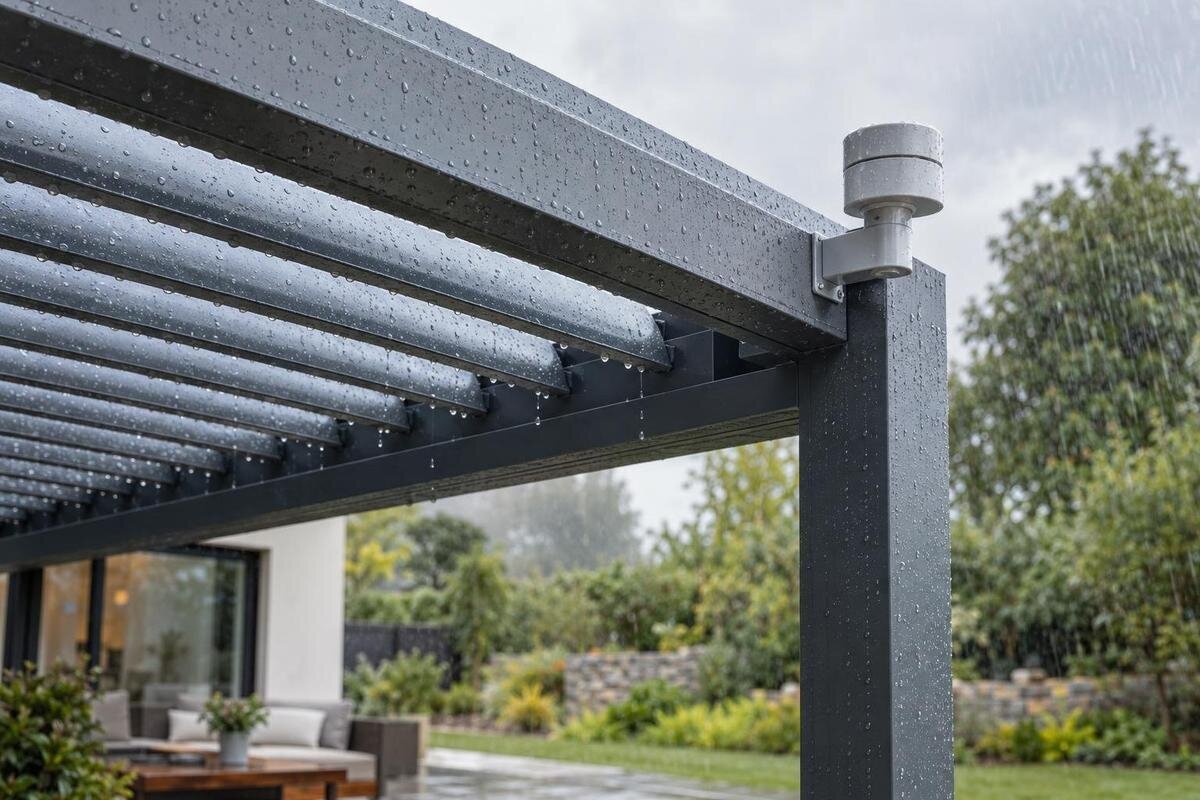
A pergola rain sensor is an input to a particular control system, not a general-purpose weather forecast. It detects the condition its sensing element is designed to register; a controller then applies its own threshold, delay and programmed response. Those details vary by system, so a label saying “rain sensor” is not enough to tell you whether the roof will move, which way it will move or when it will reset. It also cannot, by itself, confirm that a roof is watertight or assess wind. The useful question is exactly what the instructions say the sensor detects and what the complete system does with that signal.
What a pergola rain sensor actually detects
A rain sensor is best understood as one measuring point. Depending on its documented design, it may report that a sensing surface is wet, provide a wet-or-dry state, or supply a measurement that a controller compares with a threshold. Those are not interchangeable. A wet-or-dry signal can show that the sensing element has changed state, but it does not necessarily quantify rainfall. A numerical reading, where supported, describes the sensor’s measurement, not conditions across the whole pergola. Ask what the device senses, how its output is expressed and whether the stated trigger is a direct sensor reading or a controller rule.
Separate three stages when reading a specification: detection, trigger and action. Detection is the condition reported by the sensor. The trigger is the condition the controller accepts, possibly after applying a threshold or waiting for a signal to persist. The action is what the system is configured to do in response, which might be a command, a notification or no movement. Product descriptions can compress these stages into one phrase, but the manual or control diagram should distinguish them. If it names a rain sensor but not the controller rule, you cannot infer whether the roof will move immediately, wait or remain unchanged.
How a rain signal becomes a roof command
An automatic response depends on a chain of compatible components: a sensing device, an input or receiver, a control unit and an operating mechanism capable of carrying out the assigned command. A sensor can detect rain without being connected to a motor, and a motor can operate without rain automation. The specification should name the sensor and controller, explain how the signal reaches the controller and identify the movement assigned to it. Some designs combine components; others use separate units. The documents for the exact configuration, rather than a broad description such as “automated pergola”, establish which arrangement is actually offered.
The Bloomcabin Pergola product page identifies a regular pergola and gives a listed area range of 9 to 24 m²; those facts do not establish whether a motor, sensor or rain-control unit is included. Ask for the exact configuration and documentation for each control component. If a sensor is optional or supplied by another installer, confirm that its output is accepted by the controller fitted to the roof. Keep the product specification and control-system instructions together: the response depends on the complete chain, not on the sensor label alone.
The trigger threshold depends on the sensor and controller
“Rain detected” may mean that the sensing element became wet, that an instrument passed a defined rainfall level, or that a controller received an alarm state. A threshold may be fixed, adjustable or not expressed as a numerical value. Do not assume that a sensitivity setting represents millimetres of rain; depending on the system, it might change the sensor response or a controller’s trigger rule. A useful specification identifies the quantity or state being measured, any units, the trigger level and who can change it. If the manual gives no numerical threshold, do not invent one or compare sensitivity using an unlabelled setting.
When considering the Bloomcabin Bioclimatic Pergola, distinguish the roof specification from the settings of any rain-control equipment offered with it. Read the sensor instructions alongside the controller instructions: the first may describe the input, while the second explains how the automation uses it. If a setting is adjustable, ask whether it changes a trigger value, a delay or something else; those controls are easy to confuse. Record what each relevant setting means for the equipment being offered. This gives you a useful basis for comparison without treating two similarly named sensitivity settings as equivalent.
Delay and reset settings determine timing
Timing matters because a brief wetting event may not be treated like a sustained signal. A controller could require the input to remain active for a period before acting, or use a confirmation delay to avoid responding to an isolated splash. Once a sensor becomes dry, a separate reset delay could keep the rain status active. These are possible control rules, not features to assume. Check whether the documentation specifies a delay before movement, how the system decides that rain has stopped and whether it sends another command when the signal clears. If these details are absent, ask how the exact system is intended to behave.
Do not assume that the roof automatically returns to its earlier position when the sensor dries. The controller might clear the rain status without moving the roof, wait for a manual command or run a separate return action; the instructions for the installed system must say which. For a Bloomcabin Wall Pergola configuration offered with rain automation, distinguish the time needed to clear the rain status from any delay before a return movement. Ask how both stages can be observed using the manufacturer’s approved test procedure. Otherwise, a cleared status could easily be mistaken for a promise that the roof will reopen.
The sensor does not choose a roof position
A rain signal does not decide which roof position is appropriate. Depending on the roof and controller, the response could be movement to a specified position, a stop command, an alert or no action. None of these should be assumed from the words “rain sensor”. A louvred roof and a retractable covering may use different control logic, and products within a broad category can also vary. Confirm the command, any movement limits, whether a person can override it and which part of the roof receives it. The instructions should describe the intended response rather than leaving you to infer it from an illustration or a general claim about rain protection.
When reviewing the bioclimatic pergola listing and any accompanying control information, look for an explicit description of the rain command: close, tilt, stop or another stated response. A model-specific diagram should link the sensor input to that action and identify the configuration to which it applies. If the literature says only that a sensor “protects” the pergola, ask what that means in operational terms. Distinguish the movement the controller requests from the protection the roof is specified to provide. A rain response is not, by itself, a guarantee that every edge, joint or drainage route will keep the area beneath the roof dry.
One sensor cannot describe rain across the terrace
Most sensors report conditions at their own location, so the reading may not match the rain reaching a table, doorway or the full roof. An exposed sensing point could get wet while part of the terrace remains sheltered; a point protected by an overhang or another obstruction could respond later than an open area. Wind can carry rain sideways, and water may drip from nearby surfaces after rainfall has eased. A sensor reading is therefore not a map of conditions across the terrace. Ask where the manufacturer permits the sensor to be placed and what the selected position is intended to represent.
If you are considering the Bloomcabin Wall Pergola page, discuss the proposed sensor position in relation to the wall and nearby surfaces, rather than choosing a position from a generic product picture. Explain the actual exposure, any overhangs and likely sources of spray or drips to the qualified installer. The sensor and installation instructions should establish where it may be placed; the site discussion should clarify what conditions that position will represent. If the roof has independently controlled areas, also ask whether that single sensing point supplies the rain input for all of them or only a particular zone.
Rain detection is not a storm or drainage assessment
A rain-only input is not a wind sensor, storm warning or structural assessment. Unless the system documents separate sensing, it cannot classify wind, hail or another non-rain hazard. Nor does detecting water establish how much a roof can withstand, whether a drainage route is clear or whether water will enter at a junction. Those are separate questions about the roof, its installation and any other specified controls. If wind response matters, check whether an appropriate separate input is specified for the exact system. A rain sensor cannot take its place, and a rain-triggered movement should not be treated as evidence of performance in other weather conditions.
Even rain-related readings can mean different things. A sensor based on a wet sensing surface may react to drops, spray or water left on that surface, depending on its design; it may not distinguish the source of the moisture. A device that measures rainfall intensity, if specified, measures a different quantity. Dew, condensation, washing water or irrigation spray could affect some sensing methods. Check the manual for the detection method and stated limitations. If the wording is unclear, ask the sensor supplier what the input represents rather than treating “rain” as a precise account of all outdoor conditions.
Placement and care affect the reading
Sensor placement is useful only when the sensing element is exposed to the conditions its design expects. Dust, leaves or other deposits may affect an exposed element; damage, a loose connection or loss of communication could instead result in a fault or no reading. The outcome depends on the device and controller, so do not assume that every fault will produce a clear warning. The instructions should specify the permitted location, inspection method and cleaning method. Avoid scraping a sensor, using solvents or pouring water onto it as a test unless the manufacturer’s instructions expressly allow that procedure.
Keep the sensor and controller model numbers with the pergola information. A regular pergola listing can help identify the product being discussed, while the sensor’s own instructions should provide its care and test information. Ask whether the control unit shows a status or fault and whether it has an approved test function. If a response seems delayed or inconsistent, note the sensor status and controller display, then follow the service instructions or arrange a qualified check. Changing settings at random can make it harder to identify whether the cause is the sensor, controller or assigned rule.
Check compatibility across the control system
Before adding a sensor, verify compatibility by exact model number, not by appearance or brand alone. The controller must accept the sensor’s output, and the sensor must be intended for that controller; a radio connection, contact input or communication protocol cannot be presumed. The documentation should also state the power requirements and permitted connection method, which a qualified installer can verify. Do not connect an unlisted sensor just because its plug or product description sounds similar. Compatibility covers the control logic and any receiver or software version specified by the manufacturer, not simply whether components appear to fit together.
Confirm which mechanism and roof area the input is intended to control. One sensor could be assigned to a whole roof, to a particular zone or not be supported with a given configuration; only a diagram or written specification can settle that. For any control package offered with Bloomcabin’s bioclimatic pergola, identify the motor, receiver and sensor pairing being proposed. Ask whether manual operation remains available, what happens if the signal or power is lost, and whether control depends on an app or network. Treat rain sensing, wind sensing and smart-home integration as separate compatibility questions, even when they appear in the same package description.
What to confirm before purchase or handover
Before purchase or handover, bring the individual control details together in one specification for the configuration being supplied. It should identify the sensor and controller, what is sensed, whether the trigger is fixed or adjustable, any units, thresholds and delays, how the dry state resets, the command issued and the roof area affected. Include fault or lost-signal reporting, manual operation and any separate weather inputs. Use the Bloomcabin Pergola model details to identify the product under discussion, then distinguish the equipment included in the offer from optional additions. This provides a clear record of the agreed configuration rather than a collection of general feature descriptions.
Ask for the current user instructions and, if available, a demonstration using the manufacturer’s approved test procedure. Observe the controller’s stated status and the roof response under that procedure; do not improvise a wetting test or assume that one delayed movement proves a fault without checking the documented timer. If buying a package, have its written scope state whether the sensor, controller, motor and setup are included. A product category or image cannot establish package contents. These checks clarify what the sensor can register and which parts of the roof-control system act on that information.
Frequently asked questions
Does a rain sensor detect every drop over the pergola?
No. It reports what its sensing element and control logic can register at its own location. Rain can vary across a terrace, so a point reading cannot establish that every roof panel or seating area is wet or dry.
Will rain automatically close the pergola roof?
Only if the specific controller is configured to issue that command. A rain signal might be linked to a movement, an alert or no action. Check the instructions for the exact roof and control system rather than assuming what direction it will move.
Can a rain sensor measure how heavy the rain is?
That depends on the sensor. Some systems report a wet or dry state; others may provide a measurement for a controller to compare with a threshold. Check the documented input and units before treating it as a rainfall-intensity reading.
Will the roof return to its previous position when the sensor dries?
Not necessarily. The controller may clear the rain status without moving the roof, wait for a manual command or run a separate return action. The reset and movement rules should be stated in the instructions for the installed system.
Does a pergola automatically include a rain sensor?
Do not assume that it does. A pergola’s model name or roof category does not confirm that a sensor, motor or controller is included. Check the specification for the exact configuration being offered.
Treat rain automation as a specific chain of sensing, control logic and movement. The sensor’s output tells you what it can register; the controller’s trigger rule, timing and assigned command explain what happens next; the roof documentation defines the limits of that response. When those details are stated for the exact configuration, the feature is easier to assess. When the description offers only a general promise of rain response, do not fill the gaps with assumptions about closure, restart, storm safety or dryness. A clear specification makes those boundaries visible before the system is relied on.
