
Choosing Sauna Heater Controls for Everyday Use
Sauna equipment guide
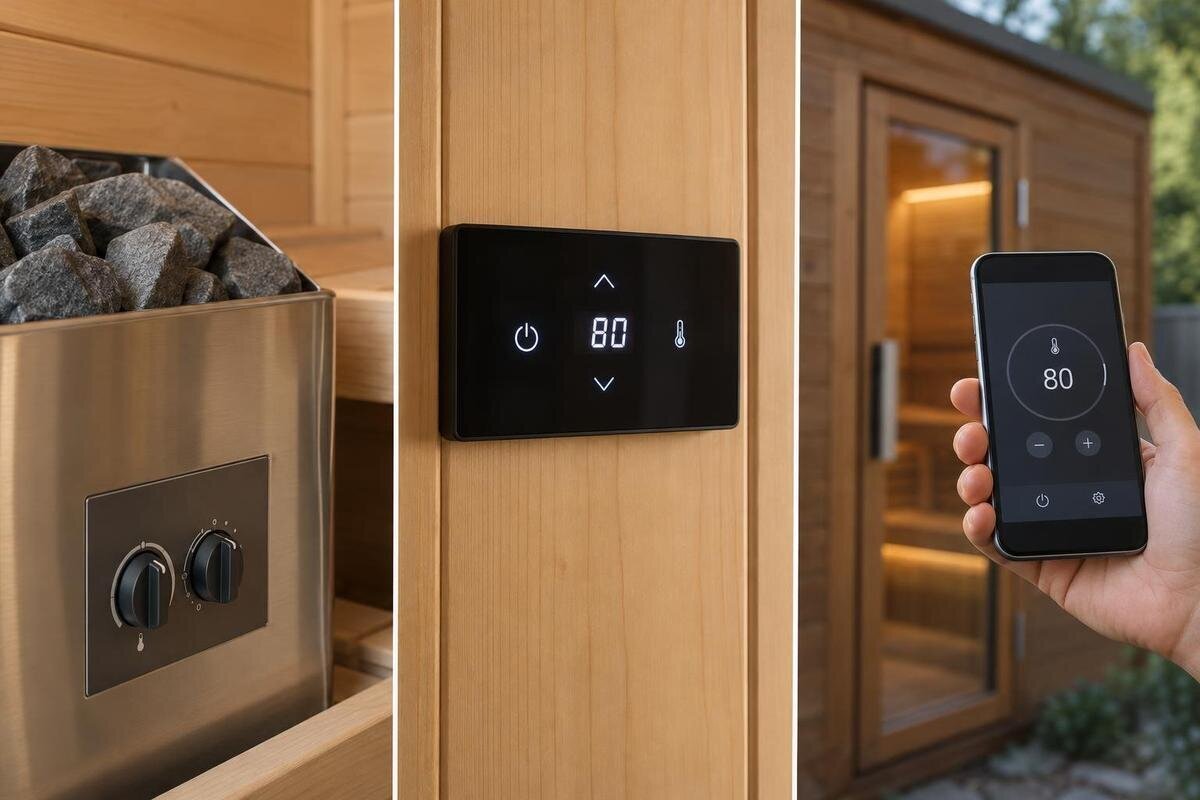
Sauna heater controls affect how easily you set up a session and make adjustments, but the control format is only one part of the decision. Some heaters use controls mounted on the heater; others pair with a separate panel, and some compatible systems offer an app. Functions and included parts vary by heater and package. Compare where you want to operate the controls with the exact heater and controller combination on offer. A cabin listing alone does not establish which controls are supplied or compatible. Keep remote starting separate: ordinary app operation does not, by itself, confirm off-site starting or the safety arrangements for it.
01
Sauna control functions and heater capability
Think of a sauna control as the user interface for a particular heater, not as a separate measure of heater performance. Depending on the system, it may switch operation on or off, let you select a temperature setting or running time, or show operating status. Some interfaces offer only a subset of these functions; others split them between the heater and a separate controller. A row of buttons or an app icon is not enough to tell you what is supported. Compare the manufacturer’s stated functions for the exact control model rather than assuming every dial, panel and app works alike.
Keep control format distinct from heater capability. A wall panel does not make a heater more capable, and a phone interface does not guarantee that a function can be used from outside the sauna. A display may show the selected setting, a sensor reading or both; that depends on the system. These details affect daily operation but come from the equipment and its instructions, not from words such as “digital” or “app”. Decide which adjustments you expect to make and where you want to make them. Heater performance, electrical supply and remote-start safety are related buying questions, but each needs its own product information.
Built-in controls: direct access at the heater
With on-heater controls, the interface is physically attached to the heater rather than positioned at a separate panel or presented through a phone. This keeps interaction in one fixed place and avoids relying on a mobile device for ordinary adjustments. It can suit someone who prefers a physical control and is happy to operate the heater directly. Check the exact functions: a dial, button set or display may behave differently by model, and the label “built-in” does not confirm whether a timer, temperature reading or other setting is available. Read the control list for the proposed heater instead of buying on the format name alone.
That fixed position can be a drawback if the interface is awkward to reach or difficult to read in the planned layout. Consider how you would approach the controls and see their labels, then ask an installer to check the arrangement against the heater instructions. When enquiring about the Sauna S-140 listing, ask which heater is proposed and where its controls would sit. Picture making an ordinary adjustment from that position, rather than judging the interface only in a close-up photograph. If the proposed package uses a separate panel instead, compare that actual set-up: the cabin listing alone does not establish which control format is included.
02
Separate control panels: where you operate the heater
A separate control panel gives you a physical interface apart from the heater itself. For everyday use, the practical gain is a choice of approved operating position: you might find a fixed panel easier to see, reach or share than controls attached to the heater. Panels can have different layouts, so check the actual unit rather than relying on the category label. Its features depend on the matched system, and it does not follow that any panel can be installed wherever convenient. Confirm the exact panel model, its stated functions and the locations allowed by the manufacturer, especially if the layout is a reason for choosing this option.
Before choosing this format, establish whether the panel is included in the quoted equipment, an optional part or an alternative to controls on the heater. Ask for the panel name and whether it manages only the heater or other equipment too; do not assume lighting or accessories are covered. For an enquiry about the HC-150 cabin page, ask the seller to identify the proposed panel as a separate item in the equipment description. This makes it easier to compare the functions you would actually use. A panel that looks comprehensive may still leave you using another control for an adjustment you expected it to handle.
App-based controls: check functions and connectivity
An app can make the interface familiar if you already manage settings on a phone, and it may show status or offer adjustments without touching a fixed panel. Those functions are system-specific: one app might be limited to information, while another may provide particular controls. Confirm that the exact heater and controller are supported, whether the app is part of the quoted configuration, and which actions it can perform. Ask whether a physical control remains available or required. A phone app is a different way to interact with compatible hardware, not a replacement for checking what that hardware includes.
Connectivity is another everyday consideration. Depending on the system, app use may rely on a local connection, a home network, an online account or another service; do not assume Bluetooth, Wi-Fi or internet access works in a particular way. Ask what must be available at the sauna and what happens when the connection or phone is unavailable. If you are considering the Sauna HC-225, request the app name alongside the proposed heater and controller models. Then compare the tasks available through the app with those available at a physical control, including the ordinary adjustments you would still want to make without your phone.

03
Compatibility depends on the exact heater and controller
A controller is not universal just because its plug, screen or brand looks familiar. Compatibility is defined for specific heater and control models and may depend on the configuration described by the manufacturer. Before comparing interface types, ask for the heater’s exact model designation and the exact controller model; confirm that the manufacturer specifies them for use together. If an option requires an additional module or sensor, it should be identified rather than inferred from a product photo. Do not choose a combination on appearance or on a general claim that a system is “smart-ready”.
The specified combination also needs to meet the heater manufacturer’s electrical and installation requirements. You do not need to assess those yourself: give the exact models and proposed location to the supplier and a qualified electrician or installer, and ask them to confirm feasibility. If the N-210 model page is on your shortlist, keep the cabin, heater and controller names together in your comparison notes. Check the actual combination being offered, not a neighbouring model, old brochure or generic illustration. If the proposed heater changes, recheck the controller rather than carrying over an earlier assumption, even if the replacement interface looks much the same.
Control-panel placement: access and manufacturer limits
Think about the full interaction, not just how far a panel sits from the heater. Can regular users see its labels, understand the display and reach the controls from a permitted position? Is the interface likely to be used before entering, while adjusting a setting, or both? Those questions help define a useful position, but the manufacturer’s limits take priority over preference. A control’s operating environment, location and mounting requirements vary by model. Do not infer a suitable position from a product photograph, a wall that looks convenient or another installation; check the instructions for the actual equipment.
For built-in controls, the heater’s proposed position largely determines where the user interacts; for a separate panel, ask where that specific panel may go. A phone app can change where you stand, but it cannot remove restrictions on physical equipment. When discussing a layout for the N-250 listing, describe where you expect to stand while reading and operating the controls. Include whether you want to check a setting before entering or make adjustments from inside. Have an installer confirm the proposed position against the manufacturer’s instructions, so your comparison reflects a usable, permitted location rather than an appealing spot on a drawing.
04
Everyday use by more than one person
Control convenience is personal, especially when several people will operate the sauna. A fixed panel gives everyone the same physical interface; a phone app may suit people who prefer a familiar screen but can depend on individual access, account set-up or app confidence. Neither format is inherently easier for every household. Ask who will make routine changes, how clear the labels and feedback are, and whether a first-time user can recognise the basic operation without guessing. If a demonstration is available, try the exact control proposed rather than a similar-looking unit.
Consider whether you need to repeat familiar settings or make different adjustments from one use to the next. Some systems may offer saved settings, schedules or restrictions; treat these as features to verify, not standard inclusions. Check how settings are changed and whether an app is needed for anything you expect to use. For a shortlist that includes the LC-260 cabin page, ask household members to assess the actual proposed interface using the same routine tasks. Can each person identify the selected setting, change it and understand the resulting display? Comparing those interactions is more useful than choosing a control simply because one person likes its appearance.
Temperature settings and displayed readings
Temperature displays are easy to overinterpret. A control might show the value you have selected, a sensor reading or information the manufacturer describes in another way; not every interface shows all of these. Even when a measured value is available, it depends on the system’s sensor arrangement and is not automatically a description of every point in the sauna. Read the manual’s labels and explanations, and ask the supplier to demonstrate how the chosen controller presents its information. This matters if users expect the display to answer “what have I set?” and “what is the current reading?” as though they were the same question.
Check the sensor and display information for the exact heater, rather than assuming an app or wall panel changes what is measured. Ask where the manufacturer specifies the sensor and which value appears on each interface. Do not add or relocate sensors without manufacturer guidance. If the HCF-300 model page is on your shortlist, request an explanation of the display on the proposed controller. During a demonstration, ask the supplier to distinguish selecting a target from viewing a measured reading, where those functions are available. That distinction helps users understand what has changed after an adjustment without treating every number on the screen as the same kind of information.
05
Remote start needs a separate safety assessment
Ordinary control and remote starting are related but not interchangeable. Turning a heater on or adjusting a setting at a local control describes one kind of use; an app that initiates operation when nobody is at the controls is a separate capability. A system may offer phone-based status or in-person app use without allowing off-site starting. The phrase “app-controlled” alone therefore does not answer the remote-start question. Keep this guide’s choice focused on interface, access and compatible equipment, and assess any unattended-start function separately.
If remote start is part of the proposal, ask the manufacturer and a qualified installer what the exact system permits and which safety conditions apply. Follow the product instructions; do not infer the required arrangements from another sauna, an app screen or a general online claim. Record remote starting separately from the app’s other functions when comparing offers. That keeps a feature you may not need from overshadowing everyday usability. If you only want phone-based adjustments while nearby, ask specifically about that use, then compare visibility, compatibility and access to a physical control without assuming that remote starting is part of the choice.
What to compare in the quoted configuration
To compare offers fairly, have each seller identify the sauna model, heater model and control model separately. Ask what is included, what is optional, which functions the control provides and which positions the manufacturer permits. For an app, add its name, connection requirements and a clear answer about what remains operable if a phone or connection is unavailable. For a separate panel, record its proposed position; for on-heater controls, confirm access in the planned layout. Use the LCF-300 listing to identify a cabin in your enquiry, not as a complete statement of the heater, controls or installation configuration.
Compare the written combinations rather than descriptions such as “digital”, “smart” or “included control” in isolation. Keep the relevant manufacturer’s instructions with each offer and resolve electrical or placement questions with a qualified installer. Once those requirements are clear, weigh the practical differences: direct operation at the heater, access to a fixed panel, or supported phone functions. Note which differences matter to your household and which features you are unlikely to use. If the package changes during quoting, revisit that comparison; a different heater or controller may change both the available functions and the way you operate them.
Frequently asked questions
Can I add a separate control panel to a heater later?
Possibly, but only if the exact heater and panel are specified to work together. Ask the manufacturer or supplier about the compatible controller and any installation requirements, then have a qualified installer check the proposed setup. A similar brand name or matching-looking panel is not enough to confirm compatibility.
Does app-based control mean I can start the sauna remotely?
No. An app might show information or allow adjustments when you are nearby without supporting off-site starting. Confirm the exact functions for the proposed system. If remote starting is available, assess its requirements and safety separately using the manufacturer’s instructions and advice from a qualified installer.
Does an app always need Wi-Fi or internet access?
No single connection method applies to every system. App use may rely on a local connection, a home network, an online account or another service. Check what the exact app requires at the sauna and what functions remain available if your phone or connection is unavailable.
Where should a separate sauna control panel go?
Choose a position that is easy to see and reach, but only within the locations allowed by the panel and heater instructions. Ask the supplier for the relevant documentation and have a qualified installer confirm the proposed position. Convenience does not override the manufacturer’s placement requirements.
What should I ask for when comparing control options?
Get the exact heater and controller model names, the control functions, what is included in the offer, and the manufacturer’s placement requirements. For an app, also ask which connection and services it needs. If the heater or configuration changes, recheck compatibility rather than carrying over an earlier assumption.
The most convenient control is the one that is compatible with the heater you are actually buying, works from a permitted position and makes routine adjustments clear to everyone who will use it. Built-in, separate-panel and app-based formats each have trade-offs; none is automatically the simplest. Compare the named equipment and its instructions, then judge the interface against your real routine rather than its label.
