
Pergola Rain Sensors: How They Work and Their Limits
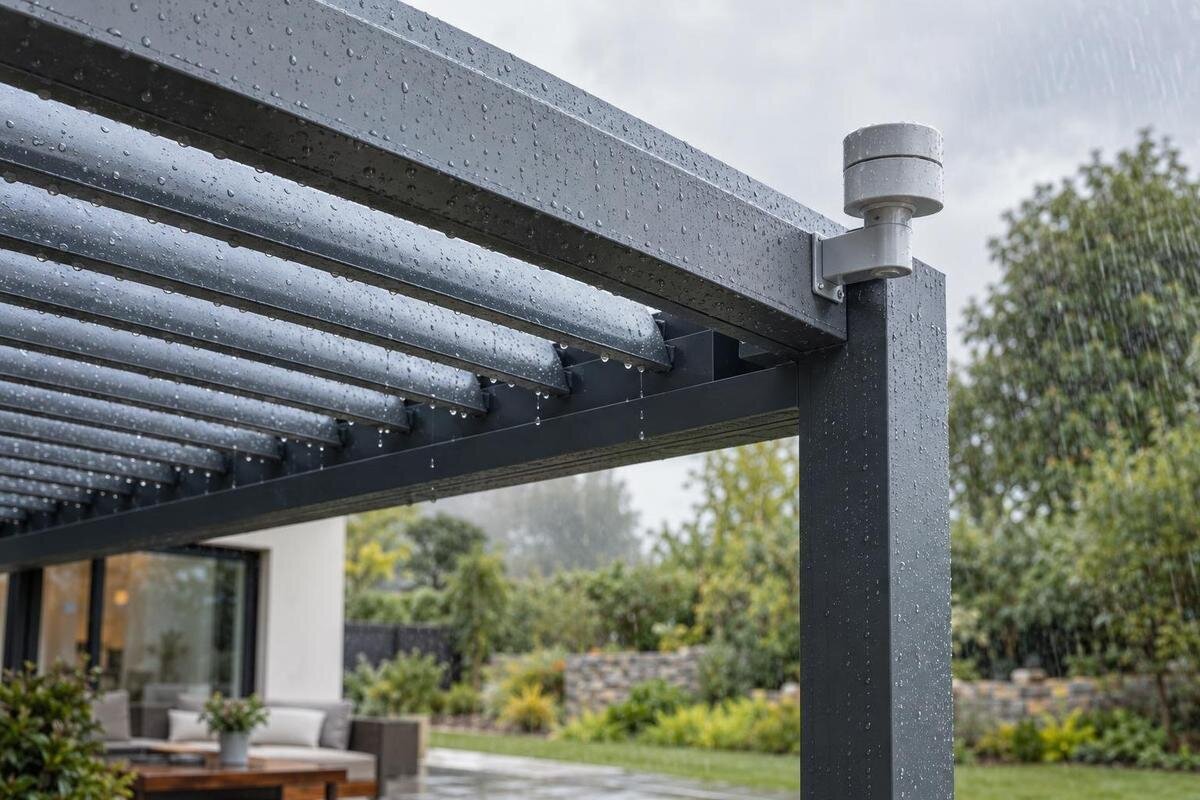
Pergola weather controls
A pergola rain sensor is one input to a control system, not a miniature weather station. Depending on its design, it may detect moisture at a sensing element and send a signal that prompts a programmed response. That response, its timing and even whether the roof moves at all depend on the exact sensor, controller and roof mechanism. Knowing what the sensor detects—and what it cannot assess—helps you separate a genuine automation feature from assumptions about rain protection. No motorized roof or sensor is implied by a pergola model name.
What a pergola rain sensor detects
A pergola rain sensor reports a condition at its own sensing element; it does not monitor the entire roof. Depending on the design, the element may respond to water contacting a surface, a defined wetness level or another measured input. Treat these as possibilities to check, not features every product shares. A device that sends a wet-or-dry signal is not automatically a rain gauge. Unless its specifications state that it measures precipitation amount or rate, it cannot tell you how many millimetres have fallen or how hard it is raining. A threshold signal may be enough to trigger a control, but it is not a complete rainfall record.
Its reading is local to the sensor’s approved position. Wind, overhangs, walls and nearby shelter can mean that the element gets wet at a different time from the roof or patio. It cannot inspect every part of the roof, determine whether water is entering the covered area or consult a forecast unless those functions are separately specified. Ask for the exact sensor type, what value or state its output reports, and the manual’s definition of “rain detected.” A model label such as Bloomcabin Bioclimatic Pergola identifies a structure, not the sensor’s detection method or trigger threshold.
How a rain signal reaches the roof
In an automated installation, detection is only the first step. A sensor reports an input to a controller; the controller applies its logic and, if supported, sends a command to a compatible motor or other actuator. Each part has to be present and configured for the stated function. A standalone sensor cannot automate a manually operated roof, and a motor alone does not establish that rain input is supported. Check the documentation for the exact sensor, controller and roof motor, including listed compatibility and operating modes. A general accessory description may not cover every combination, so confirm the component versions that will actually be installed.
Never assume the action is to close the roof. Depending on the mechanism and documented control logic, the response might be to retract a covering, adjust a movable roof, inhibit movement, send an alert or make no automatic change. Ask what happens if rain starts during movement, whether a manual command overrides the input, and whether another operating mode can block movement. If you are considering the Bloomcabin Pergola listing, distinguish the structure itself from any separately specified sensor, powered mechanism or automatic response. Model-specific documentation—not the word “pergola”—establishes which components are included and how they work together.
Trigger thresholds, delays and reset behaviour
Trigger logic may involve more than a simple on-off switch. A specification can define how much moisture counts, how long the condition must persist or how long the controller waits before acting. Some systems may allow an installer or owner to adjust sensitivity; others may use fixed settings. Do not assume that adjustment is available, that a setting has a particular range or that two systems use the same threshold. Look for units, the adjustment method and who is permitted to change it. Distinguish a sensor’s detection delay from the controller’s wait and the roof motor’s travel time: these are separate stages.
Reset behaviour is just as important as the trigger. Once the sensor dries, the controller might clear the signal automatically, wait for a separate dry threshold, restore an earlier roof position or require a person to issue a new command. The manual should explain whether the roof reopens on its own and how a pause or manual override affects later operation. Reset may not be immediate: retained moisture, a programmed wait or the sensing design can keep the system in its rain state. Ask for the complete sequence—wet detection, response, signal clearing and return to normal—rather than treating one delay value as the whole operating rule. You can also ask whether settings persist after a power interruption or service reset.
What a rain sensor cannot assess
Rain sensing describes one weather input, not a complete forecast or safety assessment. Unless the exact device specification says otherwise, do not treat it as a wind, gust, snow, ice, hail or temperature sensor. A combined weather station or separate sensor may provide additional inputs, but its presence and connection need confirmation. Even a device that reports precipitation may not classify the type or severity of every event as an owner expects. Find out which sensors are supplied, which are optional and which inputs the controller can actually use; a catalogue list of possible accessories is not the same as an installed, active system.
A rain sensor cannot establish structural capacity, safe wind limits, snow-load performance, anchorage, drainage or the roof’s resistance to water entry. A rain signal does not tell a controller whether conditions are safe for every movement or whether snow should be removed. When reviewing the Bioclimatic Pergola product page, keep questions about weather detection separate from questions about the structure’s operating limits. Even a separate wind or snow sensor does not assess structural load unless that function is specifically documented. For questions about structural capacity, installation or safe limits, have a qualified professional assess the exact system, including any restrictions that apply regardless of the sensor reading.

Why sensor location matters
A sensor only responds to what reaches its sensing element. If it is sheltered under an eave or roof edge, it may stay dry while exposed parts of the patio receive rain; if it sits where runoff or splash reaches it, it may report wetness before rain reaches the covered area. Wind direction, surrounding walls, trees, nearby surfaces and roof geometry can change exposure, sometimes across different parts of the same installation. These examples explain why location matters, not where a particular sensor should be mounted. The manufacturer’s approved position, orientation and mounting arrangement take priority, since some devices are designed to work only in a defined placement.
Ask whether the sensor is mounted on the pergola, placed remotely or installed at another approved point, and whether cable length, wireless range, power or controller location affects the choice. Confirm the permitted mounting surface and orientation rather than choosing the spot that is easiest to reach. When considering the Bloomcabin Wall-Mounted Pergola, ask how the adjoining wall and any overhang would affect exposure at the proposed sensor location. Follow the compatible system’s installation instructions and have the installer confirm the location before relying on the automatic response. The chosen spot needs to provide the exposure required by the sensor’s specifications, not simply a convenient mounting point.
False triggers and missed rain
Unexpected triggers often begin with the difference between rain and moisture. Depending on the sensing method and threshold, sprinkler spray, a cleaning splash, roof runoff or condensation may wet the element when rain is not falling. Dew or water retained on a surface may also delay a dry signal on a moisture-based device. These are possibilities, not a diagnosis: some designs filter certain conditions, while others may not. If the sensor reports rain in clear weather, note what was happening nearby and compare it with the manufacturer’s explanation of trigger and reset behaviour before changing a setting. A reading reports the defined input, not the source of the water.
A missed event can have the opposite causes: rain does not reach a sheltered sensor, the sensing surface is dirty or obstructed, a connection is interrupted, or a setting is unsuitable. Physical damage or a controller fault may also be involved, but an indicator or event log—if that system provides one—should guide troubleshooting. Do not assume every model offers logs, alerts or remote diagnostics. Compare the reported sensor state with conditions at its approved location, record when the discrepancy occurs and follow documented service steps. Changing sensitivity without finding the cause may hide a missed trigger rather than fix it. If behaviour is inconsistent, treat automatic response as unreliable until the system has been checked.
A rain sensor does not make a roof rainproof
A correctly triggered sensor does not make an open or movable roof watertight. It can request only the response supported by the controller and roof mechanism; rain may still blow in from the sides, pass through gaps or run off in a way the structure was not designed to manage. A roof’s coverage, joints, drainage path and connection to a building are separate design and installation questions. Do not infer a sealed or leak-free result from a feature labelled “rain sensor,” or assume every roof should move into one universal rain position. The manual should state whether the roof is intended to remain in a particular position during rainfall.
Check the roof manufacturer’s stated rain use, instructions for leaving it open or closed, and the route water takes; if the design has moving sections, ask whether its rain response changes runoff. When reviewing Bloomcabin’s regular pergola model page, distinguish the roof’s stated rain performance from any control features offered with it. The relevant questions are whether the roof provides the coverage you expect and what happens to water during and after movement. Consider seating and belongings separately: a sensor may act only after water reaches its sensing point, and wind-driven rain may enter from the sides. Set expectations using the documented roof limits, not the trigger alone.
Power, communication and control compatibility
The signal path may be wired or wireless, and other controller functions may depend on local power, a network connection or neither; arrangements vary by system. Ask exactly which components need power and what connects the sensor to the controller. Find out what the display or app reports when contact is lost, if applicable, and whether internet access is required for the rain response or only for remote access. Do not infer fail-safe behaviour from the word “automatic”: a connection failure could prevent a command from reaching the motor, while the motor itself may be unavailable during an outage. The manual should describe expected behaviour in those cases.
Ask for the documented failure state: does the roof stay where it is, stop moving, follow another control rule or require a person to operate it? Confirm whether a local control remains usable, how an override interacts with later rain signals and what to do after service or power is restored. If you are considering the Bloomcabin bioclimatic pergola listing, include these questions when discussing the exact control package. Distinguish a notification about rain from a command that reaches the roof and from a completed roof movement. The operating instructions should explain what feedback is available and how to recognize an interrupted or incomplete response.

What to verify before choosing a sensor
Before choosing an add-on or a pergola package, ask for the manufacturer and model number of the sensor, controller and roof motor. Verify that they are expressly compatible with one another and with the exact roof configuration; a shared brand, connector or app is not proof of compatibility. Ask whether the sensor is included, optional or third-party, what commissioning is required and whether the controls can be used locally without a network connection. When comparing the options on Bloomcabin’s pergola product page, identify which components are covered by the proposed package and which would need to be added. This separates the structure you are buying from the control equipment needed for the response you want.
Then ask the supplier to describe one complete event in plain terms: what wet condition starts the response, whether a delay applies, what the roof does, how the signal clears and what happens during a fault. Request the manual and installation instructions for the exact version, including stated exposure limits, settings and service requirements. If your concern includes wind, snow or unattended operation, request the separate specification for that capability; a rain sensor is not a substitute. The useful comparison is not how many automation terms appear in a description, but whether the documented trigger and response match how you plan to use the pergola. Ask whether a retrofit requires a particular installer or affects the available support for that system.
Testing and maintenance
Use only the manufacturer’s stated test and maintenance procedure. If the system has a built-in test or status indicator, confirm what the manual says it verifies: a sensor indicator may show that an input changes without proving that a motor can complete a roof movement. A check should cover both sensor state and controller response only when the procedure permits it. Clear the area and follow the prescribed safe sequence before any permitted operational test. Do not pour water on the sensor, bypass a connection or force the roof through a test unless the exact instructions allow it. Electrical work, mounting changes and troubleshooting beyond routine owner maintenance should be handled by an appropriately qualified person.
Keep the permitted sensing surface clear using only the specified cleaning method, and inspect for visible obstruction or damage at the intervals the manual recommends. In cold conditions, frost or frozen precipitation may affect an exposed element differently from liquid rain; never assume a rain sensor detects snow or protects a roof from snow loading. If you are considering the wall-mounted pergola listing, ask which maintenance and winter instructions apply to the proposed sensor and control package. Record unexpected triggers or a failed permitted test before resetting the system; those details may help distinguish a sensor issue from a control issue. Until it is checked, do not rely on an inconsistent sensor for automatic weather response.
Frequently asked questions
Does a pergola rain sensor always close the roof?
No. It sends an input to compatible controls, and the documented response may be to close, retract, reposition or pause the roof, send an alert, or make no automatic change. Check the manual for the exact model and control package.
Can a rain sensor tell how much rain has fallen?
Only if its specifications say it measures rainfall amount or rate. A sensor that detects wetness at its own sensing element may send a rain signal without measuring accumulation or intensity.
Will a rain sensor detect snow or strong wind?
Do not assume so. Snow, ice and wind require separately documented sensing functions, and a weather sensor does not automatically assess a roof’s structural limits or safe operating conditions.
Can I add a rain sensor to an existing pergola?
Only after confirming compatibility with the exact roof, motor and controller. Check whether the sensor is approved for that system and whether installation or setup should be handled by a qualified professional.
Why does a rain sensor activate when it is not raining?
Depending on its design, sprinkler spray, cleaning water, runoff, condensation or lingering moisture may trigger it. Check the sensor’s location and manual; an inconsistent response may also need service.
A rain sensor is useful only when its local reading leads to a roof response that suits your needs. Understand the trigger, the time between detection and movement, and what happens when the signal clears. Those details help you judge the convenience of automation without mistaking it for a guarantee of dry seating or protection from every kind of weather.
