
Pergola Remote Unresponsive: Batteries, Pairing or Power?
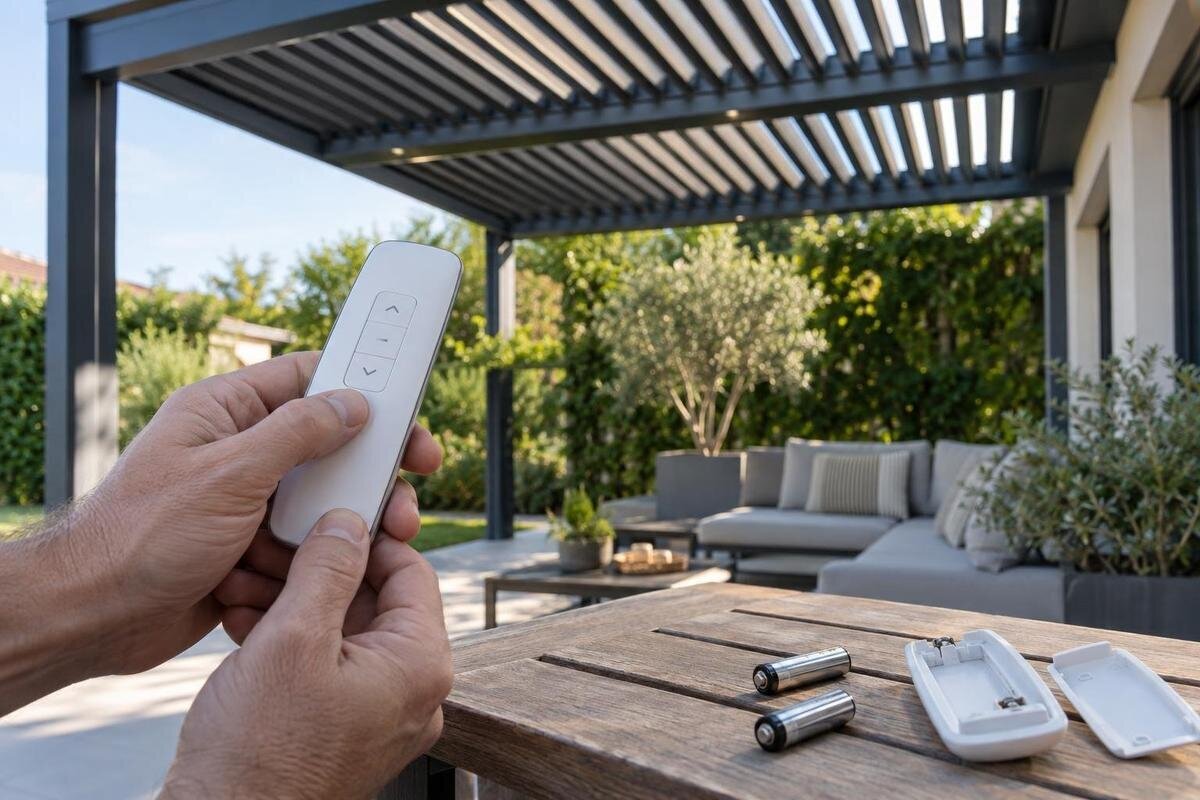
Pergola remote troubleshooting
An unresponsive pergola remote does not automatically mean the motor has failed. A flat or poorly seated battery, a remote that is no longer paired, a fault in the receiving control or a wider power problem can produce similar symptoms. Begin with checks that stay on the user side of the equipment: identify what still responds, inspect only the remote’s accessible battery compartment, and find the manual for the exact controller and handset. Do not guess at a reset sequence or open electrical covers.

Identify what has stopped responding
Begin by defining what ‘not working’ means. Does the handset show no visible response when you press a button, or does it appear active while the pergola does nothing? Does every command fail, or is only one function affected? Note when the problem began and whether it followed a battery change, controller work, a known interruption to the power supply or a long period without use. Describe what happens after a command without repeatedly pressing it to force a response. The remote, the receiving control and the drive mechanism are separate links in the command path, even if some parts share a housing. Similar symptoms can arise at different points; a quiet remote alone does not prove that the pergola has lost power.
Write down the exact product name from the invoice or installation paperwork rather than describing it simply as a garden pergola. If the paperwork says Bloomcabin Wall-Mounted Pergola, record that wording: it helps identify the pergola, but does not identify the remote or controller fitted to it. Note any model code visible on the handset, whether it has an indicator or screen, and which commands still work. Keep people and objects clear of moving parts during any normal test. Do not remove equipment covers just to look for a label; use paperwork or labels that are safely accessible.
Check the remote batteries safely
Check only the remote’s user-accessible battery compartment, following its instructions rather than guessing from the shape of the cells. Use the specified battery type, number and orientation; a cell that fits may still be the wrong type. If the remote takes more than one battery, use a matching set rather than mixing old and new cells. Refit the cover as described, and do not force it if it will not close normally. Look for visible damage, dampness or leakage. If a battery has leaked or the contacts appear corroded, stop rather than scraping them, spraying cleaner or attempting a repair.
Once the correct fresh batteries are fitted, test the remote in its usual way from a position where you can watch the pergola safely. If a display or light is provided, note what it does, but do not take illumination as proof that a signal reached the controller. A product name such as Bloomcabin Pergola identifies the pergola, not the handset’s battery specification; check the remote marking or its own manual. If the symptom is unchanged, avoid cycling through different battery types. The next useful comparison, where the manual permits it, is whether another user control still operates the same function.
What different remote symptoms can tell you
Look at how much of the system is affected. If every button fails, a battery or handset fault is one possibility, but so are pairing, signal reception or a controller issue. If one command works and another does not, a completely flat battery is less likely, although a failed button or a fault further along that command’s path is still possible. Separate a button that produces no visible response on the handset from a command that appears to register but produces no movement. These are different observations, even though neither identifies the failed component. An indicator, if fitted, can show that the handset is responding locally; it does not necessarily confirm communication with the pergola. Record the affected function as well as the product name, such as Bloomcabin Bioclimatic Pergola, so that support can distinguish a problem affecting one command from a remote that is entirely unresponsive.
Where your installation has a second user control and the manual describes it, compare the same function using that control from its normal position. If it operates while the remote does not, the handset or its connection to the controller becomes a more plausible area to investigate, but this does not prove that pairing is the fault. If neither control works, or only one pergola function fails, make a note of that difference. Do not borrow an unverified remote, reach into a moving mechanism or keep issuing commands while someone is near moving parts.
Pairing instructions for your remote and controller
Pairing is not a universal reset routine. The process, if one is required, depends on the exact remote and controller, and instructions may differ between versions. Changing a battery does not automatically mean pairing has been lost. Use the manual that matches the fitted controller and handset; a pergola model name alone is not enough. For example, the page for a wall-mounted Bloomcabin pergola can help identify the product, but it does not establish which controller is installed or specify its pairing sequence. Do not copy button combinations from a similar-looking remote or an online video.
If the correct manual includes an owner-level pairing procedure, read the complete instructions and warnings before starting, then follow them exactly. Check any stated prerequisites and interpret indicators only as the manual explains them. Before attempting the procedure, identify how the instructions describe successful pairing and what they say to do if that confirmation does not appear. This gives you a defined outcome to record instead of assuming that completing a button sequence means it worked. Do not invent a long press, reset sequence or power cycle when instructions are missing. Make sure the area around moving parts is clear before any permitted test. If a procedure requires opening the controller, accessing wiring or carrying out an installer-level step, stop and ask the supplier or a qualified service professional instead.
Look for signs of a wider power or control fault
A battery powers the handset; it does not confirm that the pergola’s control system has power. If the remote appears active but several functions do not respond, the issue may lie with signal reception, the controller or the supply rather than the batteries. If every normal user control and every available function is inactive, that points away from a handset-only fault, but it does not identify a failed part. Systems differ, so do not diagnose a mains fault from a dark indicator unless the relevant manual explains what that indicator means.
Observe only status lights and controls that the manual identifies as user-accessible. If there is another ordinary control, note whether it operates; do not remove a cover to look for a receiver or test wiring. Record whether the failure began after a known interruption or service visit, and whether there is visible external damage or moisture. Be precise about the timing: a fault noticed after an interruption is not the same as a fault observed at the moment the supply was interrupted. If you do not know when it began, say so rather than treating the most recent event as the cause. Do not reset electrical equipment or change connections as an experiment. If the manual does not describe a safe user-level check, leave investigation of the supply and controller to qualified service.
Keep troubleshooting outside electrical enclosures
Keep the boundary between observation and repair clear. Do not open the controller enclosure, motor housing or junction box, probe terminals, alter wiring, bridge connections or bypass a sensor or limit. Those actions can expose live parts or cause unexpected movement, and they are not a substitute for the model-specific manual. Do not try to make a generic remote work by changing the controller, or fit a replacement board based only on a symptom. Electrical and control-system work should be handled by a suitably qualified service professional who can identify the equipment and follow the relevant instructions.
Stop using the remote if the pergola moves unexpectedly, stalls, makes an unusual noise or shows signs of damage. Do not push a moving part into position or keep sending commands to force a response. Visible moisture inside a unit, exposed wiring, unusual heat or a burning smell are reasons to stop and arrange service, not to open the equipment and investigate. Keep people clear of the mechanism until it has been assessed. If the manual gives a specific owner-level safety action, follow that instruction rather than improvising.
Find documentation for the fitted remote and controller
Look for the documentation supplied with the installation: order confirmation, product paperwork, handover notes and the remote’s own manual. Keep three identities separate: the pergola model, the controller or receiver model, and the exact remote model or part number. The Bloomcabin Wall-Mounted Pergola product page can help match the pergola name in your paperwork, but it cannot tell you which control hardware is installed. Use labels visible on the outside of equipment only; do not remove a controller cover to read a rating plate.
Check that any manual you find names the controller and remote you actually have, not merely a similar pergola or handset. Compare the model names and any version references with the details in your installation paperwork. If the documents disagree, keep both references and ask which applies to the fitted equipment; do not select whichever instructions look easiest to follow. A replacement handset or previous service visit is worth mentioning when asking this question, because the original pergola paperwork may not identify the remote now in use. If paperwork is missing or a label is unclear, ask the original seller or installer for the correct documentation and provide the model details you can safely see. Keep the confirmed manual with your order records so that any later replacement enquiry uses the same equipment reference. Until the instructions are confirmed, stay with external observations and battery checks rather than trying undocumented controls.
Check compatibility before buying a replacement
Do not choose a replacement remote by colour, shape or brand alone. Compatibility may depend on the exact controller and remote version, and a replacement may have a pairing requirement. The Bloomcabin Pergola listing identifies the product, but is not evidence that a particular remote will operate it. Before ordering, provide the supplier with the labels you can safely access and ask them to confirm the exact compatible part for your installed controller. Avoid a universal handset unless the controller’s documentation explicitly supports it.
Ask what is involved before purchase: whether the proposed remote matches the controller, whether pairing is required, whether the procedure is suitable for an owner, and whether the existing handset can remain in use. Request the exact replacement part reference, not simply an assurance that it is a pergola remote. If the supplier proposes a different-looking handset, ask them to explain which confirmed equipment details establish compatibility. Conversely, an identical appearance should not replace that check. Clarify whether the proposal is for the handset alone or involves changes to the control system, as these are different purchasing decisions. If compatibility remains uncertain, request a check rather than experimenting with a cheaper or similar-looking device. Keep the original remote and its markings until the replacement has been verified, and retain the compatibility confirmation with the order. A mismatch can create a second problem and make the original fault harder to diagnose.

Prepare a clear report for support
Make the support request a short record of what you observed rather than a guess at the cause. Include the pergola name and any model code, the remote and controller markings visible without dismantling anything, whether all commands fail, and what happens with any other user control described in the manual. Add the battery type and whether a correct fresh set changed the symptom; mention an indicator only if one is fitted. If your paperwork uses a name such as Bloomcabin Pergola, copy it exactly. Note when the fault began and whether it followed an outage, battery change or service visit.
Clear photographs of the remote, its external labels and relevant paperwork can help identify the right manual. Photograph the whole handset as well as any readable model marking, without dismantling equipment to obtain a better view. Avoid sharing personal order details publicly. Keep the written report in chronological order: the first symptom, the checks performed and the result of each check. Distinguish something you observed from something you suspect. For example, reporting that the handset indicator lit but no movement followed is more useful than declaring that pairing has failed. Include any manual reference used for a permitted procedure and say whether the result matched its description. Tell support where you stopped and what remains untested; there is no need to complete every possible check before asking for help. This gives the person assessing the fault a clear account without asking you to open electrical equipment or repeat unsuccessful tests.
Know when to stop troubleshooting
Owner-level troubleshooting has reached its limit when the correct batteries make no difference and the exact manual offers no further user check, or when its pairing procedure is unclear. At that point, the useful outcome is a clear handover rather than a guessed diagnosis. Include the exact product name from your paperwork, such as Bloomcabin’s bioclimatic pergola, alongside the separate remote and controller details you have found. Explain whether you need help identifying the equipment, confirming a permitted pairing procedure or arranging assessment of a wider fault. These are different requests, and stating which remains unresolved helps support respond to the actual problem.
Once the request is with support, keep the remote, paperwork and observations together. Avoid introducing another unverified handset or repeating unsuccessful pairing attempts while waiting for advice, as that makes it harder to describe the original condition clearly. If the symptoms change during ordinary use, update the report rather than assuming that the earlier explanation still applies. The aim is not to prove which component has failed from the remote alone, but to establish what responds, what does not and where owner checks ended. That record provides a useful starting point for deciding whether a compatible handset or service work is needed.
Frequently asked questions
How can I tell if the remote batteries are flat?
Use the battery type and orientation specified on the remote or in its manual, then fit a fresh, matching set. If the same symptoms remain, batteries may not be the only issue. An indicator, if fitted, shows a local response; it does not prove that the pergola received the signal.
Do I need to pair the remote again after changing its batteries?
There is no universal rule. Changing batteries does not automatically mean pairing has been lost. Check the manual for the exact remote and controller, and follow its procedure only if it says pairing is needed. Do not try a sequence intended for a different model.
Can I reset the pergola’s power to fix the remote?
Do not try a generic reset or power cycle. Controls and procedures vary, and an improvised reset may not address the fault. Use only a user-level action described in the correct manual; leave controller access, wiring and electrical checks to qualified service.
What if the remote lights up but the pergola does not move?
A light can show that the handset is responding locally, but it does not confirm that a signal reached the controller or that the pergola has power. Note what happens and compare another user control only if your manual describes one. Seek service if the fault persists.
Can I use another remote from the same brand?
Not without confirming compatibility. The exact remote and fitted controller matter; appearance or brand alone is not enough. Ask the supplier to confirm the part for your controller and whether pairing is required before ordering or trying another handset.
Treat the remote, the control system and the pergola’s drive mechanism as separate parts of the problem. A careful battery check and a clear record of which commands and user controls respond can narrow the possibilities; only the exact controller manual can guide a pairing procedure. If the signs point beyond the handset, stop at observation and leave electrical or controller work to qualified service.
