
Creating an Outdoor Workspace Under a Pergola
Outdoor workspace planning
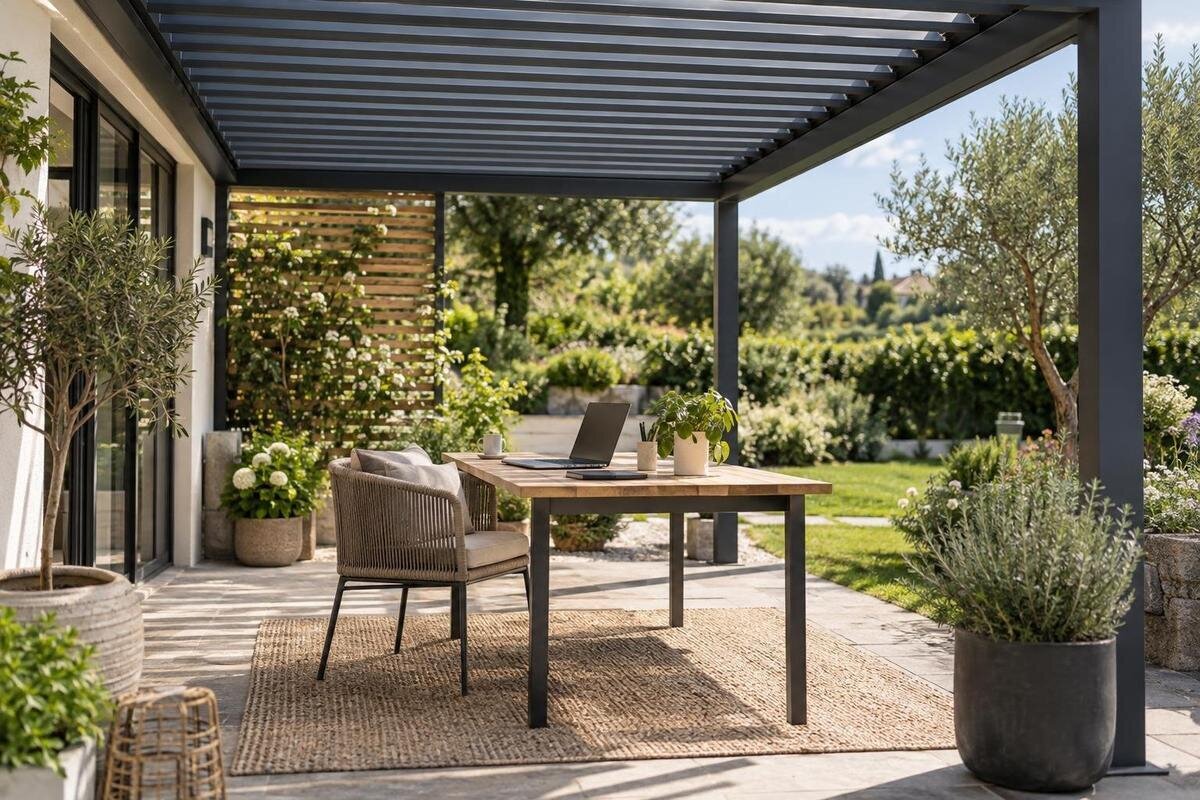
An outdoor desk can make a useful change of setting for reading, planning or occasional laptop work, but it is not an indoor office with a different view. Sun moves, wind can carry rain beneath a roof, and power, internet access and secure storage may be limited. Plan around the work you genuinely expect to do: mark the desk and chair, observe the screen in changing light, decide where equipment goes when the weather turns, and keep an indoor fallback.
Before choosing a pergola 1
Decide which work belongs outdoors
Begin by listing the tasks you would actually take outside. Reading briefs, planning, routine email or a short laptop session may need little beyond a stable surface and a reliable connection; a video call, dual-screen task, printing job or work involving confidential papers can demand more control. For each task, note the equipment, expected session length and cost of an interruption. Include small items too: a charger, headset, notebook and somewhere to set a drink all affect the desk footprint. Group tasks that can share equipment, then identify those that need a quiet room or an uninterrupted connection. The aim is to define a useful part of the working week, not to recreate every part of a home office in the garden.
Separate optional tasks from work that must happen without interruption. If a deadline, sensitive conversation or secure system calls for a quiet, controlled setting, keep an indoor desk available rather than relying on the garden. Decide which activities can pause if rain starts or the connection drops, and save work before moving devices. Estimate whether a task would still be worthwhile if you had to move indoors part-way through. A clear fallback also helps you decide whether the outdoor station needs permanent furniture or should remain easy to pack away. Weather, sound, privacy and network conditions will not behave like they do indoors, so plan around what can tolerate change.
Measure the desk area and walking routes
Draw the usable area before choosing a desk. Measure the desk, screen or laptop, chair in working position and the room needed to pull it back; include a footrest, side table or printer only if the task list genuinely calls for one. The catalogue lists Bloomcabin Bioclimatic Aluminum Pergola at 97–258 ft², but that is an area range, not proof that a particular arrangement will fit. Compare the exact dimensions for the configuration under consideration with your own measurements rather than selecting from the headline figure alone. Record fixed objects and any part of the terrace that needs to stay clear.
Add the routes that make the desk usable: the path from the house, a door’s swing, movement past the chair and access to anything shared with the rest of the garden. Mark fixed elements only from a dimensioned plan or an on-site measurement, not from a decorative image. Use masking tape or a cardboard outline to test the furniture at full size; sit down, stand up and walk past it. If another person uses the route, repeat the test while they pass through. An area total can hide awkward corners and blocked access, whereas an outline makes the pinch points easier to spot.
Before choosing a pergola 2
Track sunlight and reduce screen glare
Check the light from the seat, not just from the garden doorway. At the hours you would work, note when direct sun reaches the screen, when a bright opening or nearby surface reflects in it, and when the sky behind the display makes the image harder to read. Repeat the observation at more than one time of day: the shaded patch can move, and morning conditions do not show how afternoon work will feel. A short log over several days is more useful than choosing a desk direction from the compass alone. If you expect to work in different seasons, revisit the test when the sun’s angle changes.
Try the laptop or monitor in the proposed direction before fixing the desk. Turning the table or seat may keep direct light off the screen; changing the tilt can reduce reflections, though it cannot provide shade. Keep the user’s view of bright sky and the screen in mind together, since avoiding one reflection can still leave the display difficult to read. A compatible anti-glare filter may be worth testing with the actual screen, but it will not compensate for direct sunlight or a poor angle. When considering the Bloomcabin Lean-To Pergola, mark the proposed position alongside the house on your sketch and test alternative desk orientations within it. Include nearby windows and pale surfaces that could reflect light towards the display.
Plan for rain, wind and temperature changes
A pergola does not turn an open garden into an enclosed office. Rain can arrive from the sides with wind, while damp surfaces, gusts, falling temperatures or strong sun may make a session unsuitable even when the desk is under a roof. The amount and type of cover depend on the actual configuration; do not assume every pergola or arrangement offers the same protection. Check the documentation for the model you are considering and whether any proposed side panels or accessories are expressly compatible. A sheltered position can still be exposed to changing outdoor conditions.
Decide in advance what will end a session: approaching rain, wind moving papers, glare that cannot be corrected, or equipment becoming too warm or damp. Move devices indoors before conditions worsen rather than waiting for water to reach the work surface. A cover or storage box is not automatically a substitute for dry, secure storage. When reviewing the Bloomcabin Pergola configuration options, ask for documentation explaining the coverage available with your chosen setup and any limitations on use. Relate that information to the desk’s position, especially its distance from open sides. This helps you judge whether the proposed shelter meets your expectations without treating the whole area beneath it as equally protected.
Before choosing a pergola 3
Choose furniture for outdoor use
Choose furniture according to how often it will be brought outside and how it will be stored. A desk that stays in the garden should be intended by its maker for the conditions it will meet; a portable table can be easier to bring inside, but it still needs to provide a steady working surface. Make the chair and table work together, leaving room to sit, turn and reach the keyboard without moving into a walkway. For longer tasks, include any separate keyboard, mouse, monitor stand or notebook you normally use. Testing the space with a laptop alone may conceal the extra room your usual setup needs.
Place accessories where you will actually use them: a headset, notebook, phone, drink or task light each takes up space, and a light may create glare as daylight fades. Keep small items clear of the keyboard and away from places where a cable could snag. For the bioclimatic pergola model, request a dimensioned layout for the configuration you are considering and compare it with your complete furniture outline. Show the furniture in use as well as at rest, including how you move when sitting down, standing up or carrying equipment indoors. Check that the chair can move freely on the proposed surface and that table legs do not obstruct your feet or the position of a storage bag.
Plan outdoor power and cable routes
List every device that needs power: laptop, second screen, phone, router or lamp, along with how long you expect to work and whether several will be running at once. Check each manufacturer’s charging and operating guidance, then decide which devices can use their own batteries and which need a fixed supply. This inventory gives an electrician useful information and helps you avoid a desk plan that depends on an outlet that is too far away. Battery power may suit shorter sessions, but only within the battery and device makers’ instructions and with a realistic plan for recharging.
For a permanent supply, ask a qualified electrician to assess the site, equipment and route before any installation. Discuss suitable outdoor equipment, outlet position, protection and a cable path that does not cross a walking route. Do not improvise with indoor equipment in damp conditions or put cables where a door, chair or feet could catch them. If you are considering Bloomcabin’s wall-mounted pergola model, show the electrician the proposed desk position and the route between the house and the workstation. Establish whether any electrical provision is included in the selected configuration and who is responsible for it. Keep the furniture plan provisional until the supply arrangements are confirmed; otherwise, use only a suitable battery-powered setup.
Before choosing a pergola 4
Store equipment between work sessions
Decide what must leave the pergola at the end of each session. Laptops, tablets, portable screens, chargers, headsets and paper records are easier to manage if they have a designated place indoors; do not assume that a roof makes valuable electronics safe to leave outside. If you are considering a storage cabinet, check that it is suitable for its intended location and consider how its contents will stay dry and secure. A storage space exposed to the same weather does not become protective simply because it is close to the desk.
Make packing away a short routine: save files, shut down or disconnect devices as their makers direct, carry removable kit indoors and leave only furniture intended for outdoor exposure. Keep paperwork and accessories out of view when the space is unused. When comparing configurations on Bloomcabin’s bioclimatic pergola page, include the footprint of any proposed storage unit in your layout, with room for its doors or lid to open. Consider whether you can reach it while the chair is occupied and carry equipment through the doorway without squeezing past furniture. A bag or tray that holds the removable accessories together can reduce forgotten items, provided it suits the equipment and is not treated as weatherproof storage.
Check Wi-Fi, sound and privacy
Test Wi-Fi from the exact seated position, using the device and task you expect to rely on. A page that loads once does not prove a stable connection for a long call or file transfer; try both at the times you would normally work and note any interruptions. If the signal is unreliable, compare realistic alternatives before moving furniture, such as a mobile connection where available or keeping connection-dependent tasks indoors. If the lean-to pergola is on your shortlist, mark its proposed location and test each plausible desk position there. Record which position you used rather than simply noting that the garden has a signal. Repeat the test with the house doors and windows in their normal working-day positions.
Calls add two checks beyond signal: what the microphone picks up and who can see or hear the conversation. Listen for traffic, garden machinery, children or neighbours during a sample call, and consider how wind may affect sound. Place the screen so passers-by cannot casually read it, keep papers out of view and use an indoor room for discussions that need more privacy than the garden provides. A headset may help you hear colleagues in an open space, but it cannot silence nearby noise or stop your voice carrying. Check the camera angle and background from the chair you will actually use.
Before choosing a pergola 5
Choose working hours and allow for interruptions
Use your observations of light and weather to identify workable periods, then match tasks to those periods. A comfortable hour for reading may not be long enough for a scheduled meeting followed by detailed screen work. Include the time needed to bring equipment out, connect it and pack it away: a short gap between appointments can disappear into setting up. If you share the garden, compare your preferred working hours with mowing, play or other regular activities. This is not about reserving the whole terrace all day, but finding times when its normal use and your concentration are compatible. Agree any shared arrangements before treating the outdoor desk as a regular workplace.
Allow time to move indoors between an optional outdoor task and a fixed appointment. Keep the files and accessories for that appointment together so that changing location does not mean searching for a charger or notebook. For work that can be divided, choose a clear stopping point, such as finishing a document review, rather than moving halfway through a complex edit. Over a few sessions, compare the useful working time with the effort of setting up and relocating. If the balance is poor, reserve the station for longer suitable periods or simpler tasks. A practical schedule can make occasional use worthwhile without requiring the outdoor space to support your entire working day.
Test the workstation layout before choosing a pergola
Before buying furniture or selecting a pergola configuration, run a full-size trial using the desk and chair you already have, or temporary substitutes. Mark the intended outline, sit through the tasks on your list and note glare, screen angle, routes, call quality, cable access and the time needed to pack away. Test more than one orientation if possible, and repeat when the light differs from your first trial. Label any sketch as a concept layout, not a construction or installation drawing; it is a way to test how you will use the space, not a substitute for project documentation.
Turn the trial results into a short buying brief: the measured furniture outline, preferred desk direction, essential walking routes, equipment list and any storage space. Include the problems the trial revealed, not just the arrangement that looked best. When discussing the regular Bloomcabin pergola, ask which available configuration can accommodate that brief and request the dimensions and coverage details needed to assess it. Distinguish essential requirements from preferences, such as space for a second chair that will only be used occasionally. If an essential task still depends on conditions the proposed setup cannot provide, leave that task indoors. Choose the outdoor layout for the work it can genuinely support, rather than enlarging it to accommodate equipment you are unlikely to use there.
Frequently asked questions
Can a pergola replace a garden office?
Not automatically. A pergola workstation may be useful for suitable tasks in favourable conditions, but changing light, wind-driven rain, noise, power and privacy can all affect work. Keep an indoor option for calls, confidential tasks and deadlines that cannot be interrupted.
How should I position a screen outdoors?
Test from your seated position at the hours you expect to work. Check for direct sun on the display, reflections and bright sky behind it, then try turning the desk or adjusting the screen. Repeat the test as the light changes.
Can I leave a laptop under a pergola?
Do not assume the roof will keep electronics dry or secure. Unless the device maker permits the conditions and you have suitable storage, take laptops and other portable equipment indoors after each session.
What is a safe way to provide power outdoors?
For a permanent supply, ask a qualified electrician to assess the equipment, outlet position and cable route. A battery may suit shorter sessions if used according to its maker’s guidance. Avoid improvised cables or equipment in damp conditions.
How much space should I allow for a workstation?
Measure the desk and screen, the chair in use and the space needed to pull it back, stand up and walk past. Add any storage or accessories you genuinely need. A catalogue area is not the same as a clear, usable floor plan.
A pergola workstation works best when its role is specific: suitable tasks, a screen position tested at real working hours, a considered power plan and a routine for bringing equipment inside. Let the measured layout and the conditions in your garden determine what the space can support. If an important call or deadline cannot tolerate a change in weather, light or connection, moving indoors is part of the plan, not a failed workspace.
