
Pergola Remote Not Working: Pairing, Battery or Power?
Pergola troubleshooting
A pergola remote that stops responding does not, by itself, tell you which part has failed. A depleted or poorly seated battery, a handset no longer paired with its receiver, loss of supply to the control system, or a separate safety or mechanical condition can look similar from outside. Start with observations and checks that the manual for the fitted controller allows an owner to make. There is no safe universal pairing sequence. Do not open electrical enclosures, reset the system by guesswork or bypass a sensor to test a theory.

Describe the fault before changing anything
Before changing a battery or pressing a reset button, describe the failure as precisely as possible. Does every button appear dead, or does only one command fail? Does the handset have a light or screen, and does it respond when pressed? Does the pergola move partly, stop at a repeatable point or remain still? Note when the fault began and whether it followed a battery change, power interruption, cleaning, installation work or service. Record what you requested and what happened, rather than labelling the controller faulty. Repeated pressing can trigger movement when you are not expecting it; one careful observation is more useful than a stream of commands.
Identify the structure and control equipment as separate items. Check your order confirmation, handover pack and any labels visible without removing covers; photograph the wording so a model code is not copied incorrectly. If your paperwork names the Bloomcabin Lean-To Pergola, record that as the structure’s product name, then separately capture the code on the handset or controller documents. A product-family name does not identify the fitted receiver, control revision or remote protocol. Keep those distinctions clear when looking for a manual: it must match the equipment, not merely the pergola’s general appearance. Do not dismantle anything to find an inaccessible label; ask the installer where it is.
Check the remote’s battery safely
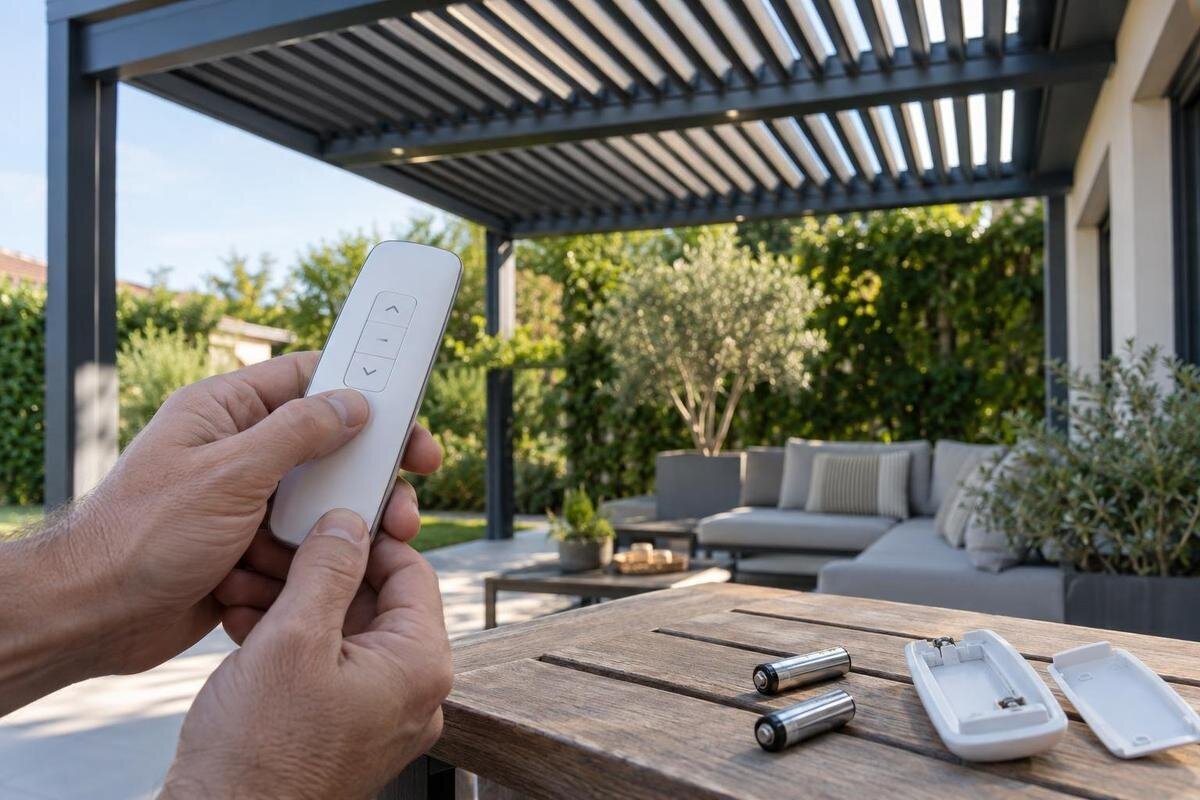
Only check the battery if its compartment is intended for routine user access and the remote manual shows how to open it. Read the battery designation and polarity marks on the handset or in its own manual; use the specified type instead of guessing from the case shape or an online photograph. If it takes more than one cell, follow the maker’s instructions and replace them together rather than mixing old and new batteries. Fit the battery gently and make sure the cover closes as intended. If it will not seat or the cover resists, stop rather than forcing the compartment. If you are unsure whether a previously fitted cell is correct, trust the marking or manual instead.
If you need a replacement handset for a Bloomcabin Pergola, ask for its battery specification and whether a battery is included, rather than reusing the old handset’s cell automatically. For the existing remote, inspect only the outside and the normally accessible battery compartment for cracks, moisture or obvious corrosion. Do not scrape contacts, apply liquid cleaner or solder them. If a cell is leaking, swollen or damaged, do not reuse it or handle residue; follow its maker’s safe-handling and disposal instructions. If contacts look corroded, stop and ask for advice rather than cleaning them. After a correctly specified replacement, note whether any fitted indicator changes. A light on the handset cannot by itself prove that the receiver has accepted a command.
What a light or short range can tell you
Treat a status light as a clue, not a diagnosis. Some remotes have no indicator; on those that do, the light may show only that a button has been pressed or that the handset has local power. It does not necessarily confirm that a signal reached the pergola, that the receiver recognises the handset or that the control system has power. Compare what you see with the exact remote manual instead of interpreting a flash, colour or timing from a guide for another brand. Record which button was pressed and what the indicator did, if a brief test is permitted. If the manual defines a light sequence, note it exactly rather than assigning your own meaning.
Range changes help describe the fault without naming it. Note whether the remote works only from unusually close by, whether the symptom varies by location or whether it began after a change in the surroundings. Do not assume the system uses infrared, radio or a particular line-of-sight arrangement, and do not add an antenna, cover a sensor or reposition equipment. If you are considering a Bloomcabin Bioclimatic Aluminum Pergola, ask how any supplied remote is intended to be used and what conditions apply to its documented range. For an existing installation, keep any permitted comparison at the same safe location and distance, and do not climb or lean towards the receiver to test range.
Compare another control only if one is fitted
If a wall control, app or second handset is already installed, use it only when the owner’s manual describes it and it is safe to operate the pergola. Make sure people, furniture and other objects are clear of moving parts, then observe whether the permitted control produces the expected response. Do not install an app, borrow an unverified remote or press combinations just to create a comparison. Not every installation has a second control, and a manual that describes one does not prove it was fitted to your structure. If the instructions do not explain its use, leave this check to the installer.
If the alternate control works while the handset does not, the issue may be with the handset, battery, registration or signal path; the observation still does not prove which part has failed. If no control works, a shared control, power supply, safety condition or mechanism may be involved. When enquiring about controls for a wall-mounted Bloomcabin Lean-To Pergola, distinguish between replacing an existing handset and adding another way to operate the system. Ask which options are approved and whether installation or configuration is required. For fault reporting, record which controls are already present and what each does. Avoid ordering a receiver solely because one remote does not operate the pergola.

Pairing depends on the exact controller
Pairing instructions belong to a particular transmitter and receiver, not to pergolas in general. Find the manual that names the exact handset and controller, then confirm that it applies to the installed revision before following any owner-level procedure. A similar case, button layout or product-family name is not enough to confirm compatibility. When requesting instructions for a Bloomcabin Pergola control system, ask the supplier to confirm whether the equipment originally supplied is still fitted, particularly if a handset or receiver has previously been replaced. A manual from the original handover pack may not cover a later replacement. No controller manual has been supplied for this article, so it deliberately gives no button presses, hold times or reset sequence.
Do not try a reset or button-hold sequence from a generic video. On some systems, a reset can affect saved handset registrations or operating settings; the result depends on the fitted controller. Check the manual for prerequisites, warnings and consequences before starting any approved procedure, and keep others clear if a test may move the pergola. If the correct instructions are missing, send the control markings and order details to the installer or seller and ask for the matching manual and owner procedure. If the procedure requires access inside an enclosure or entry to a service mode, leave it to a qualified professional.
Check only accessible power indications
At owner level, look only for indications accessible without removing covers: a display or light identified in the manual, a known user-operated switch, or a power interruption you already know about. Operate a switch only as the installation instructions describe. Do not test terminals, probe wiring, open a control box or repeatedly switch the supply off and on. A dark indicator is not proof that mains power is absent; some systems have no visible status light, and a blank display can have more than one cause. Note what you can see without opening equipment rather than deciding that the controller is dead. If there is no documented user control, do not try to find one by trial and error.
Tell the service team whether the fault affects one handset or every approved control and whether any accessible status display changes. For a service enquiry about a Bloomcabin Bioclimatic Aluminum Pergola installation, include any installation or commissioning record alongside the order details; it may help the technician establish how the control equipment was supplied and set up. If a breaker or protective device has tripped, do not keep resetting it to see whether the remote returns. If there is a burning smell, visible damage, water at electrical equipment or unusual heat, stop using the system and contact a qualified professional. Electrical fault-finding is not a remote-control owner check, and a responsive handset does not rule out a separate supply problem.
When a command does not produce movement
A command that appears to be accepted without movement can point beyond the handset. Some systems have interlocks, weather sensors, travel limits or obstruction responses, but the arrangement differs and the relevant manual must say what applies to yours. From a safe position, look for an obvious obstruction or a status message; do not reach between moving parts, push a louvre or screen by hand, defeat a sensor, or repeat commands against resistance. Follow a safe owner check only if the exact manual explicitly provides one. Otherwise, leave the mechanism untouched and record what you observed.
Describe the response precisely: whether there is a click or other sound, whether movement starts and stops at the same point, or whether nothing happens at all. These observations help a technician distinguish a handset symptom from a possible controller, supply, interlock or mechanical issue, but they are not a diagnosis. When arranging service for a Bloomcabin Lean-To Pergola, state which fitted function fails and whether any others still respond. This helps define the scope of the enquiry without assuming that every accessory shares one controller or that the whole structure needs replacement. Stop testing if movement is uneven, noisy, jerky or unpredictable, and keep people clear until the system has been assessed.
Electrical and internal repairs are service work
Some checks cross the line from owner troubleshooting into service work. Opening a receiver, checking internal fuses or terminals, reconnecting wires, testing a motor with separate power, changing a travel limit or bypassing an interlock can expose live parts or cause unexpected movement. These actions may also change settings or the evidence a technician needs. Do not attempt them because a remote has stopped working, and do not assume that a generic wiring diagram applies to your controller. A qualified installer or service professional should use documentation that matches the actual equipment and follow its product-specific service requirements.
Stop and seek help if the handset is cracked or wet, cable or enclosure damage is visible, a protective device trips again, the structure moves unpredictably, or the manual does not clearly describe a check as owner-permitted. Keep clear of a pergola that cannot be controlled safely; do not restrain or force it. If the fault began after installation or service, tell the person who carried out that work and avoid further adjustments. If you are unsure how to keep people away from a system that moves unpredictably, ask the installer for guidance rather than improvising a restraint. The aim is to provide a reliable symptom record without adding another risk.
Give support enough detail to identify the system
A concise service request can prevent the wrong manual or spare part being suggested. Give the full product name from the order, any accessible serial or label details, and the make and model codes printed on the handset or controller documents. Include the manual title or version if shown, the battery type and when it was changed, whether a handset indicator responds, which buttons fail, and whether another approved control works. Describe what the pergola did rather than naming a failed part. Photograph labels only if they can be reached without removing a cover or climbing; film a brief test only from a safe distance and when the manual permits it.
Ask for the exact controller manual and the owner checks that apply if you do not have them. If you used the Bloomcabin Pergola model page to locate the product, also provide your order reference: the service team needs to distinguish your supplied installation from the current catalogue listing. Say whether the fault is constant or intermittent and mention any recent power interruption, cleaning or repair. Separate checks already completed from questions you still need answered, so support does not mistake a proposed battery change or pairing attempt for something you have done. Keep the reply with your equipment documents, particularly if it identifies a manual revision or replacement part reference.
Confirm compatibility before ordering a replacement
Replacing a handset is sensible only after compatibility has been confirmed. Remotes that look alike may use different control systems, and a handset described as universal may still be unsuitable for a particular receiver. Ask support to verify the exact reference and whether the replacement needs a model-specific procedure. If the receiver, power supply, safety state or mechanism is implicated, a new handset alone may not address the fault. Do not order by appearance, product name alone or a photograph of the buttons; compare the actual code on the equipment documentation and ask what information is still needed.
Treat an upgrade as a separate compatibility question, not a shortcut around diagnosis. Confirm that the proposed unit is approved for the existing controller, which manual covers any configuration, and who is qualified to install or commission it. Keep the original handset and documents until the installer has confirmed the new arrangement, so there is a clear record of what was supplied and which controls are in use. Ask what happens to any existing remotes and what instructions other users will need. A reliable decision rests on the installed controller’s identity and observed symptoms, not on a generic remote or an online pairing trick.
Frequently asked questions
How can I tell whether the remote needs pairing?
A light on the handset, if it has one, does not confirm that the receiver recognises it. Note the symptoms and check the exact remote and controller manuals. Only use a pairing procedure that those instructions identify for your equipment; there is no universal sequence.
Will a universal pergola remote work?
Do not assume so. Similar-looking handsets may use different control systems, and a remote described as universal may not be compatible with your receiver. Ask the supplier to confirm the exact reference against the fitted controller before buying.
Should I reset the receiver?
Only if the exact controller manual describes a reset as an owner-permitted procedure and explains its effects. A reset may affect saved controls or settings on some systems. If you cannot confirm the correct instructions, do not try a generic button sequence.
What if the remote works only from close by?
That is a useful symptom, but it does not identify the cause. Check the specified battery and use any range check in the exact manual. Compare from the same safe position, and do not alter an antenna, receiver or other equipment.
Can I check the power supply myself?
Limit checks to visible indications and user-operated controls that the installation manual describes. Do not open an enclosure, test wiring or repeatedly reset a tripped protective device. Ask a qualified professional to investigate electrical faults.
A handset with no visible response, one that appears active but produces no movement, and a system that ignores every documented control are different observations, even though none alone names the fault. Check only a normally accessible battery, compare documented controls safely, and leave pairing, supply and mechanism checks to the exact manual or qualified service. The most useful result of owner checks is a clear record—not a guessed diagnosis or a reset that changes the system.
