
Ways to Monitor a Greenhouse Without Home Wi-Fi
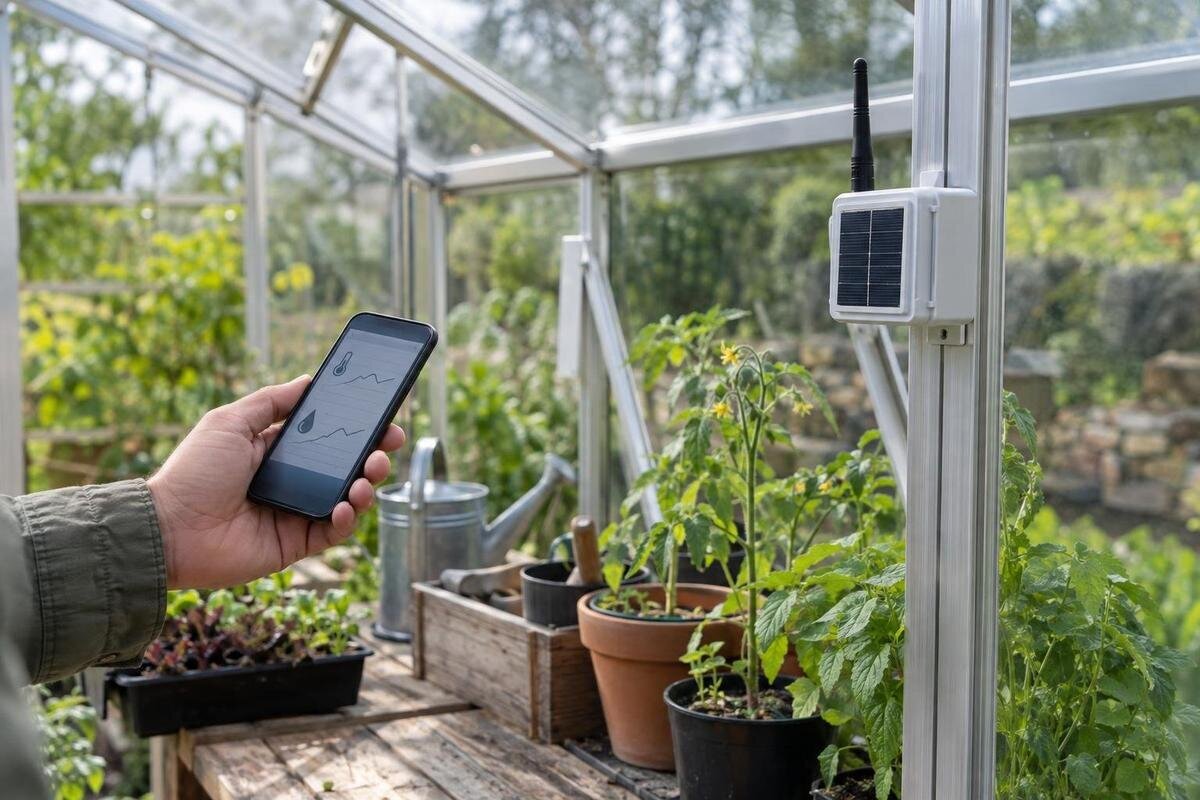
Greenhouse monitoring
A greenhouse beyond the reach of your home Wi-Fi can still provide useful records and, in some cases, alerts. A standalone logger can save readings for your next visit; cellular equipment can use a mobile network; and a long-range radio link can carry readings to a receiver elsewhere on the property. These options differ in coverage, ongoing costs and sensor compatibility. Choose by tracing the route from measurement to the person who needs to see it, then check that route at the greenhouse itself.
Before you choose a monitor 1
Decide whether you need a log, an alert or control
First decide what question the monitor must answer. A temperature and relative-humidity log can show what happened between visits; an alert can report that a reading crossed a chosen limit while you are away; an automated controller may operate equipment. These jobs can be combined, but they are not interchangeable. A logger does not necessarily send an alert, and a device that sends a message does not necessarily open a vent or start irrigation. A record you review each morning calls for different access than a warning someone must receive promptly. Name who would respond before paying for remote notifications.
Set the acceptable delay and record gap as well. A schedule that helps compare gradual changes may miss a brief event, while more frequent sampling can use more memory or power on some devices. Check the logger's documented intervals and capacity rather than assuming continuous recording. Sketch growing zones before choosing sensor count. The Spacious Greenhouse is listed in configurations from 47 to 70 m², but that area alone cannot tell you how many readings are useful. Internal layout, crop needs, openings and the risk you want to watch all affect the plan; treat footprint as context, not a sensor specification.
Sensor locations and connection paths
Choose measurements according to decisions you can make. Air temperature and relative humidity answer different questions from soil moisture or light; add a measurement only if it will be useful to you and a compatible sensor is available. A probe beside a vent, sunlit panel, watering line or heater may register a local condition rather than the conditions across the growing area. Decide what each sensor is meant to represent, place and label it accordingly, and avoid treating one point as a whole-greenhouse average without a reason. For crop-specific limits, use guidance appropriate to what you grow instead of adopting a generic alarm value.
On a sketch, mark the greenhouse outline, growing areas, doors, vents, planned sensor positions and the place where you will read the result. Include the route between a sensor and any receiver or gateway, along with nearby buildings, terrain and vegetation. The Classic Aluminum Greenhouse is listed in size options from 3.77 to 28.08 m²; use the actual footprint and internal arrangement you are planning, not the model name or total area, to place readings. Label each channel by location so that later graphs remain meaningful, particularly if you move a probe or add another one.
Before you choose a monitor 2
Standalone loggers for local records
An offline logger records measurements on the device rather than relying on home internet. It can suit a greenhouse you visit regularly if you mainly want to review conditions afterwards. Before buying, confirm that recording continues without an account or network connection, which sampling intervals are available and how much history the memory can hold. Check what happens when that memory fills: older readings might be overwritten, or recording might stop. Find out how you retrieve the data, whether from a screen, cable or app, and whether you can export it if you want to compare longer periods.
Local records do not automatically become remote alerts. A screen or saved file is useful only if you can access it during your normal visits and understand which sensor produced each reading. If you are planning a lean-to greenhouse, mark where you would check the logger alongside the growing areas and access route. Its listed options range from 3.69 to 14.34 m²; choose a position within your planned layout where checking readings will fit your routine. Also confirm how the device keeps time and what happens to the log if its power is interrupted. Those details determine whether an offline record will still be useful when you return.
Cellular monitoring for off-site alerts
A cellular monitor uses a mobile network rather than your home Wi-Fi to send readings or alerts. It may be an option when you need to know about conditions while away, but the deciding factor is service at the device or gateway location. A phone showing reception at the house is only an initial clue, not proof that a monitor will connect in the greenhouse. Check which carrier and network the device supports, whether it needs a SIM or eSIM, and whether the available service includes the data or messaging needed for its alerts.
Clarify the full arrangement before committing: some systems may require an ongoing plan or account, and the app, alert method and fees can differ. Ask whether readings are stored during a service outage, whether missed alerts are retried, and how the device shows that it has gone offline. If you are considering the Limited Edition Aluminum Greenhouse, mark the proposed monitor or gateway position on your site plan so you can test reception there before choosing a service. Record which equipment, carrier and position you tested; a result from another part of the property does not answer the same question. Confirm the plan's recurring costs, terms and cancellation process. Separate the functions you need—viewing current readings, reviewing history and receiving alerts—and ask which remain available without a subscription. This makes it easier to compare systems whose advertised packages include different services.

Before you choose a monitor 3
Long-range radio links to a receiver
A long-range system usually sends readings from a sensor to a separate receiver or gateway. That link may operate without home Wi-Fi at the greenhouse, and a nearby receiver may let you view readings locally. Remote notifications are a separate question: if the receiver has no internet or cellular connection, it may not be able to pass information on to you when you are away. Systems vary, so trace the route from sensor to receiver and onward to your phone before assuming that a long-range label means remote access.
Treat advertised range as a starting point, not a guarantee for your property. Distance, terrain, vegetation, nearby structures and the materials between devices can affect the route, with results varying by system. For a layout with corners or separate areas, draw the actual positions: the T-Model Orangery Greenhouse is listed from 16.52 to 30 m², but its total area cannot tell you whether a sensor will reach a receiver. Ask the manufacturer what components are required, test the intended positions and confirm how the system signals a lost sensor connection.
Bluetooth and local displays have limits
Bluetooth can be convenient for checking readings when you are near the sensor, but a nearby phone connection is not the same as a continuous off-site alert service. Find out whether you must open an app and connect in person to see the data, or whether a separate device relays it. A dedicated display may show local readings without Wi-Fi, but it does not necessarily send them beyond its own range. Terms such as wireless or smart do not, by themselves, explain where you can view readings or what happens when you leave.
Ask for the exact connection path and what each component does. When planning a Pyramid Greenhouse, include where you expect to view readings: beside the growing area, at the house or on your phone while away. Then confirm whether the sensor connects directly to a display, a phone, a gateway or a cloud service. These arrangements are not interchangeable. For local access, ask whether the latest reading appears automatically or whether you need to connect and download it during each visit. Also check whether the screen shows when a reading was taken, so you can distinguish a current measurement from an older one. If you want a message while away, verify every step between sensor and phone. A clear description should identify which device forwards the reading, what connection it uses and how you will know if that connection stops working.
Before you choose a monitor 4
Check sensor and platform compatibility
Match the sensor to the recorder or gateway by its exact model and supported connection method, not just by the measurement it takes. Check which readings the device accepts, how many sensor channels it supports, whether probes are included or optional, and any stated limits for a wired probe. Confirm that the system records the units and intervals you need. A device described simply as a temperature sensor may still use a connection or format that another recorder cannot interpret.
Also check app, account and data requirements: can you see readings without internet, export a file or keep access if you stop a paid plan? If you are comparing a Limited-Edition Aluminum Greenhouse with Built-In Storage, keep the greenhouse layout and the monitoring equipment list together, but record their specifications separately. For each planned measuring point, list the exact sensor, the recorder or gateway it connects to, and the label you want to see in the app. This gives you a practical way to check that all proposed components work together before ordering them. Ask whether adding a sensor later requires another receiver, a different plan or a change to the software. If you already own equipment, identify its model rather than assuming a newer sensor from the same brand will work with it. Confirm compatibility and data access in the monitoring equipment's documentation.
Plan for power failures and missing data
Check how each sensor, receiver and gateway is powered, and what the system does when power runs low or stops. A battery-powered logger may continue recording independently, but confirm its documented battery life and whether it warns you before power runs out. A gateway that relays remote alerts has its own power needs; a working sensor does not help if the receiver is offline. Follow the manufacturer's power requirements, and have fixed electrical work assessed by a qualified professional if the chosen equipment needs it.
Make a short failure plan for a dead sensor, full memory, lost radio link, unavailable cellular service and gateway outage. For each, note what indicator or notification you will see, whether readings are retained and what manual check you can make instead. If the Prestige Greenhouse with Metal Base is on your shortlist, add the monitoring components to your layout plan and identify how each would receive power. Keep battery checks and any required gateway checks in your regular greenhouse routine rather than waiting for a missing reading. After an interruption, check that the sensor labels, clock and recording schedule are still correct before treating the new readings as a continuation of the previous log. Record the start and end of any known gap, along with its cause if you know it, so you do not mistake missing data for stable conditions.
Before you choose a monitor 5
Test coverage and alert delivery on site
Test the complete setup at the intended sensor and receiver positions before relying on it. Use the manufacturer's setup or test procedure to check that readings arrive, that every sensor is identified correctly and that the display or app shows a lost connection when appropriate. If the system depends on cellular service or a radio link, test that link at the greenhouse, not only at the house. Repeat checks after moving a gateway, adding a sensor or changing the layout, because each change can affect the route you are depending on.
Test notification delivery separately from data recording. Use the system's test function, if available, and confirm that the intended phone or account receives a clear message. Check that the message identifies the sensor and the condition that triggered it; a warning is less useful if you cannot tell which growing area needs attention. Choose alert limits and any delay according to the crop, the conditions you are watching and the sensor's documented capabilities; there is no single value that suits every greenhouse. Avoid a setup that sends so many routine messages that important ones are easy to miss. Decide who will act, how they will verify a reading and who can respond if the intended recipient is unavailable.
Compare costs with the response plan
Compare the complete cost of keeping the system useful, not just the initial monitor. Include the required sensors, receiver or gateway, any cellular plan or platform subscription, replacement batteries and any fees for data access or additional users. Check whether a recurring charge is optional or essential to the functions you want. Compare packages using the same number of measuring points and the same access requirements, rather than comparing a basic logger with a complete remote-alert system on purchase price alone. Ask what happens to stored readings and alerts if you cancel a service, change phones or lose an account. Prices and terms depend on the specific equipment and service, so verify them before choosing rather than assuming that every connected monitor has the same costs.
Then match the arrangement to your routine. If you mainly need a history and can check it on visits, a standalone logger may cover the requirement. If someone needs notice while away and cellular service is confirmed on site, a cellular option may be worth comparing. Where local cellular service is unavailable, a long-range link may help only if its receiver has a workable route for remote access; otherwise, plan on local checks. The useful choice is the one whose coverage, data and response steps you can confirm—not the one with the longest range claim.
Frequently asked questions
Can a greenhouse monitor work without Wi-Fi?
Yes. A standalone logger can save readings locally, while a cellular monitor can use mobile service. A separate long-range radio link may send readings to a receiver on the property. The method determines whether you can view readings remotely and what happens when a connection is lost.
Will a cellular monitor work where my home Wi-Fi does not reach?
It can, if the monitor supports a cellular network that has service at the greenhouse. Home Wi-Fi coverage and cellular coverage are separate. Check the required carrier, plan and device compatibility, then test the monitor at its intended location.
Does a long-range sensor link need internet?
Not always for readings sent from a sensor to a nearby receiver. Remote access or notifications need a further route from that receiver, such as an internet connection or cellular service. Check the system's complete connection path rather than relying on the phrase long-range.
Can I use sensors from one brand with another recorder?
Only if the recorder's documentation confirms compatibility with the exact sensor model and connection method. Similar sensor descriptions do not guarantee that devices can communicate or interpret readings correctly. Also check supported channels, software and data access.
Will an offline logger send an alert when it reconnects?
Do not assume so. Some equipment may store readings locally, but that does not mean it queues or sends missed alerts later. Confirm how the specific device handles lost connections, full memory and restored service, and plan for in-person checks if needed.
The practical choice depends on what you need to know and how soon someone must respond. Standalone logging can preserve a history without remote service; cellular alerts depend on coverage and a compatible plan; long-range links depend on the route to a receiver and, for remote access, whatever connects that receiver onward. Confirm sensor compatibility, test the complete path on site and plan for outages. With those details settled, a greenhouse can provide useful monitoring even when home Wi-Fi does not reach it.
