
Can Soil-Moisture Sensors Improve Greenhouse Watering?
Greenhouse watering
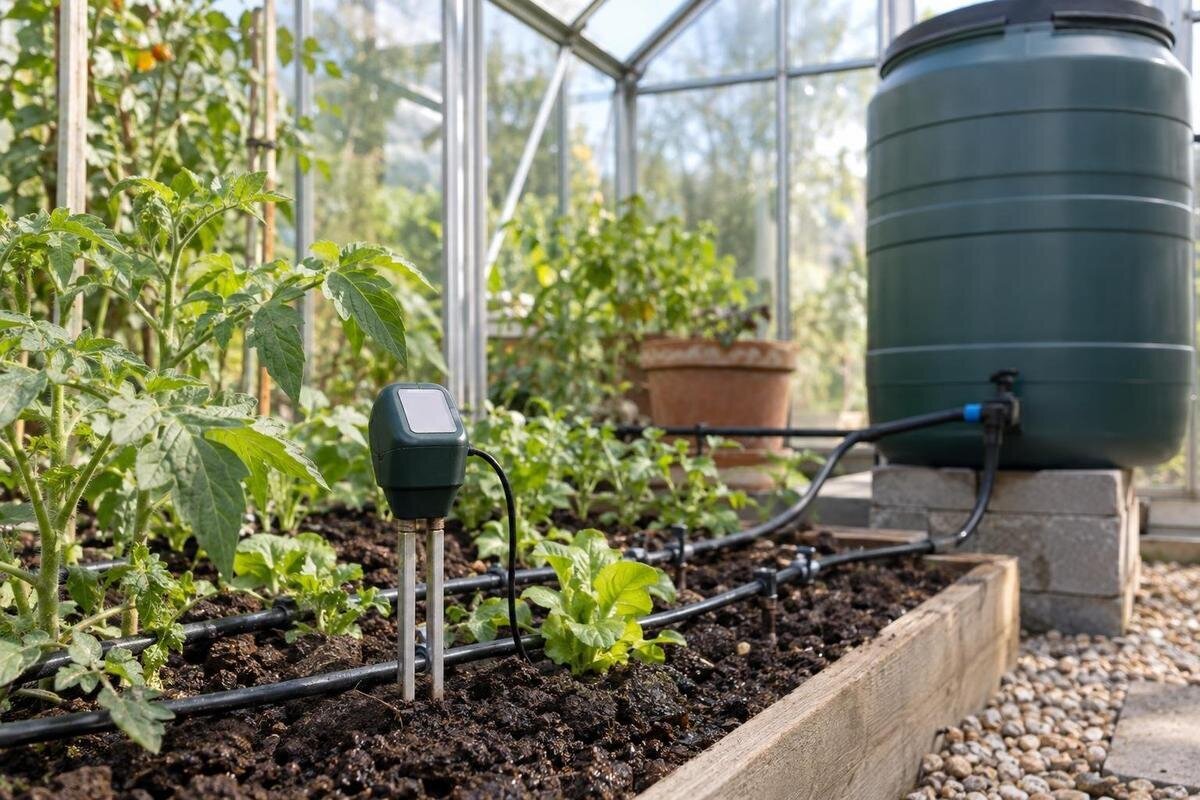
Greenhouse watering is difficult to judge by looking at the surface: one bed can be drying while a nearby pot stays wet, and warmth can change how quickly plants use water. A soil-moisture sensor gives you a repeatable observation from a chosen point. That can help with timing and spotting changes, but it is not a universal “water now” signal. Its value depends on where it sits, the medium it measures and whether the reading matches what you find in the root zone. The practical question is not simply whether to install a sensor; it is whether its reading represents the crops you intend to water.
01
What a moisture sensor measures
A soil-moisture sensor reports a condition around its sensing element, not how every plant in the greenhouse is faring. Depending on its design, the display may show volumetric water content, soil-water tension or a relative scale. These are different measurements, and the direction and meaning of the numbers can differ. A value from one sensor cannot automatically be compared with another. Check the units, measurement principle and manufacturer’s guidance for growing media before setting a threshold. A percentage is not self-explanatory without knowing the material and calibration behind it.
A sensor is most useful for tracking changes at the same place: the reading after usual irrigation, its gradual change as the medium dries, or an unexpected shift from one day to the next. It does not measure how much water the system delivered, confirm distribution across an entire bed or identify why a plant looks stressed. The data can replace guesswork with an observation, but it cannot supply a universal moment to water. Compare it with the crop, medium and physical checks, especially before letting a controller act. A useful threshold is one tested under the conditions the sensor is meant to represent.
Map root zones before choosing a sensor
Before choosing a sensor, sketch the greenhouse as it is actually planted. Mark soil beds, containers, crop groups, growing media, irrigation circuits and places that warm or dry at different rates. Note which areas share a watering schedule and which do not. This simple map separates one consistent watering zone from several conditions that only happen to sit under the same roof. It also prevents an easy mistake: buying a probe first and later discovering that it monitors a convenient spot rather than the crops you need to water. Even a hand-drawn map with zone names and probe locations gives you a useful reference when the planting changes.
If you’re comparing enclosure sizes, the Classic aluminum greenhouse listings show options from 3.77 m² to 28.08 m². Use that floor-area range as a starting point for a planting layout, rather than treating it as a bed plan. Trace the proposed beds and containers onto your sketch, then mark where irrigation lines serve different crops. Keep the layout and sensor locations together so you can see which plants each reading represents. When planting changes, update the map before deciding whether a probe should stay in its original position.
02
Set monitoring points by watering zone
A probe speaks for the small area around its sensing element. A reading from the centre of a bed can miss a dry edge; one beside an emitter can report a local wet patch while containers elsewhere are drying. A single sensor can be useful for a reasonably uniform zone with one routine, but there is no standard sensor count per greenhouse. Ask which watering decision each reading will inform, then distinguish crop groups, media, irrigation circuits and exposure where these differences affect moisture. A second point can help you test whether the first location is representative before you commit to automated control.
The lean-to greenhouse range is listed from 3.69 m² to 14.34 m². Within your chosen footprint, count watering zones according to the growing medium and irrigation routine: a compact structure may contain separate conditions, while a larger one may have a uniform bed. For each zone, identify whether you need a reading for manual decisions or an input for automatic control. Before buying a multi-channel controller, check how many independent sensor inputs it accepts and whether each can control the intended irrigation zone. An input that cannot control a zone may still be useful for monitoring.
Match the sensor to the growing medium
Growing medium matters as much as the sensor. Mineral soil, potting mixes and other soilless media hold water differently, and not every probe is calibrated or validated for all of them. Some electrical sensing methods can also respond to temperature or dissolved salts; sensor designs differ, so check the model’s stated limits rather than assuming every reading behaves alike. Confirm whether it reports a moisture percentage, tension or relative index, whether a medium setting is required, and whether the manufacturer permits user calibration. A probe intended for garden soil may be a poor guide in a loose container mix unless its instructions say otherwise.
Choose the device to suit the task. For manual watering, a stable display and readable units may be sufficient; for automation, also verify that the controller accepts the sensor’s output and has the inputs you need. Check connection type, stated operating environment and any requirements for probe orientation or maintenance in the manuals. If you’re also comparing structures, the Limited Edition aluminum greenhouse listings cover footprints from 3.77 m² to 28.08 m². Treat the enclosure and sensing equipment as separate purchases: don’t assume a greenhouse model includes, or is compatible with, a particular sensor or watering controller.
03
Place the probe in the active root zone
Set the probe in the active root zone of the plants it is meant to represent. The right depth and orientation depend on the crop, bed or container, sensor design and manufacturer’s instructions; there is no single depth suitable for every greenhouse. A probe too near the surface may reflect rapid drying there, while one far below active roots can report conditions the crop does not experience. In a container, the pot’s shape and fill depth matter; in a bed, confirm that the probe reaches the depth you want to monitor. Install it with the contact the instructions require, without forcing it through roots or stones.
Position the probe within the area irrigation is intended to wet, rather than at a bed edge or directly in a concentrated water stream. The wettest point can make a dry zone look adequately watered; a dry gap outside the wetted area can do the reverse. When planning a layout for the T-shaped orangery greenhouse listing, which spans 16.52 m² to 30 m², mark the proposed probe positions alongside the beds and irrigation lines. Confirm those positions against the actual wetting pattern once the beds are in use. Mark each installed position so routine cultivation or moving a pot does not change the monitoring point.
Verify calibration under normal watering
Calibration is specific to the sensor. Some probes arrive factory-set; others ask you to select a soil type, apply an offset or carry out a stated procedure. An offset is not automatically a calibration, and a method intended for one measurement principle may not work for another. Follow the manufacturer’s instructions for your growing medium and units, and don’t copy a threshold from a different sensor. If the product provides no user-calibration step, you can still verify how its readings relate to the moisture you observe; call this a cross-check rather than changing its settings. Keep the original settings available so any adjustment can be traced or reversed.
Test the probe in the location and medium where you plan to use it. Record a reading before routine watering, another after water reaches the probe area, then readings as the medium dries under normal conditions. Keep the probe in place and take readings at consistent times; don’t deliberately flood a bed to produce an extreme value. Compare them with a small sample from near the sensing depth and repeat during another ordinary cycle. If you’re planning a growing space from the Pyramid greenhouse range, listed from 5.53 m² to 18.9 m², allow for this testing once your chosen beds or containers are planted.
04
Manual checks at probe depth
A manual cross-check should happen at the same depth and close enough to the probe to describe comparable medium. Take a small sample or inspect carefully without disturbing roots, and note whether its texture and moisture match the sensor’s message. Touch is not a laboratory measurement and will not produce a precise percentage; it can still reveal obvious disagreement, such as a display showing a wet reading when the representative root area feels dry. Check again after normal irrigation and later in the dry-down, rather than judging by the surface alone. A greenhouse can be warm while the root zone remains damp, and visible wilting by itself does not confirm that the soil is dry.
Use mismatches to troubleshoot one factor at a time. If the display stays unchanged, confirm the probe has proper contact and the sensor is reading in the correct units. If it says wet while the sample is dry, check its location and medium setting before increasing water. Also check whether irrigation has reached the whole monitored area. When comparing the limited-edition greenhouses with storage, listed from 5.52 m² to 28.08 m², distinguish the building’s total footprint from its planted zones. Your manual sample and sensor reading should describe the same planted area, not different locations within the enclosure.
Test automation before relying on it
Moisture sensing and irrigation control are separate jobs. A controller may start watering at a setpoint, skip a scheduled cycle or adjust a program, depending on its design. Confirm the controller’s documented behaviour, compatible sensor output, units, thresholds and which irrigation zone each input affects. Ask what it does if a sensor disconnects or sends an implausible value; don’t assume a fault automatically stops watering. A moisture reading also cannot determine how long water must run, because the sensor measures the medium at one point rather than the output of every emitter or the water delivered to every bed. If the documentation is unclear, keep the sensor as a monitor until the control logic is confirmed.
Test the complete setup while you can watch it. Compare its decisions with a manual root-zone check, confirm that the intended area responds, and document any threshold change. Avoid leaving an untested controller to make repeated decisions. Setpoints depend on sensor type, crop and medium, so a number copied from an online chart may be misleading. If you’re considering the Prestige greenhouse listings, spanning 3.77 m² to 28.08 m², use your bed map to identify the irrigation circuits and controller inputs needed within the chosen layout. Check those requirements against the hardware’s stated capacity, and retest whenever you move the probe or change its zone.

05
Use trends to reassess watering
Trends are more useful when you know where and how they were collected. Keep a simple log with the probe location and depth, growing medium, crop group, units, irrigation time and any manual check. Compare readings from the same probe at the same point; don’t mix numbers from sensors with different scales. Note when you replant, change the medium, move a container or reposition the probe, because the old record may no longer describe the same conditions. A notebook or basic digital log is enough if it connects readings to real watering events. Include unexpected readings instead of deleting them; a one-off may reveal a placement or delivery issue worth checking.
Revisit your interpretation as the season changes. Plant size, weather and greenhouse ventilation can alter how quickly the root zone dries, so a threshold that seemed useful at one stage may not suit another. For a layout based on the Spacious Greenhouse listings, with sizes from 47 m² to 70 m², organize records by planted zone rather than combining readings across the entire footprint. Compare beds with the same crop, medium and irrigation routine. This keeps seasonal adjustments grounded in observation rather than an assumption that one setting should stay fixed. Recheck after major changes to the planting layout.
Benefits and limits of moisture sensors
Sensors are most useful when a repeated decision is difficult to make by eye or by schedule, and you can verify what is happening around the roots. A trend may show that one bed dries faster than expected, that watering leaves one zone consistently wetter, or that a calendar routine no longer matches conditions. This can make manual watering more consistent and give a controller better information. The benefit is better timing and earlier detection of mismatches—not a guaranteed reduction in water use or improved growth. A sensor is most useful when it remains in a clearly defined, representative zone.
They are less helpful when probes move without being marked, different soils are treated as one zone, or readings are never checked against the medium. A sensor cannot correct uneven irrigation, a failed controller or a change in crop demand; it can only flag a change at its own location. If a value is confusing, pause automation and follow the manufacturer’s troubleshooting guidance while checking the root zone by hand. When the reading repeatedly agrees with those checks, it can support a decision with more evidence than a calendar alone. Keep manual checks as part of the routine rather than relying on the sensor as the sole safeguard.
Frequently asked questions
Can one moisture sensor control watering across a whole greenhouse?
Only if the crops, growing medium and watering pattern it represents are reasonably consistent—and even then, check conditions elsewhere. A probe measures its own location. Separate zones may need separate readings or manual checks; the layout and controller’s documented capabilities matter more than a universal sensor count.
Does a soil-moisture sensor need calibration?
Not always in the same way. Some devices arrive preset; others require a medium setting or a specific calibration procedure. Follow the manufacturer’s instructions, then compare readings with a sample from probe depth during normal watering and dry-down. Don’t copy a threshold from a different sensor or growing medium.
Where should I place the probe?
Place it in a representative part of the active root zone it is meant to monitor, following the sensor’s instructions. The surface or the spot directly under an emitter may not represent the whole area. Crop rooting depth, container shape, growing medium and the wetting pattern all affect placement.
Can I use the reading to set an automatic irrigation controller?
Yes, after confirming sensor-controller compatibility, the display units, which zone the input controls and what happens if the signal fails. Compare controller decisions with manual root-zone checks before relying on automation. A threshold suitable for one sensor, crop or medium may not suit another.
Why does the sensor show moist conditions when plants look stressed?
A local reading cannot diagnose a plant’s condition. The probe may be in a wetter patch while roots elsewhere are dry, or the stress may have another cause. Inspect the root zone at probe depth, check moisture distribution and confirm the sensor’s placement and settings before changing the watering routine.
Treat sensor installation as a small trial: define the zone it represents, check the medium and units, place it at active roots, then compare its trend with a manual check through ordinary watering. If the readings agree, they can help you tune timing and, later, a controller. If they don’t, the mismatch points to placement, calibration or system questions to resolve before automation.
