
Comparing Built-In, Separate and App-Based Sauna Controls
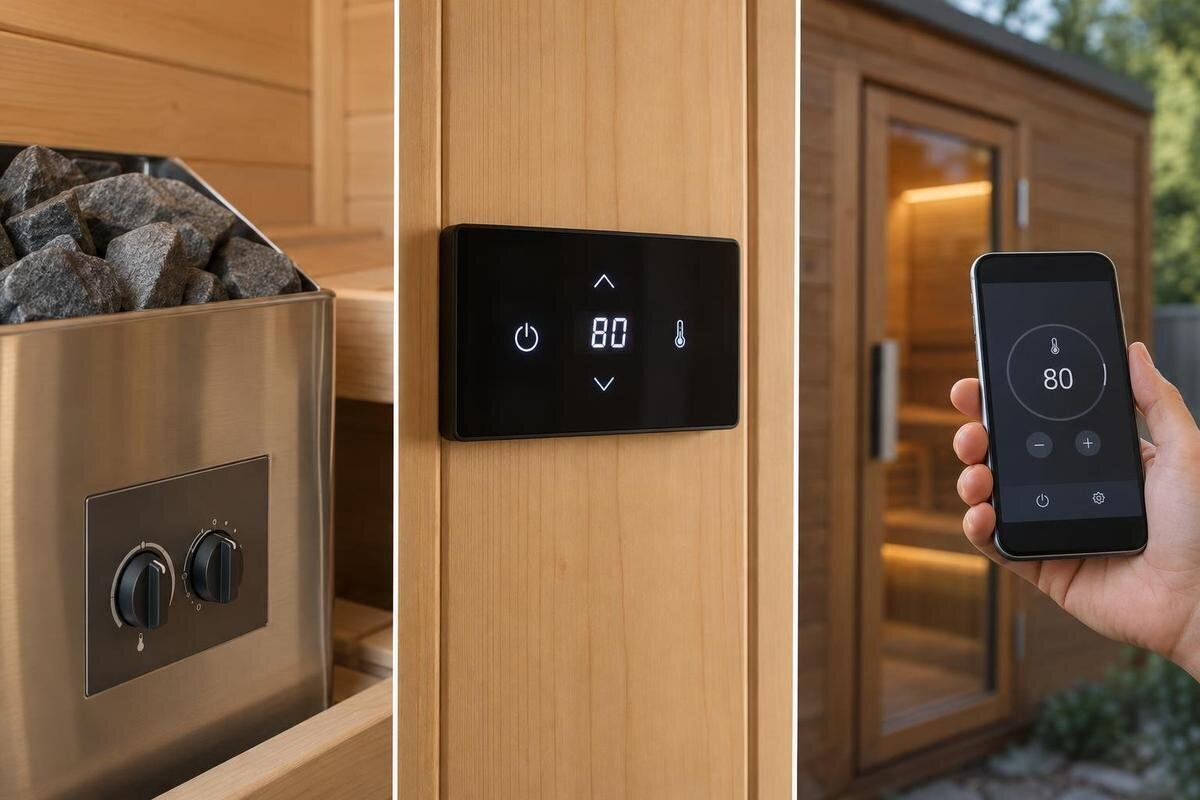
Sauna heater controls
Sauna heater controls change where and how people operate a heating system, but the label alone says little about what is included or compatible. Controls may be built into the heater, provided as a separate panel or offered through an app-compatible system. Compare where you can operate the system, which functions your household needs and whether the exact controller is supported for the exact heater. Treat remote start as a separate question: an app interface does not establish that function or its safety arrangements.
01
What built-in, separate and app-based controls mean
These terms describe how a person operates a heating system, not the complete sauna package. With built-in controls, the operating interface is part of the heater. A separate panel is a distinct interface connected to a compatible control system, with its position governed by the equipment instructions. App-based control uses software on a mobile phone or tablet alongside hardware designed to work with it. The formats are not always exclusive: an app may accompany a physical panel, for example, or local controls may remain available alongside another interface. Ask what each label means in the specific offer rather than treating the names as standard package definitions.
For a useful comparison, list the cabin, heater, control unit and user interface as separate items. Record their exact model names or references, then ask which functions are available in that proposed combination. If you are considering a cabin such as Thermowood Barrel Sauna S-140, use its model name to anchor the enquiry; the cabin name alone does not identify a heater or control system. Broad descriptions such as 'digital control' are not a substitute for an itemised offer and the relevant manual. This distinction helps you avoid comparing a complete control system with an interface that is only one part of another setup.
Built-in controls for operation at the heater
A built-in interface can suit people who want to make adjustments at the heater itself. Using that interface does not require opening an app. The actual design may use dials, buttons or a display, but the word built-in does not tell you which controls or settings are provided. Consider whether the heater's position is convenient for the people who will use it and whether they can read and understand the interface. Check the product drawing and manual for the exact layout rather than relying on a general product description.
The trade-off is access: if the built-in interface is the only one available, routine adjustments mean going to the heater. That may be unimportant if you expect to set it once, but less convenient if users regularly change settings. Think through when you would normally approach the controls: before entering, during use or when switching the system off. Ask whether another interface is included and which functions it can perform; do not assume there is an app or timer. For a cabin such as Thermowood Barrel Sauna HC-150, ask to see the operating controls on the proposed heater. This makes it easier to judge their position and readability rather than choosing built-in controls solely because they sound simpler.
02
Separate control panels and where they can go
A separate panel moves the interaction point away from the heater, which can make it easier to read or adjust the system without going to the unit. Its value depends on the position you want and the functions provided by that specific panel. A separate interface does not automatically offer more settings, a clearer display or better performance than built-in controls. Ask to see the panel itself, or a clear image of its interface, and check how it indicates the selected settings. Also confirm whether the panel is part of the proposed package or an optional component.
Panel position is a product-specific question, not simply a matter of preference. The heater and panel instructions determine the locations allowed for that system, so confirm them before planning the room or installation. Identify the position you would prefer and ask whether it is permitted, rather than accepting a general assurance that the panel can be mounted separately. Ask what connection equipment is required and have installation questions handled by a qualified professional; do not infer wiring or mounting details from a photograph. When discussing Thermowood Barrel Sauna HC-225, for example, ask which separate panel, if any, is supported with the offered heater. Then consider whether its permitted position gives you the convenient operating point you wanted.
App-based control and its practical limits
An app puts an operating interface on a mobile phone or tablet, but the available functions depend on the system behind it. Some systems may show settings or allow adjustments; the app name alone does not establish which functions are supported. Confirm the exact controller and app combination, the connection method, and any requirements for the user's device. Depending on the product, operation may rely on a local connection, an internet connection or other hardware. Check the manufacturer information for the particular system rather than assuming that an app works in the same way across different heaters.
Consider what happens in ordinary situations: a phone is unavailable, an app needs an update, or a different household member wants to operate the sauna. Ask whether there is a physical interface as well and what it can do independently. Separate the functions you would like on your phone from those you want available without it. For example, ask how you would check the current setting or switch the system off using the alternative interface, if one is supplied. App-based control does not automatically mean remote start is available; that function and its safety arrangements are separate questions. If you are considering Thermowood Barrel Sauna N-210, ask which of your preferred app functions the proposed heater and controller support, rather than requesting app control as an undefined extra.
03
Compare the functions you will actually use
Rather than judging a control by its feature list, write down the routine operations that matter to you. These might include switching the heater on or off, selecting and reading a setting, checking a timer, or operating lighting if it is part of the proposed system. These are examples to ask about, not features guaranteed by any control format. For each shortlisted interface, find out which operations it supports, where they are performed and whether they require a separate app or panel. Distinguish entering a setting from reading the system's status: ask what each displayed value or symbol means, rather than assuming every number describes the same thing. If a timer matters to you, ask what it controls and how its status is shown. This gives you a like-for-like comparison without assuming that every heater offers the same functions.
Look at how clearly the interface shows what has been selected and what the system is doing. A menu that makes sense to one person may be confusing to another, so consider the people who will use it rather than only the person choosing the sauna. Ask for a demonstration or clear interface images if available, and compare the same tasks on each option. Notice whether the information you need is visible immediately or requires opening a menu, and whether it is clear that an adjustment has been accepted. When you enquire about Thermowood Barrel Sauna N-250, request a demonstration of the proposed controls using your list of everyday tasks. This is more informative than comparing the number of buttons or advertised features.
Plan control placement around the room
Think about where people will stand when they operate the controls, not just where the heater will sit. A built-in interface is at the heater; a separate panel has its own permitted mounting positions; an app requires the user to operate a phone or tablet. Consider whether the display can be seen from a natural standing position and whether users can reach the intended interface without awkward movement. For an app, check whether the connection works where you expect to use it, if the system depends on a connection in that location. These are practical layout questions, not reasons to assume a particular format is always best.
Confirm placement early enough to use the current cabin plan and the instructions for the exact heater and controller. Sauna conditions can affect where equipment is permitted, so follow the manufacturer's location requirements rather than choosing a position from convenience alone. A qualified installer can address installation requirements for the chosen system. If your enquiry concerns Thermowood Barrel Sauna LC-260, request the relevant plan and identify where you expect to approach and read the controls. Ask how the offered interface would be positioned in relation to that area. This separates two useful questions: whether a position is permitted for the equipment and whether it is comfortable for the intended users. A location needs to satisfy both, rather than merely looking tidy on a plan.
04
Check compatibility for the exact heater and controller
Control compatibility is determined by the equipment combination, not simply by whether a panel or app looks suitable. A system may depend on a particular heater, control unit, interface and other components working together. Requirements can differ between models, so ask for manufacturer confirmation of the exact pairing rather than matching products by appearance or brand name alone. For app-based systems, confirm that the controller and the current app support one another. A cabin's size or name is not a substitute for this information, and a general statement that a product is compatible may not identify the version or configuration being offered.
Before choosing, ask for the exact model references of the heater and controller, a list of any required components, and the functions supported by that combination. Check the instructions for the chosen configuration and pass relevant electrical requirements to a qualified electrician; this article is not a guide to sizing or wiring a system. If you are considering Thermowood Barrel Sauna HCF-300, use that precise cabin name in the enquiry, then confirm the heater and controller proposed for it. Keep the confirmation tied to those exact models so a later change to the equipment does not leave the original answer unclear.
Check what the control package includes
A description of built-in controls does not by itself confirm that a heater is included with a sauna cabin. In the same way, a separate panel may be an included component or an optional one, while app operation may depend on a compatible controller or other equipment. Read the item list for the actual offer, separating the heater, controller, interface and any components needed for the functions you want. If the wording is unclear, ask for a written explanation of what is included and what is optional. This helps distinguish an interface preference from the equipment needed to make it work.
Ask for the controls to be identified by model or part reference in the proposed configuration, not just described as 'panel' or 'app control'. Confirm whether any required hardware is supplied, which functions it enables and whether the stated configuration matches the current manufacturer instructions. If your enquiry is about Thermowood Barrel Sauna LCF-300, for example, ask the seller to state the heater and control components offered with the exact configuration you are considering. The model reference makes the question specific; it does not, on its own, confirm which equipment is included.
05
Consider who will use the controls
The best interface for one household may not suit another. Think about who will usually operate the sauna, whether several people will take turns and whether occasional users can understand the controls without a lengthy explanation. A fixed panel is available at its permitted position; built-in controls are at the heater; an app depends on someone having access to a suitable device and knowing how to use the system. Compare the labels, menus and display with the people who will actually use them. Ask each person to explain how they would find a setting and recognise the system's current status during a demonstration. Differences in familiarity may reveal a confusing label or menu that the main buyer would otherwise overlook. Judge the real interface rather than the product category name.
Also ask what ongoing use involves. For an app, check whether an account is required, how access can be shared and which mobile devices or software versions are supported. Distinguish access for the person who initially sets up the system from access for other regular users. Ask what each person needs to do before they can operate it, and whether a physical interface remains available if a phone is unavailable. For a panel or built-in interface, ask about the manufacturer's support for that exact model and what information is needed if a component later requires attention. Keep its model reference with the operating instructions so users know which guidance applies. These questions do not imply that one format is more reliable; they clarify the practical responsibilities of using each system over time.
Choose by routine, then confirm the configuration
A built-in interface is worth considering if you are content to operate the system at the heater and its location works for your routine. A separate panel may suit you if you want a distinct operating point and the exact system permits it there. An app may be useful if phone-based operation genuinely fits how your household uses the sauna and the proposed equipment supports it. Some configurations may combine interfaces, but an additional option is worthwhile only if you will use it. These are preference-based comparisons, not a ranking: no format is the right answer for every room or user.
Before you decide, put the options side by side using the same questions: where can each interface be used, which daily functions does it provide, who can operate it, and which exact heater and control models are included? Separate essential functions from conveniences you could comfortably do without. If two options meet all your needs, compare the remaining differences in access, readability and shared use rather than treating the longer feature list as the better choice. Check the proposed equipment against current manufacturer documentation and the item list. If a demonstration is available, make sure it represents the same system you are being offered. The decision then rests on practical operation and a confirmed equipment pairing, rather than a feature name that may mean something different from one package to another.
Frequently asked questions
Does a built-in control mean the heater is included with the sauna?
No. Built-in describes where the operating interface is, not which equipment comes with a cabin. Check the offer for the exact heater and control components, and ask which items are included in the configuration you are considering.
Can a separate control panel be mounted inside the sauna?
That depends on the specific panel and heater. Their instructions set out permitted locations, so do not assume a panel can go inside or outside. Confirm the allowed position for the exact system with its manufacturer or installer.
Does app-based control automatically allow remote start?
No. An app may provide some control functions without offering remote start. Check the functions of the exact system; any remote-start feature needs a separate assessment of its safety arrangements.
Can I use any app with any sauna heater?
No. App operation depends on a compatible heater, controller and app combination, and sometimes other system requirements. Ask for confirmation for the exact models and check the current manufacturer documentation.
Which control format is easiest to use?
There is no single answer for every household. Compare where each interface can be used, how clearly it presents the functions you need, and whether the people who will use the sauna find it straightforward.
The practical difference is where the interaction happens: at the heater, at a separate panel or on a mobile device. Choose the arrangement that suits the people using the sauna and the way they expect to operate it. Then make sure that exact interface appears in the confirmed heater and control configuration. This keeps a preference for a panel or app from being mistaken for proof that the required equipment is included.
