
How Greenhouse Monitoring Works Without Home Wi-Fi
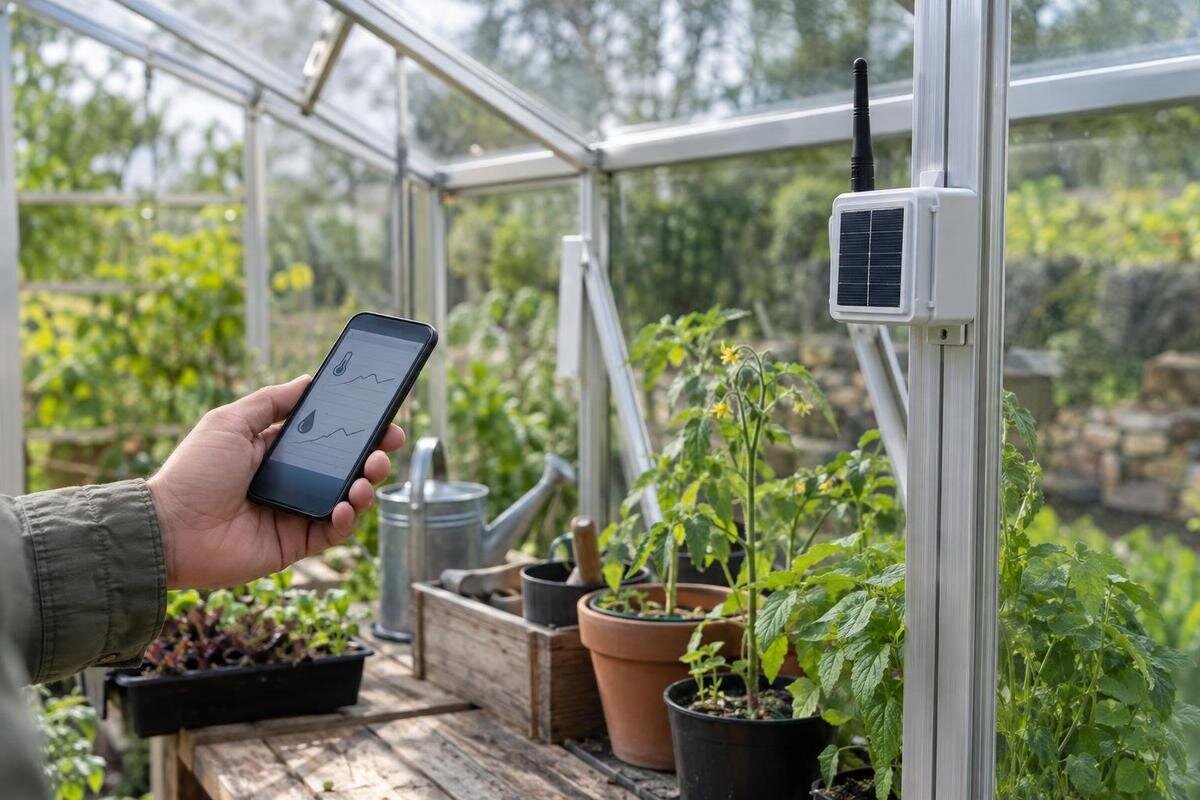
Greenhouse monitoring
A greenhouse can be monitored even when the home router does not reach it, but ‘without Wi-Fi’ can describe several different arrangements. A standalone logger may keep readings for later; a cellular device may send updates over a mobile network; and a long-range sensor link may carry data to a gateway that still needs its own route to the internet for remote alerts. The useful choice depends on whether you need a record, a warning while away, or both. Map the site and the readings that would change what you do, then compare coverage, sensor compatibility and ongoing fees.
Questions to ask before choosing 1
What monitoring without Wi-Fi can mean
Without home Wi-Fi, distinguish three jobs: collecting a reading, showing it nearby and delivering it somewhere else. A standalone logger can record and retain readings without a network if it has onboard memory and power. A local radio link can carry sensor data to a nearby screen or gateway. A remote dashboard or alert needs another route, commonly fixed internet or a mobile network, depending on the system. The word wireless does not tell you which job a device performs. Check whether its description covers local recording, off-site access or both, and which equipment makes each part work.
It helps to draw the connection as a chain: sensor, logger or gateway, connection beyond the greenhouse, then phone or computer. If a link fails, the point where information stops matters. A phone paired with a device while you are beside the greenhouse may show readings there but cannot necessarily reach it from home. A radio link between sensor and gateway may work without internet, while remote access still depends on another connection. Be clear whether the problem is weak router coverage at the greenhouse, no internet at the property, or a preference for keeping records offline; each points to a different setup.
Choose between a record and a remote alert
Begin with the decision you want the information to support. If you mainly want to understand how conditions change between visits, a logger that stores readings for later review may be enough. If you need to know about a threshold being crossed while you are away, you need a working route for an alert to reach you. If both matter, look for a system that explicitly supports local recording as well as remote access. Do not assume that buying a sensor automatically provides a display, stored history, notifications or every sensor type you might later want.
Write down what would prompt action, how quickly someone could respond and who would receive the message. A notification is useful only if it reaches a person who can check the greenhouse; it is not a guarantee that a problem will be detected or resolved. Monitoring also does not control a vent, watering system or other equipment unless a separate, compatible control function is specified. A brief record of the checks and tasks you already carry out can help establish whether a historic log, a prompt alert or both would genuinely change your routine.
Questions to ask before choosing 2
Standalone data loggers keep records locally
A standalone data logger records readings in its own memory, so collection need not depend on a router or mobile signal. Depending on the model, you may read the data on a built-in display, connect while on site, or download it later by a supported method. These are different features: a logger can have a record without offering convenient remote viewing. Check what happens when it loses power, whether its clock continues to mark readings correctly, and how you can access the stored information without a cloud account or connection, if offline access matters to you.
Before choosing, ask about the sampling interval, memory capacity and what happens when the memory is full: older readings might be overwritten, or recording might stop, depending on the device. Confirm which sensors it accepts, how many it can support, and whether readings can be exported in a format you can keep. If a Spacious Greenhouse is on your structure shortlist, sketch the intended reading points against the layout you select rather than assuming one logger position can represent every area. A simple, regularly reviewed log is more useful than a large data file that is difficult to retrieve or interpret.
Cellular monitoring depends on signal at the greenhouse
A cellular or mobile-network system may connect directly to the network, or it may use a gateway that receives data from separate sensors and sends it onward. Confirm which component needs the mobile connection and what networks or service providers it supports. Ask whether a SIM or eSIM is included, whether you must arrange service yourself, and which functions depend on an active account. A device that can send a mobile alert still needs compatible sensors, power and a working connection at its actual location.
Check coverage where the monitor or gateway will sit, not just at the house or on a map. A phone test can offer an initial clue, but your phone may use a different network or antenna from the monitoring device. If you are also comparing the Aluminium Greenhouses range, assess the proposed greenhouse site itself rather than extrapolating from a reading taken elsewhere. Ask whether the supplier recommends a device-level test. Check recurring data, message or platform fees before relying on alerts, and consider what the system does when service is temporarily unavailable.
Questions to ask before choosing 3
Long-range radio needs a gateway for remote access
Long-range radio describes a link between components, not necessarily a connection to the internet. A sensor may send readings to a receiver or gateway over a manufacturer-specific radio system. That gateway might display the data locally, store it or pass it on through an additional connection, depending on the equipment. For access away from the greenhouse, ask exactly how the gateway reaches the internet. It may need supported broadband, a wired connection or cellular service; a radio signal from the sensor alone cannot carry an alert all the way to your phone.
Do not treat an advertised radio range as a promise for your site. Distance, the position of the gateway and intervening structures can affect the link, so ask what the manufacturer’s range figure assumes and whether a site test is available. Clarify how many sensors can pair with one gateway, whether repeaters are supported and whether readings are stored during a temporary loss of contact. Even a Wall Greenhouse needs its own radio-path check at the chosen position; the structure name does not establish how well a particular sensor and gateway will communicate.
Sensor compatibility depends on exact specifications
A sensor is compatible only if the rest of the system can use its signal and data. Check the supported measurement type, connection method, radio system or protocol, connector and any required gateway. Two devices from the same brand are not automatically compatible, and a matching description such as temperature sensor may still leave important differences in model, firmware or connection requirements. Also confirm how often readings are updated, whether the system can set alerts for that measurement and whether its display or app presents the data in a form you can use.
When asking a seller or system supplier to confirm compatibility, provide the exact model numbers for the sensor, logger and gateway rather than relying on product names alone. Check whether the selected setup supports all the sensors you plan to use now, as well as any likely additions, without assuming that extra channels or a different sensor can be added later. If a Limited Edition Aluminium Greenhouse is part of your plan, include the selected structure layout in the discussion, but keep greenhouse choice separate from electronic compatibility: only the equipment specifications can confirm the latter.
Questions to ask before choosing 4
Place sensors where their readings are useful
A sensor reports conditions at its own position, not an average for the whole greenhouse. For an air-temperature reading, for example, direct sunlight on the sensor can make the result less representative of the surrounding air. A reading near a door, vent or other local influence may differ from one in the area you are trying to understand. Follow the sensor maker’s placement guidance and decide what each reading is meant to represent. A soil-moisture sensor, if supported, describes the medium around its sensing point rather than every container or bed.
The number of sensors should follow the areas and decisions you want to monitor, not a rule based only on the greenhouse’s name or footprint. Mark proposed positions on a simple plan, label each sensor and note what it measures; this makes it easier to understand a reading later or spot when a sensor has been moved. If a T-Model Orangery Greenhouse is among the options, use the layout you intend to choose when making that plan. Confirm how many devices the gateway supports and whether the system identifies individual sensors clearly in its records.
Plan for power loss and connection gaps
Power and connectivity are separate failure points. A sensor may rely on a battery, while a logger or gateway may have a different power source; network access can fail even when the equipment remains powered. Find out whether local recording continues during a router or mobile-network outage, whether data is sent later, and whether the system marks a gap. A low-battery message is useful only if the device can still send it. Check how the equipment indicates a sensor or gateway that has stopped communicating, rather than assuming that a silent screen means conditions are normal.
Choose a fallback that suits the consequences of missing information. That might mean checking the greenhouse in person on a schedule, keeping a local log or arranging for another person to check it when you are away. Ask what happens after power returns and whether stored data is preserved. If you are planning a Pyramid greenhouse, mark where the sensor and gateway would go and how you would reach them for battery changes or checks. Confirm any powered equipment’s requirements in the maker’s instructions, and have a qualified professional handle electrical work where installation requires it.

Questions to ask before choosing 5
Compare subscriptions, data access and ongoing costs
Compare the full ongoing cost rather than the device alone. Depending on the system, there may be separate costs for sensors, replacement batteries, a SIM or data plan, a cloud service, an app or additional features. Ask whether the charge is recurring, what it covers and whether alerts or historic records depend on keeping the service active. Avoid assuming that a basic account includes the functions you need. Writing each item in one list makes it easier to compare a local logger with a cellular system or a gateway-based setup without inventing a monthly figure before you have a quote.
Check how long records are retained, whether you can download a copy and what happens to access if an account or service is discontinued. If data is stored only online, consider whether that suits your need for a long-term record; if it is stored locally, find out how you will retrieve it and keep a copy. Review the relevant account and data terms before depending on an online history. When budgeting for one of the Limited Edition greenhouses with storage, list monitoring equipment and service charges separately from the structure’s cost so that you can see both the initial outlay and ongoing commitments.
Test the complete alert route before relying on it
Test the whole chain at the greenhouse: confirm that the sensor appears on the logger or gateway, that readings arrive, and that the gateway can send a message to the intended phone or account. Check the alert from outside the home Wi-Fi connection so you know it is genuinely available remotely. Use a manufacturer-provided test function where possible rather than creating an unnecessary change in greenhouse conditions. Verify which channel is used, such as a supported app notification, email or text message, and check that the recipient can recognise the message and knows what it means.
Repeat the test after moving equipment, changing a gateway or altering the connection, and check the history for missing readings and correct timestamps. Ask how the system reports a lost sensor link, a depleted battery or a lost internet connection; these failures are different from the greenhouse crossing an alert threshold. Keep a note of the tested position, sensor models, connection method and recurring charges, together with who should receive each alert. When planning a Prestige greenhouse, use that record to identify which checks must be repeated once the monitoring equipment is in its final position.
Frequently asked questions
Can a greenhouse data logger work without internet?
Yes, if the logger records data in its own memory and has power. Check how long it retains readings, how you retrieve them and whether the data can be downloaded. A logger that saves data locally will not, by itself, send you a remote alert.
Can I receive alerts without home Wi-Fi?
Potentially. A monitoring device with a suitable mobile-network connection, or a gateway with another supported internet connection, can send alerts without using the home router. The relevant signal must work where the equipment is installed, and any required SIM or service plan must be active.
Does a long-range sensor link provide internet access?
No, not on its own. It carries readings between a sensor and a receiver or gateway. To view data away from the greenhouse, that gateway needs a separate connection to the internet, such as a supported mobile-network or wired connection.
Will my phone’s signal confirm that a cellular monitor will work?
It is a useful preliminary check, but not proof. The monitor may use a different network, frequency or antenna from your phone. Check the device’s requirements and test its connection at the intended installation point before relying on it.
Can one sensor represent the whole greenhouse?
It depends on the reading you need and how conditions vary across the space. A sensor reports what is happening at its own position. Follow its placement guidance, consider whether separate zones need separate readings and confirm that the logger or gateway supports the number and type of sensors.
The right setup follows from what you need to know and how quickly someone can act on it. A standalone logger can suit record-keeping, while remote alerts require a working connection beyond the greenhouse; a long-range sensor link may be only one part of that route. Before relying on a system, confirm that its sensors are compatible, check coverage at the actual site, understand its service costs and test what happens when power or connectivity is lost. That leaves fewer surprises in both the readings you collect and the messages you expect to receive.
