
Smart-Home Control for a Pergola: Questions to Ask
Pergola buying guide
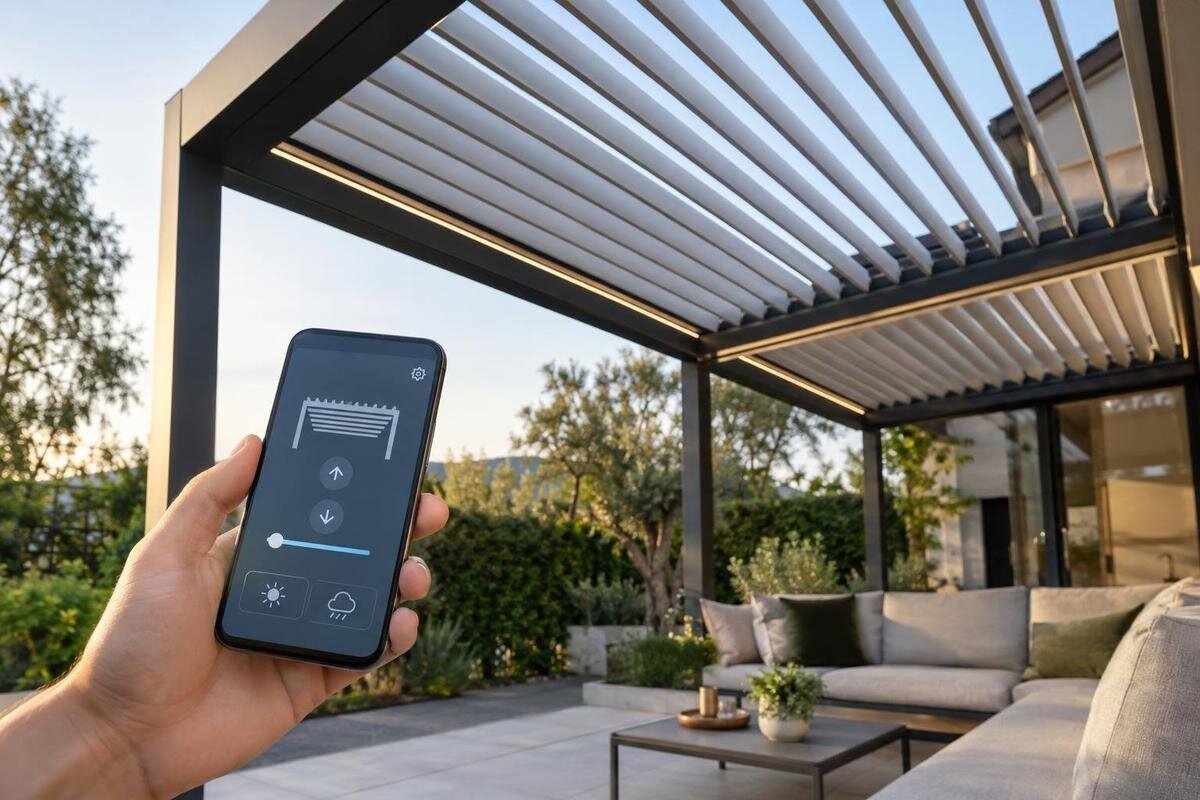
Smart-home control for a pergola depends on a complete, compatible chain: the moving roof mechanism, its motor and controller, any required bridge, and your home platform. A Wi-Fi label or a manufacturer’s app does not, by itself, prove that the system will integrate with your smart home or keep operating when internet or account access is lost. Before you buy, pin down the protocol, the commands available, local operation, account requirements and the limits of any automation. The questions below help separate a documented connection from a broad compatibility claim.
Before you buy 1
Identify the motor, controller and gateway
A smart-home system can only command a pergola through hardware that is actually present. Trace the chain from the moving roof mechanism to its actuator or motor, control box, any radio module or gateway, and finally the home platform. A louvred roof, a retractable cover and a fixed structure do not offer identical functions; the word “pergola” says nothing about whether movement is powered. Ask whether the exact configuration includes a motorised mechanism, and identify the component that receives its commands. Without that equipment, an app or voice assistant cannot operate the roof merely because the product is described as a pergola.
Request model numbers and revisions for the mechanism, motor or actuator, control unit and bridge, along with a list separating supplied, optional and third-party equipment. Ask for the manual covering that complete combination, not just a general brochure or photograph; a separately supplied component can change the compatibility route. The supplied information for the Bloomcabin Bioclimatic Aluminum Pergola listing identifies the model but does not confirm a motor, controller, sensor or smart-home interface. Treat the product name as an identifier, not a feature list, and do not infer a retractable roof or automation from a category name or image. Keep the part numbers with the quotation so the documentation matches the version offered.
Ask which protocol each component uses
A protocol name matters only when you know which component uses it. The pergola controller might communicate with its own app through one route, while the home hub reaches it through a separate bridge or cloud service. Those links have different requirements and may expose different functions. Ask whether the motor controller connects directly to your smart-home hub, whether a manufacturer gateway is required, and whether that gateway must remain installed and powered. A statement such as “connected” or “Wi-Fi enabled” may describe only the controller-to-router link; it does not necessarily explain how a third-party platform can send roof commands. Check that the documentation covers the exact controller and gateway together.
Request the protocol and version for each relevant device, together with the exact bridge model and any firmware dependency. Wi-Fi, Bluetooth, Zigbee, Z-Wave, Thread and Matter are examples to ask about, not an assumed feature list for any pergola. A manufacturer-specific radio may need its own gateway, and a bridge may expose only some controls. The Bloomcabin Lean-To Pergola page identifies a model but does not establish which controller or radio is supplied. Compare documentation for the actual controller and your hub: two matching protocol names on unrelated products do not prove that they interoperate or support the actions you want.
Before you buy 2
Match the controller to your smart-home platform
Name the exact smart-home platform, hub and software generation you intend to use. Ask for an official compatibility entry that identifies the pergola controller or bridge, not merely a statement that the manufacturer’s app works on a phone. Check whether you need a particular hub, integration service, app or system account, and whether support depends on a current device or firmware version. Compatibility may be limited by a particular platform release, so ask the supplier to confirm your setup rather than relying on an old forum post or an unqualified brand list. This matters if you already own a hub and do not plan to replace it.
Ask what “compatible” means in practice: can the platform discover the device, send commands, receive status, include it in routines, or offer only an app shortcut? Is the connection a manufacturer-supported integration or a third-party add-on, and does it work through the hub’s normal controls or only through a voice-assistant service? Those levels are not interchangeable; a device appearing in a discovery screen may still offer limited control. The Bloomcabin Pergola listing can identify the product being discussed, but the platform still needs to name the matching controller or bridge. Get the answer for your exact hub and version, including what the supplier will support if pairing fails.
Clarify what local control means when you are offline
The word “local” is often used loosely. Ask whether a command travels from a physical control, if one is provided, from a phone over the home network, through a smart-home hub, or out to a manufacturer’s cloud and back. An app on the same Wi-Fi network is not proof that commands stay inside the home; it may still need internet access or account authentication. Ask which route applies to each control method. A physical control, local hub and remote phone app can behave differently, so one broad yes-or-no answer is not enough. Do not confuse remote access over mobile data with control from inside the home.
Separate the conditions you care about: internet service unavailable while the router still works, the home router or Wi-Fi down, the vendor’s cloud unavailable, and a power interruption. A local hub may still depend on the router; cloud voice control may stop before a physical control does, but only the documented system behaviour can confirm this. Ask which commands, routines and position feedback remain available in each case. Power-loss behaviour is a separate model-specific question, so do not treat “works offline” as proof of a battery backup or manual override. If a particular outage matters to you, get an answer for that condition rather than relying on a general offline claim.
Before you buy 3
Check account, app and data dependencies
Find out how setup and ownership work before adding equipment. Ask whether commissioning requires a manufacturer’s app, an online account, a cloud login or linking to another platform account. Check who creates the account, whether the homeowner can administer access, how another household member is invited, and how access can be removed when a phone or user changes. If an installer commissions the system, make sure recovery details can be handed over securely; ongoing control should not be tied only to an installer’s personal login. Ask what happens if the primary account owner loses access or changes their email address.
Ask whether remote access, voice services, routines, technical support or firmware updates need separate accounts or a paid subscription; do not assume basic operation and every connected service have the same terms. Check what device data is collected, such as status or automation history, who can view it and what happens if an account is closed. Offline operation and account independence are related but not identical: local commands could remain available while an app or integration still requires a login. For the listed wall-mounted pergola model, ask for these answers against the exact controller and accessory kit, not just the product family. Check the service terms for any ongoing fee rather than inferring them from an app download.
List the pergola functions the integration exposes
Write down the actions you actually need. Depending on the roof mechanism, those might include opening and closing, stopping part-way, tilting louvres or setting a partial retraction; these are examples, not features to assume. A simple open-and-close integration may not offer a chosen angle, while an on/off switch may provide less control still. Ask whether the home platform exposes each required action as a command, and whether it is available by app, routine and voice. For each action, check whether the command can stop movement or set a position. Assess the bioclimatic aluminium pergola model from the exact mechanism and controller documentation, not from what similar roofs can do.
Check feedback as carefully as commands. Does the platform report the current position, confirm that movement has finished, or merely display the last instruction it sent? Is percentage positioning supported and meaningful, or is control limited to set positions? Ask how the integration represents a roof and what happens if it stops before reaching the requested state. If side screens, lighting or other accessories are included, check them separately: a bridge that exposes one connected component does not prove it exposes every part of the assembly. A function table is more useful than a list of compatible brands.
Before you buy 4
Set clear limits for routines, sensors and voice commands
Decide whether you want manual remote commands or automatic routines; they need not share the same compatibility. For a routine based on time, sunlight, temperature, occupancy or weather, identify the actual trigger source and the controller that receives it. A phone weather service, a separate sensor and a sensor built into a controller are not interchangeable, and none should be assumed to be included. Ask which sensor models or data services are officially supported, whether the hub must be online, and whether the trigger can be limited to specific conditions. A phrase such as “weather automation” does not say what is detected or controlled.
Ask how the system handles conflicting instructions, a sensor that stops reporting, a schedule that runs while someone is using the patio, and a manual command that overrides an automation. Find out whether the controller has documented interlocks and which controls remain available if the routine fails. Treat automation as a convenience, not as a substitute for the manufacturer’s operating guidance or a proven weather-protection system. If voice control matters, confirm the specific supported spoken commands and whether the platform reports the current state; a general voice-assistant compatibility claim does not promise position control. Check whether a routine can be paused without having to rebuild it.
Confirm approved installation and support
Some integrations are native; others use an add-on controller or an interface connected to the pergola’s control equipment. Do not assume a generic smart relay can correctly operate a motor. Ask the manufacturer and installer whether the proposed interface is approved for the exact controller revision, what actions it supports and whether it preserves the original controls. A third-party input may offer only simple commands and no position feedback, so request the function list before ordering. Avoid wiring or adapting equipment based on an online forum; any connection to powered equipment should be assessed and carried out by a suitably qualified professional.
Clarify who takes responsibility for commissioning, fault-finding and updates when the pergola and smart-home parts come from different suppliers. Ask whether adding the interface affects the manufacturer’s support or warranty terms, and get the relevant answer in writing rather than assuming either approval or loss of cover. The Bloomcabin Lean-To Pergola listing is a model identifier, not approval for an aftermarket control. Tie any proposal to the exact product and controller, and ask for a route the manufacturer and installer recognise. Keep installation records and the final equipment list with the manuals, and establish who will troubleshoot faults that could arise in either system.
Before you buy 5
Plan for updates and service changes
Compatibility can change when software is updated, so ask which versions the supplier supports and how changes are communicated. This includes controller firmware, a gateway, the manufacturer’s app and the smart-home platform; you do not need to predict every update, but you do need to know who supports the complete path. Ask whether updates are optional or automatic, whether you are notified, and what to do if a control disappears after an update. Keep the original model numbers and current configuration on record; a vague product name is difficult to use when seeking help later. Ask where supported software versions are published.
Think beyond initial pairing: if the hub is replaced, the broadband router changes or a phone is upgraded, can the integration be set up again from supplied instructions? If a manufacturer changes or retires a cloud service, which local and physical controls remain, and is there an approved replacement route for the bridge? Ask about support periods, replacement availability and any ongoing charge without assuming they are guaranteed. The Bloomcabin Pergola model page identifies the product, but ongoing compatibility belongs in support information for its actual controls. This is not a prediction of service failure; it is a check against relying on one undocumented connection.
Get a model-specific compatibility answer in writing
Before committing, ask for one written compatibility statement that names the pergola configuration, mechanism, motor, controller and bridge, then names your platform, hub and relevant software or firmware versions. It should state the required protocol, whether the connection is direct or cloud-mediated, which actions and status values are supported, and what requires a separate sensor, account or subscription. Include behaviour during internet or cloud loss, plus installation restrictions and approved third-party parts. Ask who is responsible for answering technical questions and date the information. This record prevents a broad “works with smart home” claim from being treated as a complete technical specification.
Ask to see the manual or an installer-led demonstration of the exact route, not a different model in a promotional video. Verify the tasks that matter to your household, including partial positioning or routines if you expect them, and ask how to regain control if an account or hub is unavailable. Where possible, check both the command and the returned status, rather than just whether pairing succeeds. Record each answer as supported, unsupported or unconfirmed. The model name on Bloomcabin's bioclimatic pergola page can anchor the product side of that record, but cannot replace controller-level evidence. If key answers remain unconfirmed, compare the pergola on documented manual controls and treat integration as unavailable until verified.
Frequently asked questions
How can I tell whether a pergola is compatible with my smart home?
Match the exact motor, controller and any gateway with your home hub, then look for official compatibility information for that combination. A product name, app or general claim of smart-home support does not confirm which commands are available.
Does a Wi-Fi controller mean it will work without the internet?
No. Wi-Fi describes a network connection, not whether commands depend on a manufacturer’s cloud or an account. Ask what continues to work if broadband, the home router or the vendor’s service is unavailable; these are different situations.
Can I add a smart relay to a manually operated pergola?
A smart relay alone cannot motorise a manually operated pergola. Smart control would require a compatible powered mechanism and an approved control interface. Ask the manufacturer whether an approved motorisation option exists, then have a suitably qualified installer confirm the equipment and supported functions before making any changes.
Does support for Matter, Zigbee or another protocol guarantee full roof control?
No. A protocol can provide a way for devices to communicate without exposing every roof function. Confirm that your exact controller and hub are compatible, and check which commands and status information the integration actually provides.
Can a voice assistant set a particular louvre angle?
Only if the mechanism and controller expose position control and the specific smart-home integration supports it. Check the available voice commands and whether the platform receives position feedback; do not infer either from a general voice-control claim.
Smart-home compatibility depends on a documented control system, not a roof style or the presence of an app. Compare the precise controller, protocol and platform functions, including what works offline and what depends on an account. Keep those answers tied to the configuration being offered. Where details are missing, mark integration as unconfirmed and choose the pergola on the operation you can verify. That separates a feature supported by the specified equipment from one that is only hoped for.
