
Can Soil-Moisture Sensors Help Greenhouse Watering?
Greenhouse watering
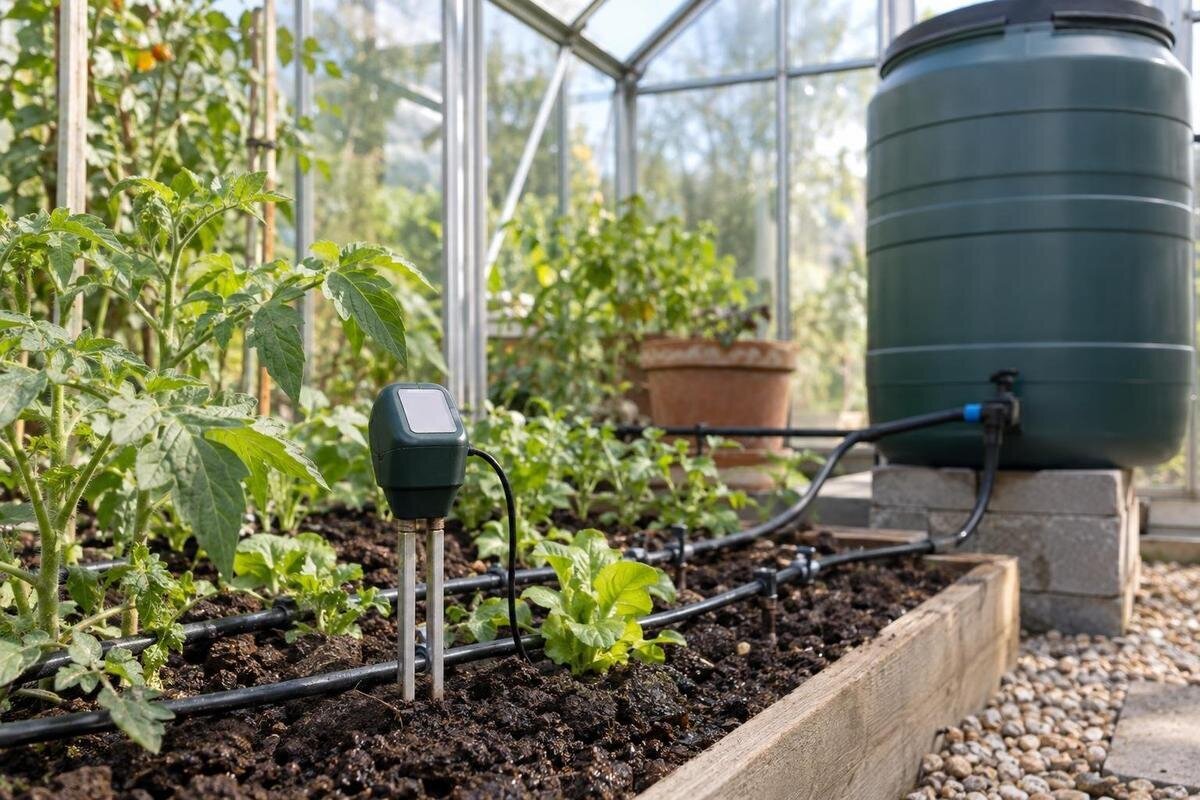
Greenhouse beds and pots rarely dry at exactly the same rate, so a soil-moisture sensor can reveal a change that a calendar-based routine misses. But the number on a display describes the probe’s immediate surroundings, not every plant under cover. To make the reading useful, match the sensor to the growing medium, position it among active roots, establish what its output means and check it by hand before letting a controller act.
01
What a soil-moisture reading tells you
A soil-moisture sensor reports a response from the small area around its probe, not from an entire bed. Depending on the device, its display may be a number, a percentage-like scale or a dry-to-wet category; check the instructions to learn what that output represents. A percentage does not automatically mean a percentage of water available to plants. The sensor cannot identify every crop’s demand or confirm that moisture is evenly spread through the roots. Its strength is repeatable observation at a known position: you can track whether that spot becomes wetter after watering and dries between events. Different models may use different scales, so do not compare their numbers as if they were interchangeable.
That local view is useful only if the position remains consistent. Keep the probe in the same medium, at the same depth and orientation, and compare readings at similar points in the watering cycle. Moving it into a different bed can produce a different baseline even when the display uses the same scale. If you are choosing a structure as well as a monitoring plan, the Classic aluminium greenhouse range is listed from 3.77 to 28.08 m². Use the area range to outline your growing space, then identify the bed or group of pots each reading will represent. Record the time and recent watering alongside the value so later comparisons have a clear context.
Map growing zones before choosing probe positions
Draw the growing areas before deciding where a monitor should sit. A greenhouse may contain an in-ground bed, a raised bed and pots; these can use different media, hold water differently and be served by separate lines or hand-watering routines. Plants near a door, at a sunnier end or in shade may also dry at a different pace. A probe in one pot is not a fair stand-in for a bed across the path, and a reading beside one outlet cannot show whether every plant receives water. Mark crops, containers, watering outlets and separate controls on a simple plan. Two crops close together may still be a poor pair if their roots or watering needs differ.
Group only areas you intend to water in the same way. If two beds use different mixes or separate controls, treat their readings separately or use one sensor for spot checks rather than as the sole trigger for both. Identify which crop and zone a reading will represent, then mark the sensor site and the places you will inspect by hand. When planning a layout for the Lean-to Greenhouse, listed from 3.69 to 14.34 m², show the planting and irrigation arrangement within the footprint. This makes it easier to distinguish beds that share a watering routine from pots or crops that need separate attention.
02
Match the sensor to the growing medium
Choose the sensor for the growing medium, not just for a greenhouse label or a feature list. A probe intended for mineral soil may not behave the same in a loose potting mix, a compost-rich bed or another substrate. Check the maker’s supported media, required insertion method and whether the probe can stay in place or is intended for occasional checks. A sensor that needs firm contact may give inconsistent readings in a coarse or recently disturbed mix. For containers, consider the depth it can sample and whether it can be installed without damaging roots or resting against the pot wall. Some sensor technologies are also affected by properties of the medium besides water, so follow their specific guidance.
Look at how the reading is communicated as well as how it is collected. Some devices give a continuous value; others use set bands or send information to a separate display or controller. Check whether the result is understandable, what happens if the sensor stops reporting and whether the device suits the conditions where it will sit. If you are also comparing the Limited Edition Aluminium Greenhouses, listed from 3.77 to 28.08 m², keep your sensor requirements separate from your choice of structure. The sensor’s instructions should establish media compatibility. For a device that records trends, check how often it samples and how long its history remains available.
Place the probe among active roots
Place the probe within the active root zone of the plants it is meant to represent. Roots occupy a depth and spread that vary with crop, age, container and growing medium, so a universal depth would be misleading. Use the crop’s likely rooting area and the sensor instructions to choose a representative position. A probe left at the surface mainly follows surface drying, which may not match conditions around established roots; one set too deep may respond to moisture outside the zone you need to monitor. Revisit the position as a crop grows or is replaced. Seedlings and mature plants can require different sampling points.
Position the probe where the irrigation pattern is typical, but not directly in a stream or against a dripper unless the instructions call for that. A point immediately beside an outlet may get wet earlier than the rest of a bed; one at the edge may dry differently. In a pot, avoid letting the probe rest against a wall or base if that is not the intended sensing position. When laying out beds within a T-Model Orangery Greenhouse, listed from 16.52 to 30 m², mark probe positions alongside the crops and outlets. Choose the depth for each crop’s root zone, then insert and secure the probe as the maker directs so contact remains consistent.
03
Calibrate readings for your own medium
Calibration helps you interpret a reading. Follow the manufacturer’s steps and first check whether the device allows user calibration; some offer a fixed scale, so establish a reference rather than trying to change settings that are not available. Use the same medium, container or bed mix and probe position that will be monitored. Useful reference points might include a normally watered state after excess water has drained away and a drier state at which you would usually consider watering. Do not deliberately dry a plant to the point of stress to obtain a reference. Record what the display shows at each point. Its numbers become useful when tied to conditions around the roots. For a device with no setup controls, keep a written local range instead.
Compare readings over several ordinary watering cycles before setting a trigger. Take them at a consistent point in the cycle and pair each with a hand check of the same zone; if the value shifts when the medium has not, revisit contact, placement and the instructions. Do not copy a percentage from another grower’s bed or assume two models share a scale. If you are planning to grow in a Pyramid Greenhouse, listed from 5.53 to 18.9 m², include the sensor’s bed or pot location in your calibration notes. Keep separate references for different growing media, and label each record so you can interpret it later.
Check readings against the medium by hand
Make a manual check beside, not through, the probe’s exact insertion point. Carefully take a small sample from a nearby part of the bed at a similar depth, avoiding roots, and compare its feel with the sensor’s indication. Texture changes how a sample crumbles or holds together, so touch is not an exact moisture measurement either. Its value is to catch a clear mismatch—for example, a display suggesting very wet conditions while the root-zone sample feels dry. For pots, a consistent comparison of the same container’s weight can add context, but it is not a universal threshold. Do not judge the root zone from the surface alone; use the maker’s suggested method if a loose mix is difficult to sample.
Keep a short log with the reading, time, recent watering and what the sample felt like. Repeat the check on more than one day before changing a controller; a single mismatch may reflect timing or an unrepresentative spot. When comparing the Limited Edition Aluminium Greenhouses with Storage, listed from 5.52 to 28.08 m², distinguish the actual beds and containers from the total floor area on your growing plan. Give each sampling point a clear label so your notes compare the same locations over time. The log can then show whether disagreement is limited to one zone or occurs across the greenhouse. For repeated mismatches, revisit the medium, probe contact and placement.
04
Check controller compatibility before automating
A sensor can start an appropriate watering response only if the controller can interpret its output and the irrigation zone serves the same plants. Before buying or configuring equipment, confirm compatibility in both manuals, including the output type and any limits the makers specify. Do not infer compatibility from a greenhouse or irrigation product listing. If there are multiple watering zones, identify which one the sensor is intended to govern; one local value should not automatically control unrelated beds or containers. If system flow or distribution is uncertain, ask an irrigation professional to verify it using the relevant system information and measurements rather than guessing from a sensor reading.
Build a trigger from local references, not a generic moisture number. If the controller offers separate start and stop points, a delay or a manual override, learn how those functions affect watering before relying on them; controls vary by system. Check what the controller does if a sensor stops reporting or gives an implausible value. The Bloomcabin Prestige Greenhouse is listed from 3.77 to 28.08 m², but its product listing does not establish compatibility between sensors, controllers, valves and emitters. Confirm those connections from the equipment instructions and actual setup. Trial any new setting while you can observe both the controller’s response and the resulting watering.
Trial the system while you can observe it
Run a supervised trial with one clearly defined watering zone before allowing the controller to operate the whole greenhouse without regular checks. Observe what reading causes an action, whether watering starts and stops as expected, and whether water reaches the part of the bed represented by the probe. Check another point in the zone and any nearby containers. A sensor that triggers correctly at its location cannot correct uneven distribution, and a timer or valve does not prove every plant received water. Keep manual control available during the trial and note any unexpected behaviour.
After a watering event, record readings at consistent intervals, following the device instructions, and compare them with the medium at probe depth. This shows whether the value changes promptly, later or not at all. Adjust placement or settings one at a time so you know what helped. If you are considering the Spacious Greenhouse, listed from 47 to 70 m², plan how you will observe each distinct watering zone during the trial. A successful test in one part does not establish uniform irrigation elsewhere. Check containers separately where they use a different line or are watered by hand, and record which areas you have actually tested.
05
Recheck after plants or conditions change
A position that was representative earlier may not stay that way. As plants grow and roots extend, the original sampling point may no longer reflect conditions across the active root zone. Moving a pot, changing a mix, adding mulch or repositioning an outlet can also change what a reading means. Seasonal shifts in light, ventilation and temperature can change how quickly different areas dry, so check whether the old reference still fits. Revisit the zone after major layout or watering changes, and re-establish a baseline if the probe or medium has moved. When replacing a crop, review both the sampling position and the reference readings rather than automatically retaining the previous settings.
Watch for readings that stay fixed while the medium changes, jump sharply without a clear reason, or repeatedly conflict with hand checks. Check probe position and contact, battery or signal status if applicable, and the maker’s maintenance instructions; do not improvise cleaning or repairs. Separately confirm that water is reaching the intended plants, since a sensor cannot diagnose a control or distribution fault. If the sensor has been moved, document its new position because the old reference may no longer apply. Until an unexplained discrepancy is resolved, use manual checks rather than letting the suspect value trigger unattended cycles.
Monitoring or automatic control?
Automation is most useful where a clearly defined zone has a repeatable watering pattern and someone can review what the sensor reports. It can make trends easier to spot and reduce reliance on a fixed calendar, but it does not remove the need to observe plants and growing media. Manual watering may be simpler for a few pots with different needs, newly planted crops or a layout that changes often. If a sensor adds more unexplained readings than useful information, keep it as an occasional reference or leave watering under manual control. The right level of automation depends on how consistent the zone is and how confidently you can interpret it.
Before selecting a unit, check its compatibility with your medium, the root depth it can sample, how its display is interpreted, whether the maker provides a calibration method, how it communicates with a controller and what maintenance it requires. Find out how the system handles lost data and whether you can override automatic watering. If you intend to leave it operating when no one is present, check the documented fault response and manual fallback first. For any unverified equipment connection or water-delivery setup, follow manufacturers’ instructions and ask a qualified irrigation professional where needed; use a qualified electrical professional for electrical work. The aim is a reading you can explain and verify.
Frequently asked questions
Can one sensor monitor an entire greenhouse?
It measures conditions around its probe, so it may represent a watering zone with similar plants, growing medium and irrigation. It cannot confirm that separate beds or pots have the same moisture. Check other areas by hand, and treat distinctly watered zones separately.
Does a percentage reading mean the same thing on every sensor?
No. A display may use a device-specific scale, so a percentage-like value is not necessarily a direct measure of water available to plants. Check the manual for what the output means, and do not transfer a threshold from another sensor or growing medium.
Where should I place the probe?
Put it at a representative point within the active root zone, following the sensor instructions for depth and orientation. Avoid placing it directly in a water stream or against an outlet unless the maker specifies that position. Reassess placement as plants grow.
Do soil-moisture sensors need calibrating?
Follow the manufacturer’s procedure if the device allows calibration. If it has a fixed scale, establish local reference readings in the medium and position you will monitor. Recheck those references when you move the probe, change the medium or alter the growing layout.
When can I rely on automatic watering?
Only after you have checked the readings by hand, confirmed the controller is compatible and observed a trial in the relevant watering zone. Keep checking periodically. If the display conflicts with the medium or stops reporting, use manual checks until you understand the cause.
Used carefully, a soil-moisture sensor can replace guesswork with a record of conditions at a particular root-zone location. Its value depends on matching the sensor to the growing medium, positioning it well and establishing reference readings supported by hand checks. Automatic control is a useful extension only when those readings make sense and trials show that watering reaches the intended plants. Otherwise, the sensor can remain a monitoring tool while you keep watering under direct oversight.
