
Greenhouse Monitoring Without Home Wi-Fi: Connection Options
Greenhouse monitoring
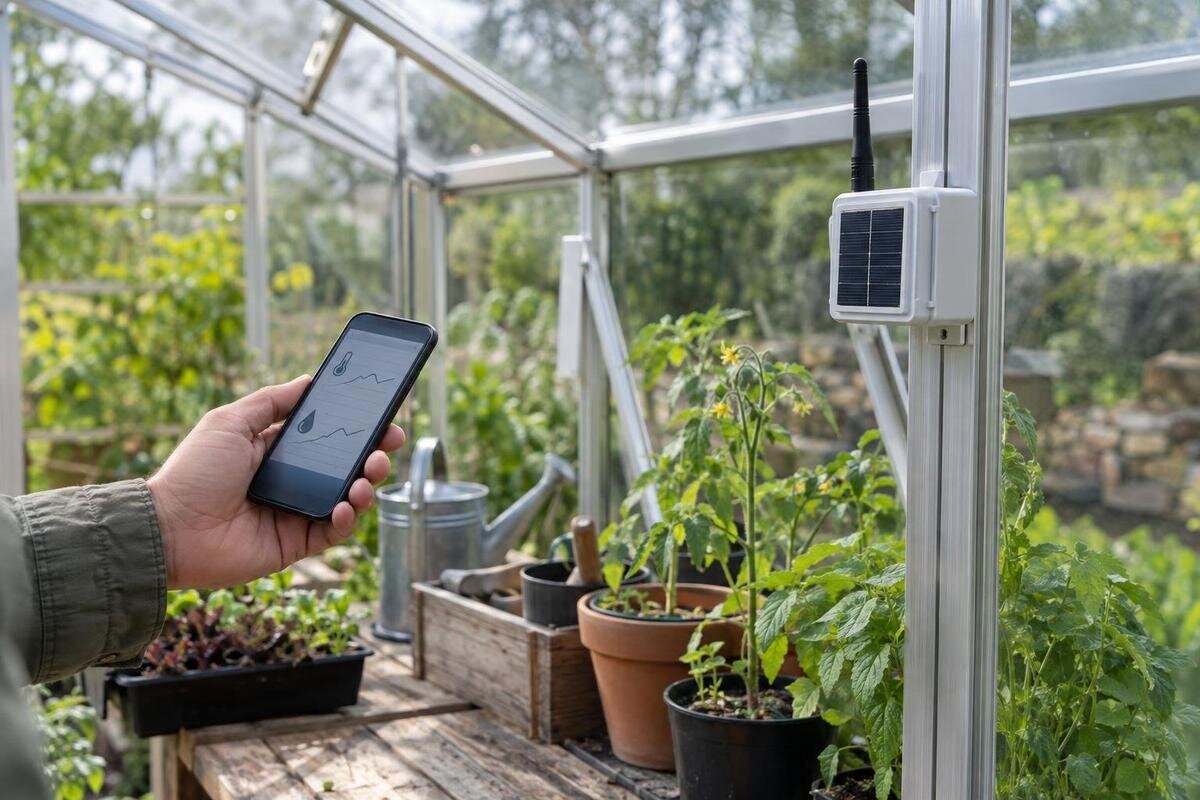
Greenhouse readings do not require a household Wi-Fi signal, but remote alerts do require a working path from the sensor to you. A standalone logger can preserve readings for later review; cellular equipment can send data through a carrier where coverage and service are available; long-range radio can connect a sensor to a receiver farther away, but that receiver still needs a way to reach you if you want off-site alerts. The right choice depends on where the greenhouse sits, what you need to know, and how quickly you must hear about a problem.

Before you buy 1
Separate local readings from remote alerts
People mean different things by “no home Wi-Fi”: the greenhouse may be beyond the router’s reach, the property may have no internet service, or the owner may not want an online dashboard. Those situations are not interchangeable. A sensor might send readings to a nearby logger through a local connection, while that logger needs a separate internet route to make data available elsewhere. A standalone logger can operate without internet if its design supports offline storage, but it cannot send you a remote notification without some communication path. Ask which link is missing: sensor to recorder, recorder to internet, or internet to phone.
Decide what result matters before choosing a wireless technology: a history you can inspect during a visit, a warning audible on the property, or a phone alert while you are away. Note how often you visit, whether the site has power, and which areas need readings. A system may provide all three, but only if each component supports that job; “wireless” alone does not say which. When planning a large backyard greenhouse, mark the growing areas you want to compare and identify what each reading would help you decide. Also decide who could respond to an alert and how quickly they could act.
When a standalone logger is enough
A standalone data logger is a practical option when you can collect readings in person and do not need immediate off-site alerts. It records from its own sensor or connected probes, then displays or stores results for later review; the exact arrangement varies. Check that the model explicitly supports offline recording, and find out how you retrieve its data—an on-device screen, removable storage, cable, or nearby app connection may be involved. Do not assume a sensor marketed as digital saves a history: a live display and a stored time series are different functions. Look for a stated logging interval, number of channels, memory capacity, and what happens when memory fills or batteries run low.
Ask whether it keeps recording through a temporary power loss, preserves accurate timestamps, and lets you export records in a usable format. A shorter interval may capture brief fluctuations but use memory more quickly; a daily minimum-and-maximum summary is not the same as a full record. When planning monitoring for a classic aluminum greenhouse, include access to the logger in your layout: you should be able to read its screen or retrieve its files without moving plants each time. Plan how often you will retrieve readings so a full memory or depleted battery does not leave a silent gap. Check that exported files include dates, units, and sensor labels; unlabeled numbers quickly lose their value.
Before you buy 2
Cellular monitors depend on on-site coverage
A cellular monitor uses a modem in its gateway to send measurements or alerts through a mobile carrier rather than relying on the home router. It may suit a site beyond Wi-Fi range if a compatible carrier signal is available. Check coverage at the exact gateway location, not just at the house, driveway, or nearest road. Coverage maps and a phone’s signal bars are useful screening tools, not proof that a particular monitor’s modem and antenna will stay connected inside the structure. The gateway’s supported network and SIM also need to match service available there.
Before buying, verify which networks the unit can use, whether a SIM is included, whether a monthly or annual plan is required, and what happens if service lapses. Ask whether the fee covers sensors, alerts, data storage, and app access or whether some features cost extra. Cellular service can drop out, so check whether missed readings are stored and sent when the connection returns. For a lean-to greenhouse, include the adjoining building in your coverage test: compare permitted gateway positions rather than assuming the signal beside the wall matches the signal elsewhere on the property. Ask the seller how to confirm that the modem is compatible with service at your site.
How long-range radio connects to remote alerts
Long-range radio describes a link between a sensor and a receiver or gateway, not necessarily an internet connection. It can help when a sensor is far from where a hub can sit, provided the equipment is designed to communicate across that route. Systems may use proprietary radios; terms such as sub-GHz or LoRa identify technologies but do not guarantee that products from different brands work together. Check the exact sensor-to-receiver pairing and the manufacturer’s stated conditions for use. Advertised distances are not guarantees for a real site: terrain, walls, glazing, metal, other equipment, and antenna position can all affect the link.
Then trace what happens after the receiver gets a reading. A base unit in a nearby building might provide a local display or alarm; to send a phone notification while you are away, it needs its own route to the internet, such as a supported network connection or cellular backhaul. If no backhaul is available, a local warning may still be useful while someone is nearby, but it is not remote monitoring. When comparing a limited-edition aluminum greenhouse, map both parts of the connection: the sensor-to-receiver link and the receiver’s route to your phone. Identify which equipment supplies each link before ordering.

Before you buy 3
Test the signal where equipment will sit
Coverage tests should use the planned locations, not a rough distance estimate. For cellular equipment, test with the same carrier or the manufacturer’s compatible gateway; a phone can offer a clue but has different hardware and may connect differently. For long-range radio, put the sensor and receiver where they would actually be used and check status or send test messages repeatedly. Try the system with the door and normal equipment arrangement in place. If a device has a signal-quality or link-loss indicator, learn what it reports rather than relying on one successful alert.
Draw a simple site sketch showing the router or gateway, sensor positions, doors, walls, and any route between the greenhouse and house. Terrain, nearby buildings, tree growth, and stored equipment may affect a path; the actual glazing and frame can matter too. Allow room to reposition a receiver only as the manufacturer permits. If you are considering a T-model greenhouse, mark each intended growing area on the sketch and test the connection from its planned sensor position rather than just from the entrance. Repeat the check after final placement and, if power or antenna mounting requires work beyond ordinary setup, follow the manufacturer’s guidance or use a qualified installer.
Choose sensors around the decisions you need
Start with the decisions you expect a reading to inform. Common greenhouse measurements include air temperature and relative humidity; other tasks may call for soil moisture, light, or water detection, but a monitor only supports readings its sensors are designed to take. Write down which readings matter, where they matter, and how many distinct points you need to compare. A probe describes conditions at its own location, not automatically every bench, shelf, or end of the greenhouse. One sensor may be enough for a small, uniform area; separated zones can call for additional probes.
Check measurement range, stated accuracy, and calibration or replacement guidance. Alert behavior matters too: a warning might trigger on one reading, after a delay, or only when a value remains outside a set range. Choose limits based on the plants and task you are monitoring, rather than copying a generic preset, and confirm that the unit lets you set them. For a pyramid-type greenhouse, as for other layouts, choose measurement points around the actual growing areas rather than the structure’s overall shape. Record each probe’s location and height, and note whether it measures air or growing media, so you can interpret comparisons correctly.
Before you buy 4
Verify sensor, gateway, and app compatibility
Compatibility is a system-level question. Confirm that each sensor pairs with the specific receiver, that the receiver supports the app or service you need, and that the complete chain works without home Wi-Fi in your intended setup. Matching brand names, similar-looking connectors, or the shared word wireless do not guarantee compatibility. Ask about the radio protocol, supported frequency or regional version, firmware requirements, maximum sensor count, and whether all readings appear in the same dashboard. If a gateway is described as optional, establish exactly which functions disappear without it. Have the supplier confirm the complete combination by model number, not just by product family.
Consider replacement and expansion before buying. Find out whether a failed sensor can be replaced separately, whether older sensors work with current gateways, and whether adding another zone requires a new hub or subscription. Check whether you can export the data before closing an account or canceling service. If a greenhouse with built-in storage is part of your plan, ask whether the intended receiver location meets the equipment’s requirements for temperature, moisture, access, and power, then test its connection there. A written component list can reveal a missing gateway, probe, or service requirement before setup. Include model numbers so replacement parts can be matched later.
Compare service, power, and data costs
Compare ongoing ownership costs, not just the logger or gateway price. A cellular device may require a data or monitoring plan; some systems bundle service, while others charge separately for features such as longer histories, multiple users, exports, or additional sensors. Check the plan term, renewal and cancellation rules, and whether alerts continue if an introductory period ends. Long-range radio may avoid a cellular plan for each sensor but still depend on an internet-connected gateway or paid software. Check the current terms for the exact system instead of inferring them from its product category.
Include power and upkeep in the comparison: battery replacement, charging or an approved power source, probe replacement or calibration, and the time needed to retrieve records all count. Check the manufacturer’s expected battery life for your chosen reporting rate and network, not just an idealized maximum. Ask how data is stored if a paid service stops and whether local records remain accessible. If you are budgeting for a Prestige greenhouse at the same time, keep monitoring equipment and service charges as separate entries. Compare an offline setup and a remote-alert setup over the same ownership period, including any gateway, replacement batteries, and recurring fees each requires.
Before you buy 5
Plan for outages and missing readings
Ask how the system reports its own failures. Does the app or base station warn about a sensor that stops reporting, a weak battery, a lost gateway connection, or expired cellular service? A chart that simply stops updating may look like stable conditions unless missing data is clearly flagged. Find out whether readings are saved offline and uploaded later or whether a gap is lost. Do not assume that a sensor, gateway, and cloud account behave alike when a connection fails. Local storage is useful as a backup only if it remains accessible and you know how to retrieve it.
Consider what an alert can and cannot do. A message informs a person; it does not restore power, improve coverage, or correct a condition unless a separate, compatible control system is specified. Confirm how notifications reach the intended recipient, including app permissions and any escalation options, and use the manufacturer’s test function to check delivery. Keep a practical way to check the greenhouse when remote alerts are unavailable. If messages matter while you are away, test low-battery, offline, and reconnection warnings before relying on them, and establish who will respond if one arrives.
Choose a setup around your response needs
Use three questions to narrow the field. If you can visit often and mainly want a history, choose an offline logger with suitable sensors, enough memory, and a retrieval method you will use. If you need to be notified away from home, consider cellular only when the compatible gateway has verified coverage and the service cost makes sense. If a sensor cannot reach a nearby receiver, assess a long-range radio link, then confirm that the receiver has its own route to you. If no reliable link exists, offline logging plus regular checks is more dependable than treating an unverified alert promise as monitoring.
Before ordering, write down the readings needed, sensor locations, maximum acceptable alert delay, recipient, power source, connection path, recurring cost, and how you will recover records after an outage. Ask the seller to confirm the exact sensor-gateway combination, offline behavior, supported network, and service terms. Separate must-have alerts from useful extra information so you do not pay for features that will not change what you do. During use, date your notes and record sensor locations and relevant changes, such as watering, venting, or moving a probe; that context makes trends easier to interpret.
Frequently asked questions
Can a greenhouse logger work without any internet connection?
Yes, if the logger is designed to record readings locally and has a suitable power source. Check its memory capacity, how you retrieve the records, and what happens if the memory fills or power is lost. A local record does not, by itself, send alerts to your phone.
Does a cellular greenhouse monitor need my home Wi-Fi?
Not if its gateway sends data through a compatible cellular connection. You still need usable carrier coverage where the gateway will sit, any required service plan, and sensors that pair with that gateway. Confirm those details for the exact equipment rather than assuming a phone connection proves the monitor will work.
Will long-range radio send alerts to my phone?
Not on its own. Long-range radio can carry readings from sensors to a compatible receiver or gateway. To reach your phone while you are away, that unit also needs a working internet or cellular connection. Without one, it may still provide a local display or alert if the system supports it.
Will I have to pay a monthly fee for monitoring?
It depends on the system. Check whether cellular service, app access, data storage, and alerts are included, billed separately, or available only under a recurring plan. Confirm the renewal and cancellation terms, and ask what happens to stored readings and notifications if service ends.
How can I test the connection before relying on it?
Test with the intended gateway or compatible equipment at its planned location, not just outside the greenhouse. For cellular, check the relevant carrier; for radio, test the actual sensor-to-receiver path. Send repeated test messages and confirm how the system reports a lost connection and recovery.
Monitoring a greenhouse without home Wi-Fi comes down to what you need to record on site and what you need to communicate off site. A logger suits later review; cellular depends on tested carrier service and clear plan terms; long-range radio solves the sensor-to-receiver link only, unless the receiver also has a backhaul. Map the actual locations, verify compatible components and outage behavior, and choose the simplest system that reliably supports your routine.
