
Why Is My Automatic Greenhouse Vent Opener Still Closed?
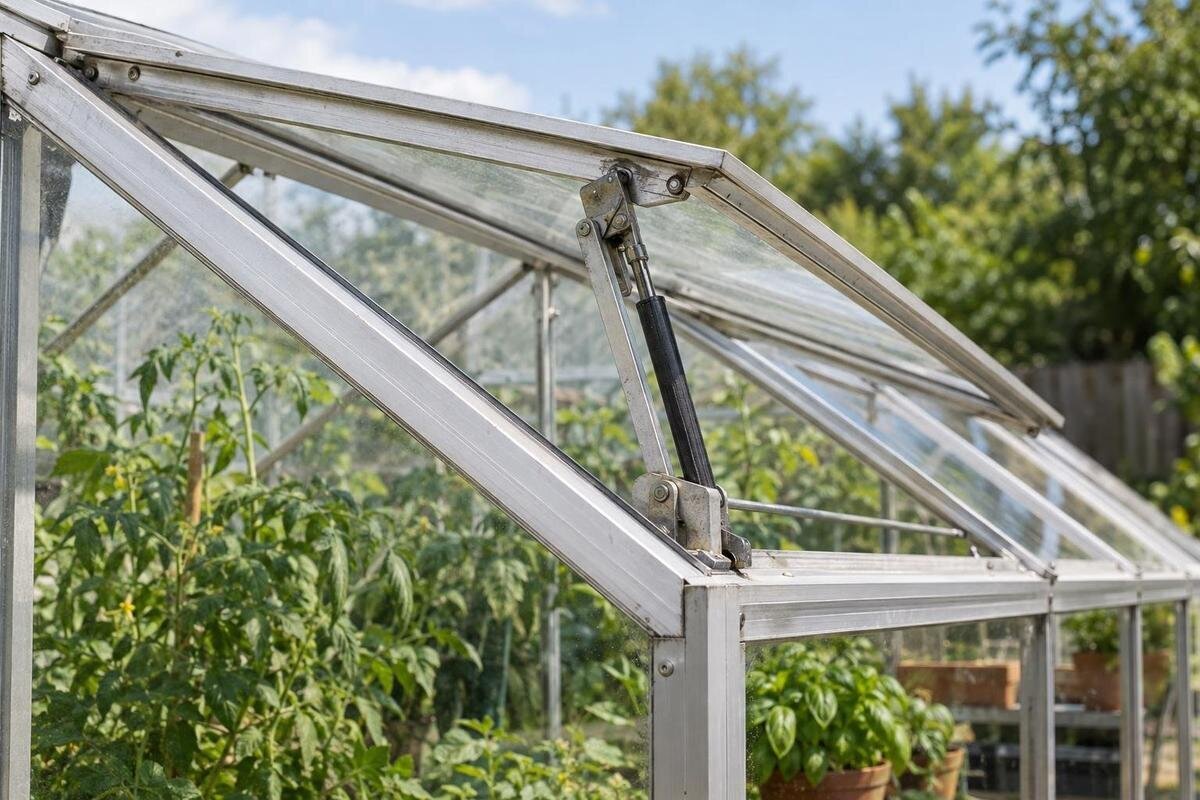
Greenhouse troubleshooting
An automatic greenhouse vent opener can stay closed because its sensor has not reached the opening range, its setting or control is wrong, or the vent cannot move freely. A closed vent alone does not prove the opener has failed: units respond differently, and a temperature-operated mechanism may take time to react. Start with the instructions for the exact opener, then compare the measured temperature with its normal behaviour before changing anything. The checks below separate a normal temperature response from adjustment, load, obstruction, alignment and control problems without forcing the vent.

Identify the opener and the vent
First check what normal operation looks like for this unit. A temperature-operated opener can remain shut until its sensing temperature reaches its specified operating range, and some models move gradually rather than switching from fully shut to fully open at once. Read the exact opener manual for normal movement and any response delay; a general greenhouse temperature guide cannot tell you whether this actuator should have moved. Note whether a separate latch, catch or stay is holding the vent, and whether the actuator itself appears to move. A locked panel and a stationary opener are different clues. Do not force a catch or panel to test it; use a release method only if the manufacturer describes one.
Keep the greenhouse and opener identities separate. A Classic aluminium greenhouse listing can help identify the enclosure, but the structure name does not identify which vent, actuator or mounting arrangement is fitted. Record the opener’s own model or label, the affected vent’s position and any separate controller. If the label is hidden, photograph what is visible from a safe, accessible position rather than removing a cover or fitting. If several vents look alike, note exactly which one you observed. This record helps you find the right manual and avoids treating a similar-looking greenhouse as proof of compatibility.
Measure temperature at the sensing point
Measure temperature where the opener senses it, not wherever it is convenient to place a thermometer. If the sensor is built into the opener, take a separate reading close to the unit without touching or covering it; if the manual shows a remote sensor, use that position. Compare the reading with the range specified for that opener. A bench-height reading, an outdoor weather report or a thermometer on the opposite side of the greenhouse may describe different air, so it cannot confirm that the actuator has reached its trigger. Keep the thermometer away from heaters or other local heat sources unless that is where the sensor is fitted.
Log the reading with the time and vent position, including the period when you expect opening to begin; use the same measuring point each time. Note changes that could affect the sensor, such as direct sun moving onto it, a door being opened or a fan operating. For a temperature-only unit, humidity is not the opening trigger, so a high humidity figure does not explain a closed vent. If the controller uses a humidity input, check its exact manual. When recording the enclosure model, the Lean-to wall greenhouse listing can help identify it. Keep that information separate from your observations of the sensor’s actual exposure and temperature.
Compare readings with the stated operating range
Find the opener’s specified opening temperature or operating band in its own manual. Some devices also specify a closing point, a response range or a delay, so do not assume that one number applies in both directions. Compare the sensor reading with the maker’s instructions before deciding it is stuck. If the sensor has not reached the specified trigger, staying closed may be normal. If the manual gives a band, use the band rather than treating one edge as a guaranteed movement point. Once the stated conditions and response time have passed, continue to the mechanical and control checks rather than immediately turning an adjustment. The temperature you want for plants and the opener’s trigger are not automatically the same.
Adjust only when the exact manual describes a procedure for that model. Photograph or write down the original setting, make only a permitted change, and observe a normal warming cycle before considering another one. Do not turn an unidentified screw by feel, pull or push a temperature cylinder, or improvise a test with a heat gun, hot water or ice. Those methods can damage parts or give a misleading result. If the procedure requires removal or access to loaded parts, leave it to an installer. For a Limited Edition aluminium greenhouse, keep the enclosure details with your notes, but base any temperature adjustment on the fitted opener’s instructions.
Check the vent load and the opener’s capacity
An opener must be suitable for the particular vent it moves. The relevant load is the window or louvre panel, its dimensions and its mounting geometry—not simply the overall size of the greenhouse. Check the manual for any stated limits, required number of openers or permitted vent type; do not estimate capacity from appearance. A unit that starts to extend but cannot move the panel may be meeting resistance or may not match that assembly. If two openers are fitted, note whether they move alike. Do not add a lever, extra actuator or improvised support: changing how force is applied can damage the vent or make it move unpredictably.
Look for a separate latch, stay, opener linkage or tight seal that may be holding the panel, but do not disconnect anything to see whether the actuator works. If a panel or hinge appears bent or resistant, a stronger opener may not be the answer. When considering a replacement, match it to the exact vent and manufacturer’s instructions, not just the greenhouse family name. The T-Model Orangery Greenhouse name alone does not provide the vent’s load or the required opener capacity. Confirm those details from the structure and opener documentation, or ask the supplier or installer to verify them.

Look for an obstruction along the vent’s path
Trace the panel’s movement path visually from a safe position. Check the edges, hinge line and frame for leaves, ties, plant labels, loose clips, debris, a shading fitting or anything stored against the vent. Look at the inside and outside edges where accessible; an obstruction can be difficult to see from one side. Keep fingers, tools and your head clear of the moving panel, especially if it is overhead. Do not reach under a roof vent or stand where it could swing down while you inspect. If the obstruction is not safely reachable, do not climb or lean out to get to it.
If a loose obstruction is easy to remove while the vent is fully shut and stable, clear it gently without levering against glazing or the frame. Do not pry a panel, force the opener or spray lubricant into the mechanism unless the manual specifically recommends it; a product chosen at random may not suit the component. Then observe the vent under normal conditions, following any test procedure in the instructions. When checking a Pyramid Greenhouse, describe which panel is affected and where it catches. These details are more useful for troubleshooting than recording the greenhouse model alone.
Inspect alignment and mounting from a safe position
Check the visible mounting and alignment without loosening the opener. Look for a bracket that has shifted, a bent arm or connection, a panel sitting crooked in its frame, a hinge that appears out of line, or fasteners that are visibly loose. Compare the current arrangement with the illustration in the correct manual. A small change in geometry can affect how movement transfers to the panel. Do not straighten a part, retighten loaded fittings or reposition the actuator just to see if movement improves; the vent may be under load and the manual may require a particular sequence. Photograph any mismatch before contacting an installer.
Note exactly what moves. If the actuator moves but the panel does not, the connection, latch, alignment or obstruction deserves attention; if the panel begins to move and then binds, stop rather than forcing it through. If neither moves, return to the temperature or controller checks before concluding that a part has failed. These are clues, not a definitive diagnosis. Include the greenhouse variant, such as a Limited Edition greenhouse with built-in storage, alongside the opener model in your notes. Describe the affected vent’s position so an installer can distinguish it from any others. For an overhead vent or one that is difficult to reach, leave close inspection to someone with safe access.
Account for sun, shade and local airflow
Temperature can differ across a greenhouse. Direct sunlight on the opener may warm its sensor faster than the air where plants sit, while shade, a nearby wall, a roof position or local airflow may leave the sensing point cooler than a thermometer elsewhere. A fan or open door can also change what reaches a sensor. These differences can make a thermal opener appear to respond early or late compared with your expectation without showing that the mechanism is defective. Do not move, shade or cover the sensor as a fix unless the manual allows it; changing its exposure changes its response.
During your log, note whether the sensor itself is in sun or shade and record the position of existing curtains, shade or nearby doors. Compare that information with readings at the sensing point, not just the temperature at plant height. For a Prestige Greenhouse, include the installed opener’s location in the log as well as the greenhouse model name, so the readings can be matched to the affected vent. If shade or a nearby surface seems relevant, use only a sensor or ventilation arrangement approved for that opener and greenhouse; do not assume a general shading product will solve a mechanical fault.
Check controller settings on an electric opener
First establish whether the opener is mechanical and temperature-responsive or operated through an electric controller; do not apply electrical checks to a thermal unit. For an electric system, use only the user-accessible controls described in its manual. Where present, check the selected mode, setpoint, schedule, displayed sensor reading and visible fault indicator. Compare the controller’s reading with an independent thermometer near its sensor. A schedule, selected mode or sensor assigned to a different location may explain why the control has not issued an open command, even when the greenhouse feels warm.
If the controller shows an open command but the actuator remains still, record that state and stop before opening the housing or disconnecting anything. If no command appears, follow the manual’s steps for the sensor and settings; do not bypass a sensor or test wiring yourself. Include the Bloomcabin Orangerie name in the record if that is your greenhouse, together with the fitted controller and actuator models. Keep the displayed command or fault details with those component names when requesting help. For damaged wiring, exposed connections or a persistent electrical fault, use a suitably qualified electrician or greenhouse technician.

Keep a diagnostic record and follow the service instructions
A brief diagnostic record is more useful than several unrecorded adjustments. Write down the greenhouse and opener models, the sensor temperature and time, the vent’s position, any controller display and whether the actuator moved. Note humidity as context unless your controller actually uses it. Include sun, shade or door conditions that may alter the sensor reading, and record how long it took for any movement to begin. Take one wider photograph showing the vent and one close view of visible fittings or labels, from a safe place. Keep the original setting in the record if you have made a manual-approved adjustment.
Use the manual’s maintenance interval and cleaning method; there is no universal lubricant or adjustment schedule for every opener. Remove accessible loose debris only as directed, and do not dismantle a temperature element or controller to inspect its interior. If a safe cleaning step clears an obstruction, observe the next normal operating cycle rather than changing the adjustment as well. This keeps the cause and effect clear. Stop repeating a test if the vent binds, shifts or moves unexpectedly, and pass your notes and photographs to the installer or supplier.
Know when to stop and ask for help
Stop and seek qualified help if the panel or frame looks bent, glazing is cracked, a bracket is loose, the vent is heavy or stuck, or the mechanism moves unexpectedly. Do not climb onto a greenhouse, lean out to reach a roof vent or work beneath an unstable panel. If the opener has electrical damage, do not open its casing or handle wiring. A professional can assess the structure and actuator together, especially when access or a loaded panel makes closer inspection unsafe. Do not keep cycling a vent that is visibly binding in the hope that it will free itself.
When asking for a diagnosis or replacement, provide the exact opener model, greenhouse variant, affected vent, manual, temperature log and clear photographs. Explain whether the sensor reached the stated operating range, whether the actuator moved and whether the vent met resistance. Ask the supplier or installer to confirm compatibility with that particular vent and mounting arrangement; neither a similar-looking opener nor the greenhouse’s overall area proves a match. If you cannot find the manual, ask the supplier or manufacturer for the one that applies to the exact unit. A replacement is worth considering when the evidence points to a failed part or unsuitable assembly, not simply because the vent was closed during one cool reading.
Common questions
Can high humidity keep a thermal vent opener shut?
A temperature-only opener responds to its temperature trigger, not to a humidity reading. If an electronic controller uses humidity as an input, check the exact manual to see whether it affects vent operation.
Should I adjust the opener to make it open earlier?
Only if the opener’s manual gives an adjustment procedure. First check that the sensor is reaching the stated operating range. Record the original setting, and do not force the mechanism or turn the adjustment beyond the limits given in the manual.
Can I push the vent open by hand?
Do not force a vent while it is connected to an opener. Use a manual release only if the manufacturer describes one, and keep clear of a panel that may move suddenly. Get help if it is stuck or out of safe reach.
The opener moves but the vent stays shut. What should I check?
That points to possible resistance or a problem between the actuator and vent, such as a catch, obstruction, loose connection or alignment issue. Inspect visually and consult the manual; do not pry or reposition loaded parts.
How can I test the opener safely?
Use only the test method and conditions given in the exact manual. Do not heat, chill, dismantle or immerse the actuator as an improvised test. If the manual gives no test procedure, record temperatures and movement for the supplier or installer.
Work through the evidence in order: identify the unit, measure temperature at its sensor, compare it with the manual, then inspect movement, load and control. If the documented trigger has been reached and the vent still stays shut—or you find damage—do not force it. A clear temperature log, model labels and safe photographs give an installer or supplier a useful basis for diagnosing the opener and identifying a compatible part.
