
How to Monitor a Greenhouse Without Home Wi-Fi
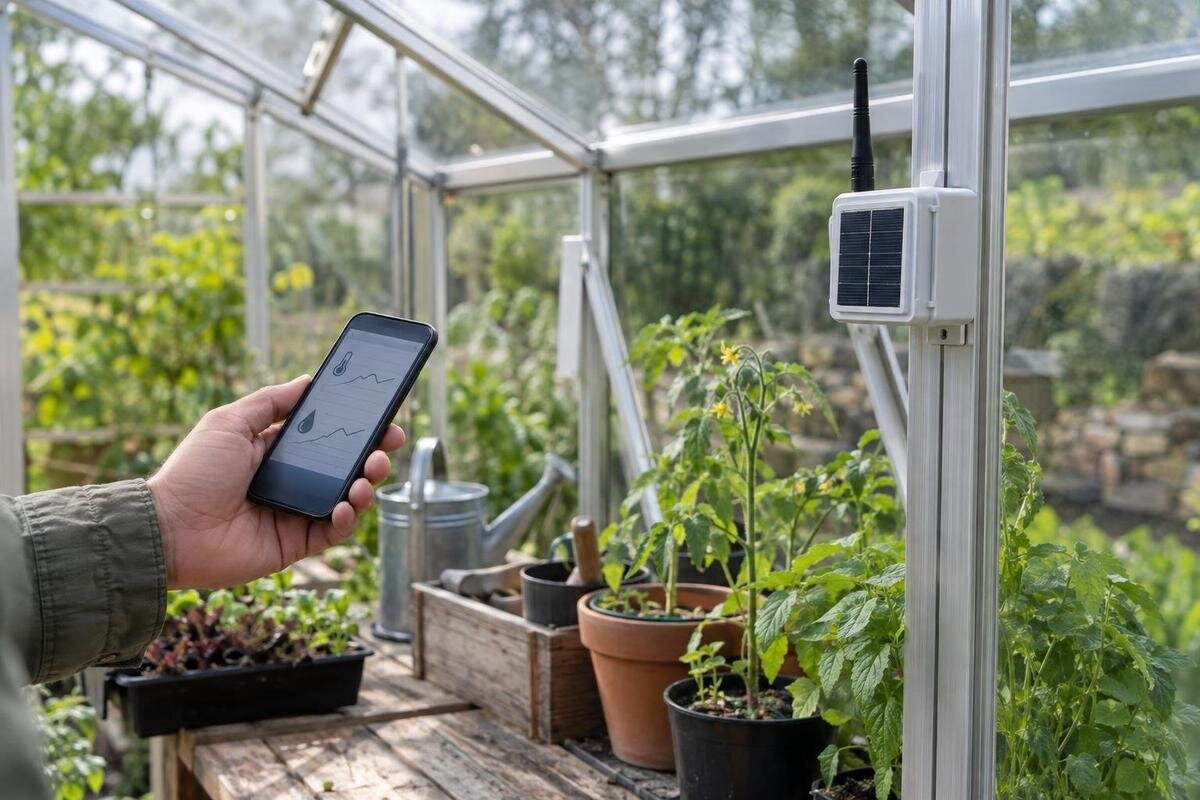
Greenhouse monitoring
A greenhouse monitor can work without your home Wi-Fi, but the alternatives do different jobs. A standalone logger stores readings for you to collect later; a mobile-network device may send remote alerts if service reaches the site; and a long-range radio link can carry readings from a sensor to a separate gateway. Choose by the information you need, the real signal path, ongoing fees and sensor compatibility—not by a claim of long range alone.

Buyer checklist 1
Decide whether you need a record, an alert or both
Begin by naming the information you need, rather than choosing a connection first. A greenhouse monitor might track air temperature, relative humidity or growing-media moisture, but a reading is useful only if the sensor measures the right variable and sits in a meaningful place. Decide whether you need a trend for later review, a live reading while you are on site, or an alert when a chosen condition occurs. These are separate jobs: a logger can keep a history without a network, while a remote alert must travel from the sensor to a receiver and then out to you. A dashboard you open yourself is not necessarily an automatic warning.
Write down what you would do with each reading. If a quick check during regular visits is enough, a local display or a logger you download may suit the task. If you are away and need to respond, the system needs a working route off the property and a notification you will notice. Identify who receives an alert, which measurements matter and how quickly you need to know. Set thresholds to suit your plants and operating decisions, rather than relying on a device’s default values. Monitoring can highlight a change, but it cannot correct it. Note when you would still inspect in person, so a sensor fault is not mistaken for reassurance.
Standalone loggers keep records at the greenhouse
A standalone logger measures at intervals and keeps readings in the unit or its local memory. Some models show current values on a screen; others are designed for you to collect or download data later. Neither function should be assumed from the word logger. Check the storage method, how many readings it can retain, whether old records are overwritten, and whether the data can be exported in a usable form. A display, removable card, USB connection or built-in battery is model-specific. Without an onward network connection, records remain local, but a genuinely standalone logger can keep recording through a home-router outage, provided it remains powered.
This can suit you if the main question is what happened between visits and you can return to retrieve the record. It is less useful when a reading needs immediate action: you will not know it has changed until you check, unless the device also has a local alarm. Match the memory capacity and sampling interval to how often you will visit. For footprint context, the Aluminium Classic Greenhouse range is listed from 3.77 to 28.08 m²; use your chosen layout to plan where readings are needed, not as a formula for sensor count. Try exporting a sample record and check that its units, timestamps and intervals are clear before relying on it.
Buyer checklist 2
Mobile-network monitors can send alerts without home internet
A mobile-network monitor uses a SIM or another supported mobile connection to send readings off the property, so it does not need your home broadband. Depending on the system, it may send a text, an app notification or readings to a cloud dashboard. Those routes are not interchangeable: app alerts may rely on the manufacturer’s platform and your phone settings, while texts depend on the device’s service arrangement. Check whether the modem is built into the monitor or supplied as a separate gateway, which network technologies it supports, and whether remote viewing depends on an account or plan.
Reception needs checking at the greenhouse, not just at the house, driveway or nearby road. A coverage map is a useful first check, not proof that a particular modem will connect in its final position. The Aluminium Lean-to Greenhouse range is listed from 3.69 to 14.34 m²; that footprint says nothing about mobile signal, so test the intended carrier with the actual monitor or gateway where it will sit. Confirm charges for data, messages or cloud access, and what happens during a loss of service. A system that stores readings until a connection returns works differently from one that reports when it has gone offline.
Long-range radio is only one part of the connection
Long-range radio usually describes the link between a sensor and a nearby receiver or gateway; it does not automatically describe the route from that gateway to your phone. A sensor may reach a local console without Wi-Fi, leaving readings visible only at the property. To receive an alert remotely, the gateway still needs a working onward connection, often called backhaul, such as a supported mobile or internet connection. Draw the full route from sensor to gateway, onward network, service and notification before buying. Ask whether a quoted range applies to the sensor-to-gateway link or the whole system, and what conditions that figure assumes.
The exact equipment and path matter: walls, metal, terrain, distance and other obstructions can affect radio reception. Match sensors to the gateway’s protocol and frequency rather than assuming every long-range device is compatible. The Spacious Greenhouse range is listed from 47 to 70 m². A larger footprint makes it useful to mark the farthest sensor and receiver positions on a plan, but the area figure is not a radio-range specification. Ask whether the quoted distance assumes line of sight and whether any relay is supported. Follow the manufacturer’s placement guidance and test the intended components in their final positions.
Buyer checklist 3
Choose alerts around the time you can respond
Pick an alert setup by the decision it supports. A warning about a condition that can change quickly is not useful if it arrives too late, while frequent low-priority notifications can be ignored. Check whether you can set limits for each sensor, choose a delay, see the reading and its location, and route notices to a second person. Threshold crossings, low batteries, sensor faults, gateway outages and lost network connections are separate events. Do not assume the system will alert you when its own connection stops. Find out whether messages repeat, clear automatically or need to be acknowledged.
Use a simple response plan: who sees the message, how they confirm the measurement, and what happens if the person responsible cannot be reached. Place sensors to represent the parts of the greenhouse you need to compare; one point may not describe every growing area. The T-Model Orangery Greenhouse range is listed from 16.52 to 30 m², but floor area alone cannot set a sensor count or alarm plan. For each important reading, check the manufacturer’s placement guidance and whether a communications fault will be visible on the app, logger or console. Treat an alert as a prompt to check, not proof that the whole system is healthy.
Test reception at the greenhouse itself
Test the exact connection path before settling on a monitoring method. For mobile service, check the network the monitor will actually use at the planned device or gateway position, with the greenhouse in its normal arrangement. A phone can give a rough indication, but its antenna and network support may differ from the monitor’s. Ask the supplier or carrier about a practical test method or trial. A coverage map cannot confirm reception at every point on a property. If you need a remote warning, test the notification at the receiving end as well as checking that the modem connects.
Test the sensor-to-gateway radio separately from the gateway-to-network service; success on one link does not prove the other. Mark likely sensor positions, the receiver location and any obstructions between them, then test the intended equipment in those places. The Pyramid Greenhouse range is listed from 5.53 to 18.9 m²; the selected footprint can help you map possible device positions, but only an on-site test can establish a usable signal path. Record where and when you tested, and whether the alert arrived. Repeat the check after final placement or a change to the equipment or layout. If the remote connection is intermittent, consider keeping a local logging option.
Buyer checklist 4
Confirm that sensors and software work together
Sensor compatibility is a system question, not a Wi-Fi question. Check the exact sensor model against the logger or gateway’s supported list. Confirm that it measures the variable you need, uses a supported input or radio protocol, and can report at the interval you expect. A connector that fits, or an app with the same brand name, does not prove that two devices exchange data. Ask how many sensors can operate together, whether extra probes need another hub, and whether readings appear in useful units. If you are combining wired and wireless sensors, check what the receiver accepts before buying either part.
Check the software chain as well: which phone platforms are supported, whether alerts need an account, how long historical data remains available, and whether you can export readings to keep. If you plan to compare records, ask how timestamps and sensor calibration are handled, and who provides support when a connection fails. A greenhouse footprint is context for considering how many measurement points you might need: Limited Edition Aluminium Greenhouse options are listed from 3.77 to 28.08 m². Confirm the monitor’s sensor capacity and placement requirements independently; the structure’s area does not establish compatibility or coverage.
Compare subscriptions and data-retention costs
Compare the full cost of ownership, not just the logger or sensor price. Depending on the system, you may also need a gateway, extra probes, a SIM, mobile data, a cloud or app subscription, data storage, replacement batteries or paid technical support. These are possibilities to verify, not standard inclusions. Ask which functions continue without a paid plan and whether remote alerts cost extra. Record the renewal period, any data limits, cancellation terms and charges for additional users. Do not base a budget on a trial feature unless you understand what it costs to keep using it.
Data access after a subscription ends is an important buying question. Can you still view readings on the device, export an archive or keep collecting data locally? Check for automatic deletion, download limits and whether you can change a SIM without replacing the hardware. Also separate a greenhouse feature from a monitoring feature: the Limited Edition Aluminium Greenhouse with Built-In Storage listing names physical storage, which does not establish that a logger includes local memory or a cloud archive. Ask each supplier for its own data-retention and service terms so the greenhouse and monitoring budgets stay distinct.
Buyer checklist 5
Plan for power cuts and lost connections
Every link needs power, including a sensor, receiver, cellular modem and any screen or router in the chain. Check the manufacturer’s stated power source and battery life under the conditions you expect; do not assume a battery, charger, solar supply or backup is included. Ask what happens during an interruption: does the device keep a local record, restart automatically, retain the correct time and report that it went offline? For fixed electrical work, use a qualified professional and follow the equipment instructions rather than improvising around a damp growing space. Even a device that is usually online can fail when you need it.
Build a fallback that matches the consequence of missing data. It might be a local logger alongside remote alerts, a periodic manual check or another person who can visit; the useful choice depends on your routine. Confirm whether readings are buffered during a network outage and sent later, or lost, and whether the system flags a flat battery or failed sensor. The Prestige Greenhouse range is listed from 3.77 to 28.08 m²; use your final layout to check sensor, gateway and power locations, then verify each part of the chain in place. A separate local record can help if the remote connection fails. Keep a note of faults and gaps so a blank graph is not mistaken for a stable environment.
Put the purchase decision into a simple test plan
A one-page comparison makes different systems easier to judge. For each measurement, note the sensor and location, logging interval, where records are stored, how an alert travels, the coverage test result, who is notified and any recurring fee. Add the sensor count, compatible gateway, power source, data-export method and what happens when the network is down. Ask the supplier to identify these features for the exact models being considered. This keeps terms such as wireless, long range and remote monitoring from standing in for details: each may describe only one part of the system.
Then apply a practical rule. If you mainly need trends and can retrieve them at the greenhouse, a standalone logger may be enough. If someone must know while you are away, choose a remote route only after confirming mobile coverage or a radio gateway with its own backhaul. If you need both history and response, look for local recording as well as tested alerts, or combine compatible equipment. Ask for a demonstration with the exact sensor and gateway pair, using the manufacturer’s test method. Make the decision from the complete route, costs and failure plan, not just an advertised distance or the presence of an app.
Frequently asked questions
Can a greenhouse monitor work without Wi-Fi or internet?
Yes. A standalone logger or local display can record or show readings at the greenhouse without an internet connection. To receive alerts while you are away, the system needs a working connection from the greenhouse to you, such as a supported mobile network.
Does a long-range sensor send alerts straight to my phone?
Not necessarily. Long-range radio may connect a sensor to a local receiver or gateway, but that is only one part of the route. For a phone alert, the gateway also needs a working connection and a service that can deliver notifications.
Is phone reception enough to confirm a cellular monitor will work?
It is a useful first indication, but not a guarantee. The monitor may use different network technology or have a different antenna from your phone. Test the intended device at its planned position and confirm that its network and service are supported.
Can I pair any sensor with a standalone logger?
No. Check the exact sensor and logger models for compatible inputs or radio protocols, supported measurements and operating limits. A shared brand name or a connector that fits does not by itself confirm that the devices will exchange readings.
Do mobile-network greenhouse monitors always need a subscription?
No; arrangements depend on the device and service. A SIM, mobile data, cloud storage or app alerts may involve ongoing fees, while a local logger may not. Check which features continue and whether you can keep your data if a plan ends.
The dependable option is the one whose full path—from sensor to stored reading or the person receiving an alert—you can verify at the greenhouse. If the path ends at local memory, plan when you will retrieve the data; if it ends at your phone, test the coverage, notification and fees together. That turns the lack of home Wi-Fi into a practical design constraint rather than a reason to pay for a feature you cannot use.
