
Why Greenhouse Readings Exceed the Outdoor Forecast
Greenhouse climate troubleshooting
A greenhouse reading above the outdoor forecast is not necessarily a fault. The forecast describes expected outdoor air conditions near a location; a greenhouse sensor measures conditions at a particular spot inside the structure. Direct sunlight on the sensor, different timestamps, a sheltered site and limited air exchange can all affect the difference. A consistent temperature and humidity log helps separate those possibilities.
A forecast is not a greenhouse measurement
An outdoor forecast does not describe the same air as a greenhouse reading. A forecast app’s headline high is an estimate for outdoor conditions in a location over a stated period; it is not a live reading beside your greenhouse, nor a prediction for the air beneath its glazing. The sensor inside measures conditions at its own position, height and time. Sunlight entering a glazed structure can warm its contents, while restricted air exchange can slow the return towards outdoor conditions. The gap may therefore be real even when the sensor is working properly. Begin by identifying the figures you are comparing: are they current temperatures, the day’s forecast high, or an observed outdoor reading?
Check whether the greenhouse number is a live value, a daily maximum or a reading saved earlier. Compare its timestamp with the forecast’s valid time, and confirm that both figures use the same units. A predicted daily high may occur later than the sensor reading you are viewing. If the app offers observed conditions, distinguish those from its forecast and note the location displayed. Treat the forecast as regional context, not an exact target for a glazed structure. A shaded, freely ventilated outdoor thermometer near the greenhouse gives a more useful same-time comparison, provided you keep it in the same position for each reading.
Check whether the sensor is in direct sunlight
Look first at the greenhouse sensor itself. A sensor in direct sun can absorb solar energy and read warmer than the surrounding air; the same can happen if its housing touches sun-warmed glazing, a frame or a wall. A position immediately under the roof may also differ from the crop zone, while a still corner may not represent the air where plants sit. Put the sensor in shade with air able to move around it, at a repeatable point representative of the area you want to monitor. Do not enclose it in a sealed box or place it against a surface. Check the device manual for any specific requirements for its probe or shield.
Test the location rather than guessing. Place a second thermometer beside the usual sensor in the shaded, ventilated spot, and let both settle as their manuals advise. Then leave one there and put the other at the normal measuring point. Repeat during strong sun and after the sun has moved off the usual sensor. If the difference follows the position, direct radiation or local air movement is a plausible contributor; it does not prove that the whole greenhouse is at the higher value. Mark the tested point and height so later readings are comparable. If planning a new structure, use the Pyramid Greenhouse page to identify a model, then confirm its exact plans and vent details before deciding where to monitor.
Verify the instrument, units and timestamps
Once the position is controlled, check the instrument and display. Confirm the setting is Celsius rather than Fahrenheit; some consoles show several sensors, a daily high or low, or a smoothed graph, while the live probe value may be on another screen. Check the date, clock, recording interval, selected sensor name, battery status and whether the app has synchronised. A clock set incorrectly can make a genuine peak appear to disagree with the forecast. Read the device manual for the probe’s stated accuracy, response time and placement guidance. Do not assume two different models react at the same speed.
Compare devices side by side in shade and moving air, not with one in the sun and one indoors. Follow each manual’s settling and checking instructions. If the difference remains outside the stated tolerance, use the manufacturer’s guidance before relying on either value; averaging two unverified readings can hide a fault. Record the greenhouse’s exact model and size alongside the instrument details. The Aluminium Greenhouses range, for example, lists floor areas from 3.77 m² to 28.08 m². Identify your particular size in the log, and label each monitored zone separately rather than treating one reading as representative of the entire footprint.
Make a repeatable temperature and humidity log
Use a log that captures conditions before, during and after the suspected heat peak. At each chosen time, record the greenhouse temperature and relative humidity, the shaded outdoor temperature, and the forecast value, noting whether it is predicted or observed. Add the app’s location and time window, sensor position, height and device ID. Describe sun or cloud conditions consistently, and note wind if you can do so reliably. Record the state of doors, windows, vents, fans and any shade. Use the logger’s recording interval if it provides one; for handwritten notes, choose repeatable times rather than relying on memory of the day’s maximum.
Include an early reading before direct sun reaches the greenhouse, one during the strongest sun and another later as sunlight fades. Repeat on several days with broadly similar conditions. The point is to see the shape and timing of the temperature curve, not to focus on one dramatic maximum. Keep the usual settings for a baseline, then annotate changes instead of altering the routine without a note. If a selected structure is listed with built-in storage, such as the Limited Edition Aluminium Greenhouses with Storage, check its exact layout and keep readings tied to the growing area you are diagnosing. A reading from one distinct zone may not represent another.
Read temperature and relative humidity together
Relative humidity is linked to temperature, so read the two columns together but do not treat them as interchangeable. It describes water vapour in the air relative to saturation at that temperature; it is not, on its own, a measure of the total amount of water present. If air warms without a corresponding increase in water vapour, the relative-humidity percentage can fall. If it cools, that percentage can rise without water being added. A lower humidity reading alongside a temperature rise is therefore not, by itself, proof of a faulty sensor or sudden drying. Check that the humidity sensor is in the same representative zone and that you understand its specifications and display settings.
Look at timing rather than relying on one correlation. A sharp temperature jump that appears only when sunlight reaches one sensor may point back to its position; a slower rise across several monitored positions suggests a broader change, although the log alone cannot identify the cause. Temperature and humidity sensors may also respond at different rates, particularly if they use separate probes or recording intervals. Note watering, open doors and vent changes if they coincide with a reading, but do not infer a crop’s water needs from relative humidity alone. Use the temperature trend to investigate the forecast gap and treat humidity as supporting context.
Measure the conditions around the greenhouse
An outdoor reading immediately beside the greenhouse can differ from an app’s reference because gardens have small-scale conditions of their own. A sheltered corner may receive less wind; paving, a wall or other nearby surfaces may become warm in the sun and affect a reading; a fence, building or trees can alter shade and airflow. The outdoor sensor can introduce another error if it sits in direct sun or against a surface. Keep it in the same shaded, freely ventilated position each time, following the sensor maker’s siting advice. Do not compare a sunlit outdoor reading with one taken in shade and assume the difference belongs to the greenhouse.
Note the sun’s path, when shade reaches the greenhouse, nearby walls and barriers, and whether wind reaches the openings. These conditions can change as the seasons do. If a local shaded outdoor thermometer and the app still differ, keep both figures: one is a site measurement and the other a forecast-area reference. When considering a Lean-to Greenhouse, include the adjacent wall in your site notes rather than predicting its effect from the model type. Record when the wall and proposed greenhouse position receive sun, and check how nearby barriers relate to the selected model’s openings.
Inspect the actual ventilation openings
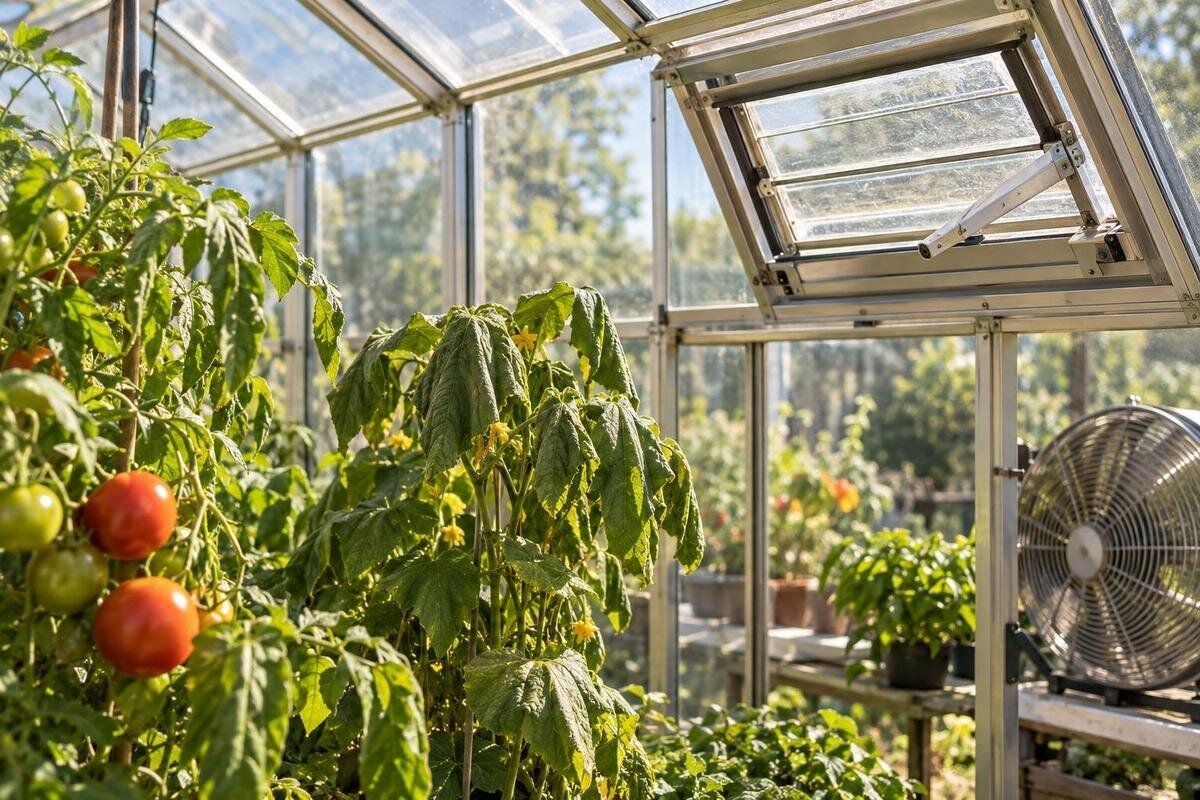
Once you have checked the sensor position and settings, inspect how air can pass through the greenhouse. Record which doors, roof or side vents, louvres and fans are actually fitted; do not assume every model has the same openings. Check that intended vents move as their manual describes and are not obstructed by stored items, ties, screens, plants or debris. Note whether each is open, partly open or shut at the time of a reading. With an automatic opener, compare its operation and settings with the maker’s instructions. Do not adjust a mechanism beyond those instructions or attempt electrical repairs.
Compare the recorded vent state with the temperature curve. A high reading while all openings remain closed may indicate that limited air exchange contributes, but that is not a diagnosis on its own: sunlight, outdoor conditions, sensor position and the path for air to enter and leave also matter. If you are considering the Bloomcabin Prestige Greenhouse, use your log to draw up specific buying questions. Check the exact variant’s opening sizes and positions, how the openings are operated and which controls are compatible. Those details are more useful for assessing your ventilation needs than the model name alone.
Test ventilation changes one at a time
Run one deliberate comparison after you have a trustworthy baseline. On a similar sunny day, change one controllable factor at a time—for example, open existing vents as the instructions allow, or operate a compatible fan according to its manual—and note the start time and settings. Keep sensor positions fixed and avoid changing shade, doors and fan settings together. Compare readings at the same points in the day, and note differences in cloud and wind. Otherwise, a cooler result could simply reflect a change in weather rather than the adjustment you are testing.
If the temperature rise is smaller after an airflow change under reasonably comparable conditions, ventilation likely plays a part. If it is unchanged, do not assume the structure cannot benefit from better ventilation: wind, vent placement, air paths, solar gain and the limits of a short test can mask an effect. Repeat before settling on a cause. For a larger greenhouse under consideration, the Spacious Greenhouse listing gives a stated floor-area range of 47 to 70 m²; area alone is not an airflow rating. Ask for the exact opening details rather than selecting by footprint or expecting size alone to prevent heat build-up.
Separate shade effects from ventilation
Shade is a separate variable to test, not a substitute for a reliable sensor or functioning vents. If the greenhouse is in direct sun, make a controlled comparison using only a shading arrangement already supplied or approved for that structure. Record where and when it is used, keep sensor positions and vent settings constant, and compare similar periods of sun. Ensure the test does not cover an opening or conflict with the greenhouse maker’s directions; do not attach an unverified load to the frame. A temperature log can show whether the change coincides with a smaller rise, but it cannot tell you whether the plants are receiving suitable light.
Do not choose a shade percentage from temperature data alone. Crop light requirements and measured light are separate questions, and a heat log cannot establish them. Before buying a structure, check whether any shade option is listed as compatible with the exact model, where it can be fitted and whether openings remain usable. When comparing the Limited Edition Aluminium Greenhouses, distinguish between shade supplied with the chosen model and an optional system that needs separate compatibility checks. Confirm the fixing arrangement and access to the vents rather than assuming every size or variant accepts the same equipment.
Use the results to choose a correction
Use the evidence to choose the smallest correction that addresses the likely cause. If the problem follows the sensor, relocate it or follow the maker’s advice. If the app and local outdoor reading disagree, retain both as different references. If a blocked or closed opening is the issue, restore its intended operation in line with the manual. If readings remain unusually high across the greenhouse despite a correctly sited sensor and documented ventilation, seek advice from the supplier or a qualified greenhouse installer before altering the structure. Do not cut new openings or modify mechanisms on the strength of a temperature chart alone.
If you are choosing a new greenhouse because the current layout cannot be ventilated as needed, turn the log into a short brief: hottest time, sun exposure, local wind shelter, existing opening type, intended controls and any shade requirement. Compare details for the exact size and variant. The T-Model Orangery Greenhouse has a stated floor-area range of 16.52 to 30 m²; specify which size you are considering when asking about opening options, monitoring positions and shade compatibility. Discuss the proposed configuration with a qualified installer before committing to structural changes or additional equipment. Use the patterns in your log to explain the problem you need to solve, rather than expecting a larger or differently shaped greenhouse to resolve it automatically.
Frequently asked questions
Why can the greenhouse be hotter than the forecast?
The forecast describes expected outdoor conditions for a location and period, while a greenhouse thermometer measures air inside the structure at one particular spot. Sunlight, limited air exchange, the position of the sensor and differences between the forecast area and your garden can all contribute to the gap.
Could direct sunlight make my thermometer read too high?
Yes. A sensor exposed to direct sun, or touching a sun-warmed surface, can register warmer than the surrounding air. Compare it with another thermometer in a shaded, freely ventilated position, and follow both devices’ instructions for placement and settling time.
Should I compare the current reading with the forecast high?
Not as if they were readings from the same moment. A forecast high may be expected later in the day, whereas your greenhouse display may show a live value or a stored maximum. Check the time, date, units and whether the outdoor figure is forecast or observed.
What should I record in a temperature and humidity log?
Note the time, greenhouse temperature and relative humidity, a shaded outdoor temperature, and the forecast value with its time window. Also record sensor position, sun and cloud conditions, and whether doors, vents, fans or shade have changed. Repeat at consistent times over comparable days.
Does lower relative humidity during a temperature rise mean the sensor is faulty?
Not necessarily. Relative humidity can fall as air warms without a corresponding increase in water vapour, and rise as air cools. Treat the pattern as context, then check sensor position, specifications and readings from another device before concluding that anything is faulty.
Once you compare like with like, the gap is easier to explain. Check timing and units first, then test sensor position and instrument behaviour. Build a matched indoor-and-outdoor log before assessing site exposure, ventilation or shade. A forecast is useful context, not a temperature promise for a glazed structure. Keep the notes with the greenhouse and repeat a controlled check after any change; patterns across comparable days are more useful than reacting to a single peak.
