
Which Greenhouse Temperature Alarms Are Worth Setting?
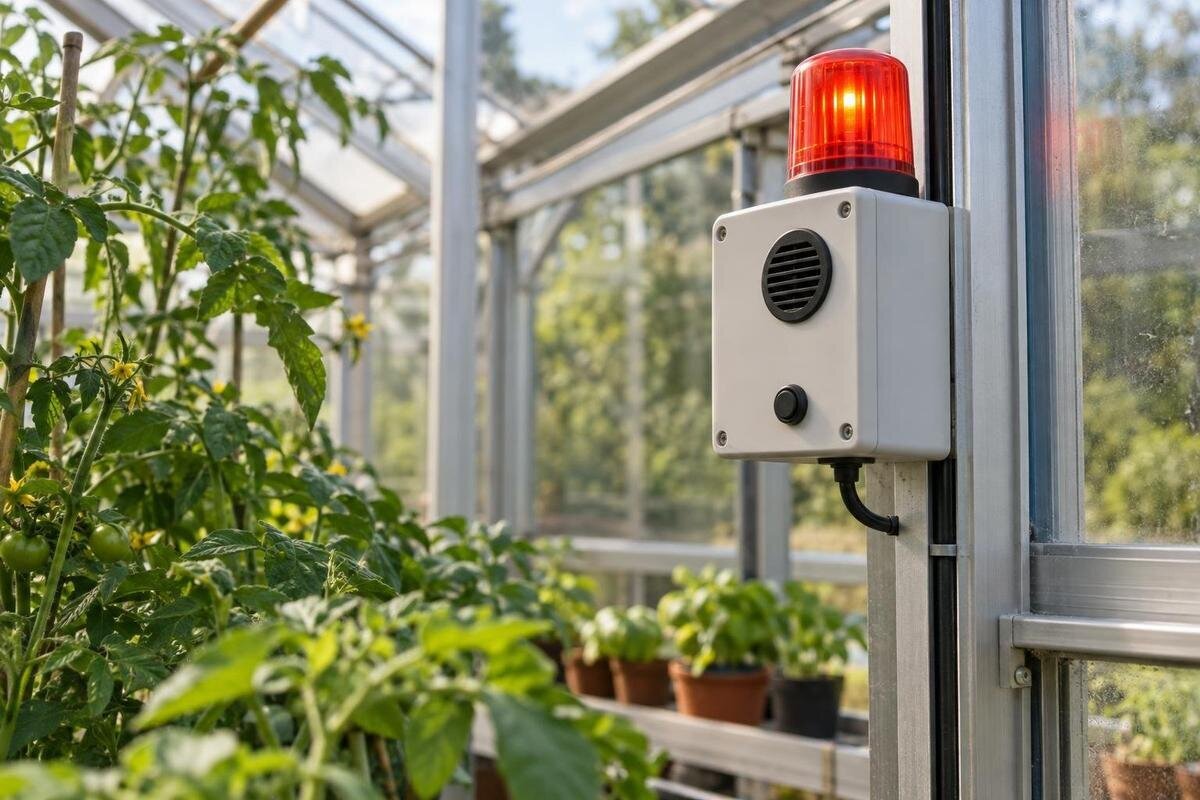
Greenhouse temperature monitoring
Temperature alarms are worth setting when they give you enough warning to make a useful check or change. A bare notification that says ‘too hot’ is not a response plan: it does not tell you whether the reading is urgent, who should act or what to do if nobody acknowledges it. Set thresholds against the needs of the crops in each growing area, separate an early warning from a critical alert, and arrange a backup person for absences. Logged readings and equipment manuals help you choose realistic margins. The aim is not to raise an alarm at every fluctuation, but to flag a significant temperature change while there is still time to respond.
01
Define the response to each temperature alert
A greenhouse display can show a number all day; an alarm should mean that a decision is due. Before enabling one, name the event, the recipient, the check they must make and the action they may take. If the system allows it, include the affected zone, reading, threshold, unit and time in the message. A notification with no owner or location is easy to dismiss, especially when several people share the work or the person who configured the app is not nearby.
Distinguish routine readings from warnings to investigate and critical alerts requiring prompt attention. Use separate alert levels only when each changes the response. A warning might ask someone to confirm the reading and check the planned controls; a critical message should prompt a call or visit, not just a reminder to look later. If both levels lead to the same action, simplify them. Where the system uses one notification channel for both, put the urgency first in the message. Fewer meaningful alerts are easier to recognise than a stream of notices for ordinary fluctuations.
Set thresholds for the crops and the conditions you record
Find the upper and lower limits that matter for the actual crops and growth stages, using trusted crop or supplier guidance rather than a universal greenhouse number. Set an action boundary for heat and another for cold; the preferred growing temperature is not automatically the point at which an alarm must sound. If crops with different tolerances share a space, use separate monitored zones and threshold sets, or base the alert on the most vulnerable crop there. Record which plants each rule protects and the guidance you used, so a crop change does not leave stale settings.
Review logged readings across ordinary warm and cool conditions; one unusually mild day will not show how the greenhouse behaves over time. Note whether readings often brush past a proposed boundary briefly. Choose a buffer between the warning and the crop action limit, allowing for the device’s stated accuracy, its update interval and the time a person needs to respond. The Pyramid Greenhouse is listed in sizes from 5.53 to 18.9 m²; its footprint is a planning input, not a sensor-count specification. Use the chosen layout and crop map to decide what an alert represents.
02
Separate a high-temperature warning from a critical alert
Make a high-temperature warning arrive before the upper action limit is reached. Set the critical threshold at or slightly below the point where you would no longer accept a delay, accounting for how quickly readings have been rising in your logs. The warning should leave time to verify the message and check the planned response; the critical alert should prompt an immediate call or visit. Keep a clear gap between the two thresholds rather than attaching two labels to the same reading. If your crop guidance gives a range, decide which boundary you are protecting before entering numbers.
Do not copy a setting from a thermostat or from another crop zone. A thermostat setpoint controls equipment; an alarm threshold notifies a person, and those purposes may differ. Make the message explicit, such as ‘heat warning: confirm the reading and check the planned ventilation’ or ‘critical heat: contact the named responder’. The Limited Edition Aluminium Greenhouses with Storage range is listed from 5.52 to 28.08 m²; size alone cannot set a high limit, so base the threshold on the crops and their logged readings.
Set low-temperature alerts before the crop reaches its limit
Set low-temperature alerts independently, because responding to cold may require a different person or action from responding to heat. Put the warning above the selected crop’s lower action boundary so there is time to check conditions; make the critical alert prompt action before that boundary is crossed. Use crop-specific guidance for the boundary and consider how long a person needs to reach the greenhouse. A low reading describes current conditions; it does not predict an overnight minimum or replace a separate forecast-based decision.
Use actual overnight minima and the duration of cold periods in your records when choosing the margin, rather than assuming the structure will prevent a drop. If the greenhouse is unheated, an alarm can alert you to risk but cannot make it frost-free; the responder needs a realistic option, such as checking the plants and applying protection already planned for that crop. The Bloomcabin Prestige Greenhouse range is listed from 3.77 to 28.08 m²; the chosen layout and plant grouping, not the catalogue name, should determine which low-temperature rule applies. Check that someone is available during the hours the alert matters.
03
Use humidity logs and growing areas to interpret alerts
Keep temperature alerts anchored to temperature readings. A humidity log can help you interpret the conditions recorded around an excursion, but humidity is not a substitute for a high- or low-temperature alert. If you also want a humidity notification, give it a separate action and owner; otherwise it adds noise without making the temperature message more useful. Pairing values in a log can reveal recurring patterns, but do not wait for a humidity threshold before responding to a direct temperature warning. Keep the primary alert plain: which limit was crossed, and when?
An alert must represent the crop area that matters. If you have distinct planting areas, review the logged pattern before applying one rule everywhere; separate thresholds are worthwhile when crops or likely responses differ. The Spacious Greenhouse range is listed from 47 to 70 m²; that fact helps with planning the layout, but it does not state how readings vary or how many monitors are supplied. Map each alert to the beds or crop group it covers, and note any area it does not represent. Do not use overall floor area as a substitute for identifying which crops a reading represents.
Choose alert delays and reset rules carefully
Choose how long a reading must remain beyond a threshold before a notification is sent, if the system allows a delay. A brief crossing may not need the same response as a sustained rise or fall. Use logged readings to distinguish the two. Keep any delay short enough to allow for message delivery and the responder’s journey before the crop’s action boundary is reached. Consider the full interval between the first threshold crossing and someone being able to act. If temperatures can move quickly towards a limit, use a shorter delay or immediate critical alert; a long filter can hide the event you set out to catch.
Some devices also allow a rate-of-change alert or a reset gap. A rapid-rise notification can prompt an early check, but it should supplement, not replace, absolute high and low thresholds. A reset gap, often called hysteresis, helps prevent repeated messages when a reading hovers around the trigger; follow the device manual and ensure the alert clears only after the reading has moved back into the crop’s acceptable range. The Aluminium Greenhouses listing covers 3.77 to 28.08 m², but its footprint cannot determine a delay: test the setting against logs from the actual greenhouse.
04
Send urgent alerts to someone who can respond
Route messages according to urgency, not just according to who owns the monitor. A warning might go to the grower first, while a critical high or low alert also reaches a backup by text message or phone if the system supports those channels. Give each recipient a clear task and keep contact details current. A push notification on one phone is fragile if it is switched off, left indoors or outside coverage. Check whether messages can be directed differently by alert level before relying on that distinction.
Set an escalation rule for an alert that is not acknowledged: after a response window based on how quickly the crop could reach its limit, contact the next person. Ask the backup to confirm they can reach the site and understand what they may do; do not assume they will be available. When planning access for a Lean-to Greenhouse, listed in sizes from 3.69 to 14.34 m², consider the actual route the helper will use rather than the footprint alone. Provide the location, entry arrangements and a clear way to report back, including whom to contact if access is blocked.
Match each alert to a safe, specific response
Write one short response for a high alert and another for a low alert. For heat, the first check might be to confirm the reading and whether ventilation or shading you already rely on is working as intended. For cold, it might be to confirm the reading and follow protection steps already planned for the crop. Do not tell a helper to improvise with equipment or assume the alarm has opened a vent. The Limited Edition Aluminium Greenhouses listing identifies a greenhouse range from 3.77 to 28.08 m²; it does not specify installed ventilation, shading or alarm equipment.
Add a stop point: when should the person call you, and what should they not touch? State which controls they are authorised to use and which need your decision or a qualified professional. If automation is part of the plan, check the manuals for the actual compatible configuration and what happens during a power or communications failure. A notification is not proof that equipment responded. Keep the response card short enough to read on a phone, with a way to report what the person found and whether the temperature is still changing.
05
Arrange cover before you leave the greenhouse unattended
Before leaving for a day, weekend or longer trip, give the responder a simple record with crop groups, warning and critical thresholds, who to call, site directions, access arrangements and the first action for each alert. Set the maximum time before someone must check in according to the threshold margin and how quickly readings change, not a convenient round figure. If nobody can attend within that window, a remote message is not equivalent to physical intervention; change the care plan before you go. Keep a copy where the backup can find it without asking you.
Walk through the handover with the responder while you are still available. Ask them to explain which message requires a visit, where they would go and whom they would call if they could not attend. Resolve any uncertainty about access or permission to use the agreed controls before departure. The T-Model Orangery Greenhouse range is listed from 16.52 to 30 m²; use your actual layout to identify which crop areas the responder must inspect rather than assuming one alert describes them all. Check that the instructions remain accessible if they cannot reach you by phone.
Test the alert chain and review it after changes
Test high and low alert paths using the device maker’s safe procedure; do not deliberately heat or chill plants to see whether an alarm works. Check the threshold label, units, timestamp, delivery channel and reset behaviour, then verify the backup route as well. Where the system supports an offline or low-battery warning, test it or confirm the feature as the manual permits. Record who received the alert and whether escalation was prompt enough. An alarm that has never been tested is only a setting on a screen.
Review readings after an alarm. If an alert did not need action, look for a short spike, an unsuitable delay, a wrong crop limit or a reading that does not represent the relevant area; do not simply raise the threshold. If an expected alert did not arrive, check the notification route and device settings. Revisit the rules when crops, growing areas, ventilation or shading arrangements, or equipment change, and after new logs show a different pattern. Keep a dated list of thresholds, delays, recipients and the reason for each change, so another person can maintain the system.
Frequently asked questions
What temperature should a greenhouse heat alarm use?
There is no single setting that suits every crop. Use crop-specific guidance to identify the upper action limit, then set an earlier warning so there is time to check conditions and respond. Set the critical alert at or before the limit, allowing for the reading’s accuracy and how quickly someone can reach the greenhouse.
How should high- and low-temperature alerts differ?
Set the high threshold from the relevant upper crop limit and the low threshold from the lower limit, using your own records to allow time for a response. Heat and cold may affect different crop groups and require different actions. Within each set, use separate warning and critical thresholds only when they prompt different responses.
Can a temperature alarm open greenhouse vents automatically?
Only if the installed system is designed to control compatible equipment. A notification does not, by itself, open a vent or operate shading. Check the relevant equipment manuals and the configuration you actually have, and make sure the response plan explains what happens if power or communications fail.
How can I reduce repeated or false alerts?
Review the logs to see whether the cause is a brief crossing, an unsuitable delay, a threshold that does not fit the crop, or a reading that does not represent the relevant area. If your device allows it, use a suitable persistence period and reset gap. Do not simply raise a threshold if a rapid temperature change could still matter.
What should I do if an alert arrives while I am away?
Follow the response plan: contact the named person who can check the greenhouse, share the message and escalate if they do not acknowledge it within the agreed time. A remote reading is not proof that the problem has been fixed. If nobody can attend quickly enough, arrange suitable cover before leaving.
The alarms worth keeping have distinct thresholds, a clear priority and a response someone can carry out. In practice, that means crop-specific high and low alerts, an early warning before a critical limit, and separate rules only when they lead to different actions. Let logged readings shape the margin and delay, and make sure urgent messages reach someone who can attend. When thresholds, escalation and testing are written down, the setup is easier to maintain—and less likely to be ignored when the greenhouse needs attention.
