
Greenhouse Monitoring Without Home Wi-Fi: What Are the Options?
Greenhouse monitoring
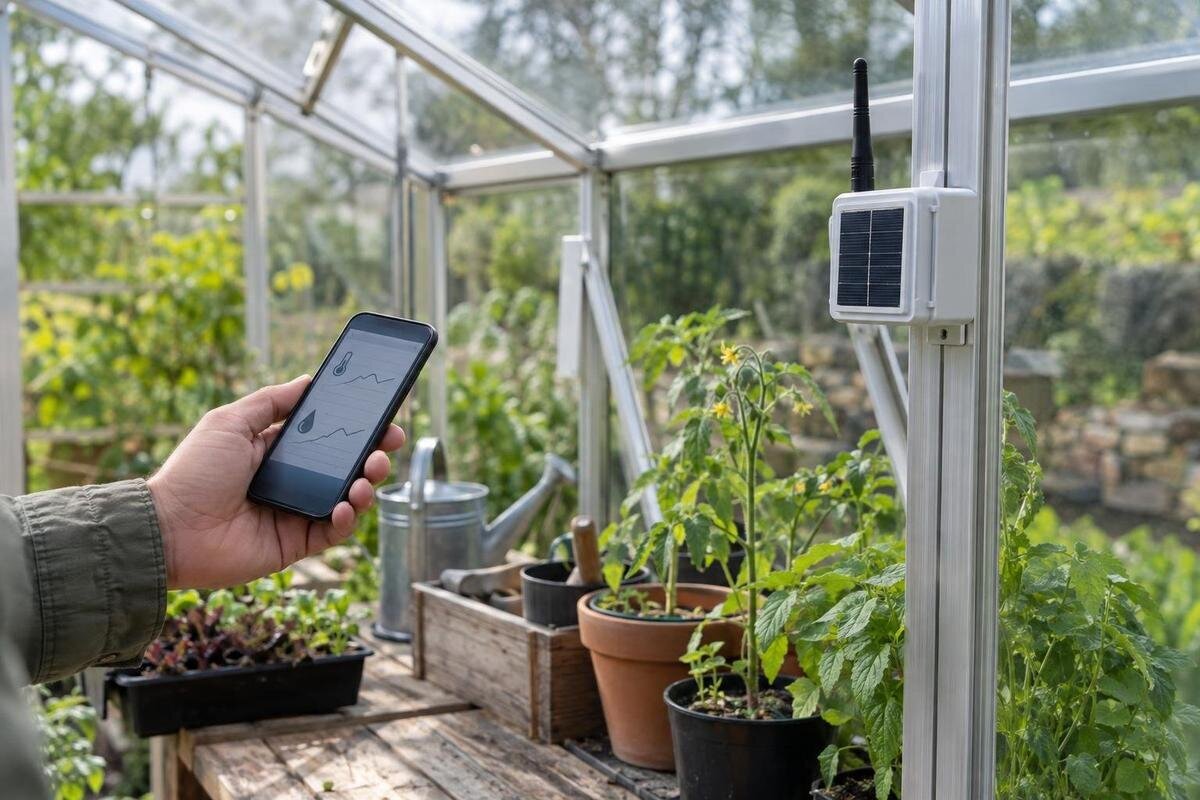
A greenhouse at the end of the garden can sit outside the reach of household Wi-Fi, but that does not make monitoring impossible. The practical choices are local logging, a mobile-network device, or a long-range radio link to a gateway; each solves a different part of the connection problem. A logger can keep a record without sending anything. Mobile monitoring needs coverage and may involve ongoing service. Long-range radio reaches a receiver, but remote alerts still depend on the gateway's route to the internet or mobile network. This guide explains what to test at the actual greenhouse, how subscriptions and sensor compatibility affect the choice, and when a simple record may be more dependable than a live alert.
Before you buy 1
Choose between a record and a live alert
Your home Wi-Fi does not have to reach the greenhouse for you to collect useful readings there. The first question is whether you need a record to inspect on your next visit or an alert that reaches you while you are away. A local display or logger may be enough if you visit often and want to understand patterns. Remote alerts matter when timing changes what you can do, but they add a communication path, running costs and a need to respond. List the decision each reading should support: checking a watering issue, reviewing temperature changes or comparing conditions over time. Monitoring alone does not open vents, water plants or correct a fault.
Choose measurements to fit that decision. Air temperature, relative humidity, growing-medium moisture and light each need a sensor that supports the measurement; an outdoor forecast is not a substitute for a reading inside the greenhouse. A sensor reports conditions at its own position, not a universal average. The Spacious Greenhouse range is listed from 47 to 70 m², so if you are considering a footprint of that scale, map the areas you care about before deciding whether one point tells you enough. Note how quickly data needs to update, how long the history should be kept, and who will act when a reading appears. These answers narrow the system before you compare brands.
Standalone data loggers keep a local record
A standalone logger senses and saves readings locally without needing home Wi-Fi or mobile service. Depending on the model, the record may be viewed on a screen, downloaded later or retrieved by connecting another device; the term alone does not guarantee any one method. A logger can suit a greenhouse beyond signal range when a delayed record is acceptable. The trade-off is that it cannot send a live remote warning unless it has another communication feature. If you only check it during weekend visits, a short-lived event may begin and pass between checks; the logger will show it only if its sampling interval and memory captured it.
Before buying, check which sensors are included, whether the logger has internal memory or relies on a separate unit, and how readings are retrieved. Ask about the sampling interval, maximum retention, timestamps and export format. Find out whether old records are overwritten when memory fills, and what happens after a flat battery, power loss or sensor disconnection. Some systems can keep logging without internet and sync later; others cannot, so confirm the exact behaviour in the manual. The Aluminium Greenhouses range is listed from 3.77 to 28.08 m²; the footprint and internal arrangement can affect how many locations you want to measure. Keep a dated note of venting, watering or other changes beside the logger record to help interpret trends.
Before you buy 2
Mobile-network alerts depend on signal at the greenhouse
A mobile-network monitor uses a mobile connection, often through a SIM in the sensor or a nearby hub, to send readings or alerts without home Wi-Fi. Confirm which component actually connects to the network: an outdoor sensor may communicate only with a gateway, and that gateway could still need Wi-Fi or a wired internet connection. Ask which networks and radio technologies the unit supports, whether a SIM is supplied or must be arranged separately, and whether the service is available at the greenhouse location. A coverage map is a useful first filter, not proof of a dependable signal at the device's exact position.
Test the selected device, on its intended network, where it will be used. A phone showing bars nearby is only a clue: its antenna, network and position can differ from the monitor's. Check whether the device reports signal strength, how it behaves during an outage, and whether it stores readings for later upload or drops them. Find out what the alert actually is—an app notification, text message or another route—and whether it needs mobile data, a cloud account or an active subscription. When planning monitoring for a Lean-to Greenhouse, include the proposed gateway position in the test rather than checking only your phone at the garden gate.
Long-range radio links and remote access
A long-range radio system has two separate links to consider. One runs from the sensor to a local receiver or gateway; the other, if you want remote access, carries information from that gateway onwards, usually over an internet connection or a separate mobile service. Long-range in a product description normally refers to the first link, not a promise that data can reach your phone from anywhere. If the gateway is in the house and has internet, the greenhouse sensor may not need home Wi-Fi itself. If the gateway is also beyond internet access, check what remote features remain.
Range figures need context. Ask whether a claim is measured in open space, indoors or through typical garden obstructions, and whether the system supports a repeater or an alternative gateway position. Walls, sheds, glazing frames, terrain and foliage may affect reception, so an advertised maximum is not a site test. Check that the receiver can be placed where it has power and its required network, then verify the link from the sensor positions you intend to use. With a T-shaped footprint, the T-Shaped Orangery Greenhouse range, listed from 16.52 to 30 m², is a prompt to mark sensor positions and the gateway route on the actual plan rather than assuming one radio path reaches every area.

Before you buy 3
Compare subscriptions, data use and ongoing costs
Remote monitoring can have continuing costs even when you buy the device outright. Separate recurring charges, such as a SIM or data plan, cloud access, paid app features, extra user accounts and message charges, from equipment purchases such as additional sensors. Include replacement batteries in the running costs. Do not assume every supplier charges for every item; compare what each plan actually includes and how long readings remain available. Establish whether app or text alerts are included, whether a data allowance applies, and whether you need a subscription just to view stored history. A local logger may avoid connectivity fees but shifts the work to manual retrieval.
Check what happens if payment lapses, the supplier's service changes, the app is discontinued or the internet connection is unavailable. Does the device still measure and hold data locally? Can you export an archive before access ends? Is it usable without a cloud account? These questions matter because a saved record may be useful across a growing season. If you are considering a Limited Edition Aluminium Greenhouse, base your monitoring budget on the sensor points planned for your chosen layout, rather than the model-family name. Calculate the first-year total alongside the feature list, showing equipment purchases, ongoing charges and optional services separately.
Check sensor, gateway and app compatibility
Compatibility is more than whether two devices use the same wireless label. Check that the sensor communicates with the gateway's supported protocol and frequency, that the correct version is supplied, and that the hub can accept the number and types of sensors you need. A device may measure temperature but not humidity or growing-medium moisture; a hub from the same brand may still support only certain product lines or generations. Ask for a list of compatible model numbers, not just a general claim that the system can be expanded. If third-party sensors are mentioned, confirm the exact combination in the product documentation.
Then check how the data reaches you: does it need a manufacturer's account, a particular app or operating-system version, and internet at the gateway? Can readings be exported in a usable file? Are alerts available for each measurement or only selected sensor types? Confirm that the manufacturer specifies the sensor for the humidity, condensation or splash conditions where you plan to place it. Mark the proposed sensor and gateway positions on your plan for the Limited-Edition Aluminium Greenhouse with Built-In Storage, then record the compatible device models alongside it. This keeps the layout and equipment list together when you compare systems.
Before you buy 4
Place sensors where the readings will be useful
Put a sensor where its reading answers a real question. For air temperature, a position in direct sun or immediately beside a vent can record a local effect rather than the conditions you want to track; follow the sensor maker's placement instructions and keep the position consistent when comparing days. For growing-medium moisture, use a sensor designed for that medium and follow its specified depth and installation method. Light sensors need a defined orientation and an unobstructed position; humidity sensors are not interchangeable with moisture probes. The right location depends on the crop layout and purpose, so write it down and mark it on a plan.
Consider whether the greenhouse has distinct beds, shelving or ends that behave differently, and whether you need to compare them or monitor one representative area. Multiple sensors can clarify variation, but they also add cost, configuration and battery-management work. Avoid moving a sensor and comparing the resulting record as if its location stayed constant; note changes to position, calibration or replacement. The Pyramid Greenhouse range is listed from 5.53 to 18.9 m², but area alone cannot show where benches or crops will sit in your own layout. Label each sensor by location in the app or log so that a reading remains meaningful later.
Make alerts actionable and plan for outages
An alert is useful only if it is timely, understood and actionable. Set thresholds around the task and the sensor's documented capabilities; a value that is too sensitive can generate repeated notifications, while a loose threshold may arrive after you could respond. Do not copy a threshold from another greenhouse without considering your own crops, equipment and normal pattern. Separate a warning about a measured condition from a notification that the device has gone offline. A quiet phone could mean nothing changed, a sensor battery failed, the gateway lost connection or the service stopped; look for an explicit outage warning and know what that feature covers.
Decide who receives an alert, who can check the greenhouse and what happens if the first person is unavailable. Test delivery during initial set-up and after changing a number, app or network; do not rely solely on the notification sound. If the device can notify more than one user, confirm how people are added and whether each needs an account. If you are planning a Prestige Greenhouse, use the same area names on the layout and in the monitoring app so anyone responding can find the sensor that triggered the alert. Keep a manual check in your routine until the alert path has proved dependable.
Before you buy 5
Test the complete connection before relying on it
Run a site trial before trusting the system during a busy spell or a period when you cannot visit. Put sensors and the gateway where they are intended to stay, record the date, time and locations, and compare readings with a separate reference instrument for long enough to reveal dropouts or implausible changes. A second instrument is a comparison, not a guarantee of accuracy; check its specifications and allow for differences in sensor response and placement. Verify that timestamps, units and stored readings look right. If the manufacturer provides a safe test function, use it to check how a test event appears in the record.
Test the entire route: sensor to gateway, gateway to the service, and message to the intended phone or account. Follow the manufacturer's procedure to confirm a warning without creating harmful conditions in the greenhouse. Check what appears after a brief connection interruption, how a low battery is indicated, whether missing data can be uploaded later, and whether an outage is distinguished from a normal reading. If remote access works only outdoors or beside the house, the set-up has not passed its real-location test. Keep a short log of the result, including any app or subscription steps and who received the alert; repeat after moving equipment or changing a provider.
Match the connection to the monitoring task
Choose by the outcome, not the longest stated range. If a record on your next visit is enough, a standalone logger may be the simplest fit. If you need remote alerts and mobile coverage is confirmed at the device, consider a mobile-network set-up and include its service cost. If there is reliable internet at the house but not the greenhouse, a tested long-range sensor-to-gateway link can bridge the gap; the gateway still needs its own route online. If neither mobile coverage nor a radio path is dependable, local logging and a scheduled visit may be more realistic than an alert system that cannot reliably reach you. Check whether a hybrid system stores readings locally when its connection drops.
Before ordering, write down the measurements, sensor locations, required update frequency, history retention, alert route, network dependencies, recurring costs and response plan. Compare those needs with the manuals for the exact sensor, gateway and subscription, and ask the supplier to resolve uncertain compatibility or coverage points. The greenhouse itself affects where measurements can be taken, so plan around its actual layout rather than relying on a product-family name. A test at the intended site tells you more than a range figure alone.
Frequently asked questions
Can I monitor a greenhouse without any internet connection?
Yes. A standalone data logger can store readings locally for you to view or download later, if that is how the chosen model works. Without an internet or mobile connection, it cannot provide a remote alert unless it has another supported communication route.
Does a mobile-network monitor need home Wi-Fi?
Not necessarily. A device with its own supported mobile connection may send readings without home Wi-Fi, but check whether the sensor or its gateway has the SIM and whether the service has coverage at the greenhouse. Some gateways still need an internet connection of their own.
Does long-range radio send alerts straight to my phone?
Not by itself in many set-ups. Long-range radio usually describes the link from a sensor to a receiver or gateway. To get an alert remotely, that gateway also needs a suitable route to the internet or mobile network.
Will signal bars on my phone prove that a monitor will work?
No. The phone may use a different network or have a different antenna from the monitoring device. Treat phone reception as a clue, then test the exact monitor in its intended position and confirm what happens if the connection drops.
How many greenhouse sensors do I need?
There is no fixed number. Choose sensors for the measurements and locations that answer your questions, such as air conditions in a particular area or moisture in a chosen growing medium. Check that the gateway supports the required sensor types and quantity.
Choose the simplest system that provides the record or warning you need and has a dependable connection at the site. Treat sensor-to-gateway, gateway-to-service and service-to-you as separate checks; one successful link does not prove all three. If no remote route passes a test at the intended location, use a local logger and a visit schedule rather than trusting alerts that may never arrive. Keep the sensor locations and connection details with the greenhouse log.
