
Buying a greenhouse on Black Friday: discount and voucher code terms

BLACK FRIDAY GREENHOUSE BUYING
If you plan to buy a greenhouse on Black Friday, a headline reduction is useful only if the item you want qualifies and the code works as stated. Offers may be automatic or require a voucher code, and their conditions can limit eligible products, spending thresholds, dates or combinations with other discounts. Read the terms beside the exact product page, then check that the reduction appears in your basket before ordering. This guide explains how to assess an offer you encounter; it does not announce a live price or code.

Identify the type of Black Friday offer
Black Friday wording can describe an automatic price reduction, a voucher code or another conditional offer. Identify which type you are looking at before comparing greenhouse prices: does the product page already show a lower figure, or must you enter a code in the basket? Note the stated saving, the products to which it applies, and any cap or minimum spend. A percentage alone does not tell you the final amount if the offer covers selected products or only part of an order. The Black Friday greenhouse discount terms, not the headline, determine what applies.
Compare like with like. Identify the exact greenhouse page and any option you have selected, then compare its displayed item price with the amount due after applying the offer. A code might be calculated against an eligible item rather than the whole basket, while a maximum saving can limit the reduction. Use figures shown for the promotion in front of you; do not infer an earlier price or a particular saving from the Black Friday label. If the calculation is unclear, confirm the final amount displayed at checkout before ordering. Where the terms define a reference price, note what that figure refers to.
Match the offer to the exact greenhouse
Eligibility is the first product-specific check. A promotion may cover every greenhouse, a named range or selected products; the category label alone does not settle its scope. Read the eligible-products wording and match it to the exact title of the item you intend to buy. For example, check whether the classic greenhouse listing is named or falls within the stated range. If the product page offers selectable options, check whether the terms include all of them or only a specified choice. Its position in the category does not establish that the offer applies.
Look for distinctions between an individual product, a product range and a selected option. Terms may exclude a named model, a particular line or an already reduced item without excluding the whole category. If the offer and product page use different wording, compare any model reference or item identifier shown rather than relying on a broad menu label. When you cannot make a confident match, ask the retailer to confirm the exact item and code before counting on the discount. A clear answer is more useful than assuming a nearby product name is close enough.
Read greenhouse code exclusions carefully
Exclusions can narrow an offer that sounds broad. Look for phrases such as ‘selected products only’, ‘not valid on reduced items’ or a list of excluded ranges. These are examples of restrictions to look for, not terms that apply to every Black Friday promotion. Read the full offer text, including footnotes and linked conditions, rather than relying on a banner or short summary. If the promotion names exclusions but leaves their boundaries unclear, an item could be outside the offer even when the general category appears relevant. Check whether exclusions apply to the whole category or specific products.
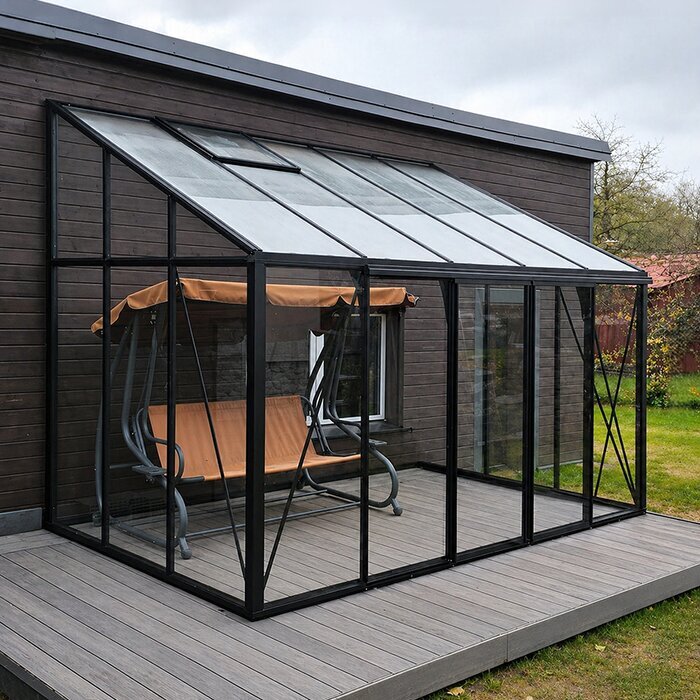
When checking a named item such as the lean-to greenhouse listing, compare it with the exclusions you actually see; the listing itself is not evidence that this type is included or excluded. Check whether the wording refers to a model, range, reduced item or another condition. Also distinguish a genuine exclusion from a code-entry problem: an ineligible product may receive no reduction even when the code is entered correctly. Keeping those possibilities separate helps you avoid changing the code when the real issue is the offer’s scope. If a list is linked, check the relevant item, not only its parent category.
Check the minimum spend and discount calculation
If an offer sets a minimum spend, find out which parts of the basket count towards it. The threshold might be based on eligible products, the amount before another discount or a specific subtotal; follow the definition in the terms rather than assuming every line or charge counts. Check whether the qualifying total must reach the threshold before the voucher is applied, and whether a maximum saving caps the result. A code may be accepted yet deliver less than the headline suggests if the calculation uses only part of the order. Put the rule into plain language before testing it.
If you are considering the limited-edition greenhouse listing, compare any price shown with the qualifying-spend rule and discount formula. For a percentage, check the amount to which it applies; for a fixed reduction, find out whether it covers one eligible item or the qualifying order. Then check the basket calculation against any stated cap. Do not add an unplanned item simply to reach a threshold: the extra purchase can outweigh the saving. The useful comparison is the final cost of the order you genuinely wanted, not the largest possible headline reduction.
Check the dates and voucher-code conditions
Check the dates and redemption rules, not just the words ‘Black Friday’. Read the stated start and end dates, any time limit and the purchase channel in which the code can be used. A saved banner may remain visible after a code’s permitted period, so do not assume it is still valid later; rely on the dates in the conditions. Terms may also restrict a code to certain accounts or purchase channels, or limit the number of redemptions. Confirm each relevant condition rather than treating a code shared elsewhere as proof that it applies to your order.
When checking a particular item, such as the Garden Orangery T listing, keep its exact title beside the code and compare it with the eligible-products list. Enter the code in the designated field before paying, copy it as shown, and look for clear confirmation that the discount has been applied. If the code is rejected, check the expiry date, spelling, spaces, account rules and channel restrictions against the offer terms. If you save the code for later, note its expiry too; do not assume it remains usable.
Find out whether discounts can be combined
A greenhouse voucher code may not combine with an automatic price reduction, another code or a separate promotion. Look for rules on one code per order, non-combinable offers or exclusions for already reduced items; the wording of the specific promotion decides. Some terms state which discount takes priority. Do not assume that two banners can be stacked simply because both are visible, or that a code will add to a reduction already shown on the product page. If the conditions are ambiguous, establish which price the checkout will use before proceeding.
If you are considering the Bloomcabin Oasis pyramid greenhouse listing, compare the amount shown with no code and after applying the eligible offer to the same product and selection. If a code replaces an automatic reduction, use the resulting checkout total rather than adding headline savings together. The useful question is which stated terms produce the lower final price, not how many promotional labels can be entered. If you change the product or basket after testing a code, review the total again; the previous calculation may no longer match.
Check product suitability separately from the discount
Discount terms do not establish whether a greenhouse fits your plot or growing plans. Before treating a reduction as a reason to buy, check the product information for stated dimensions, the space needed for access, listed materials, and assembly or site-preparation requirements. Compare those details with your available area and the way you intend to use the structure. A photograph or model name cannot establish size, construction or suitability. If an important detail or site requirement is unclear, get an answer before ordering rather than assuming that a lower price makes the product a practical choice.
The name greenhouse with built-in storage identifies a listing, but the name alone does not confirm its dimensions, what is included or how it should be assembled. Read the product information for those details and compare them with your planned use instead of treating the title as a full specification. The same rule applies to any greenhouse: make a shortlist based on fit and stated requirements first, then compare the offers that genuinely apply. If the product information does not answer a key question about installation or site suitability, ask the retailer or a qualified installer rather than guessing.
Verify the discount in your basket
At checkout, check the greenhouse line, the offer or code line and the total amount due. Confirm that the reduction is attached to the item you selected, matches the amount promised in the terms and has not disappeared after you changed the basket. A code being accepted is not enough if the expected discount is absent or attached to a different line. Review any subtotal shown and charges separately, while keeping the promotion calculation focused on the figures its terms say count. If you change a quantity or product option, check the calculation again.
Match the basket to the exact item, such as the Bloomcabin Prestige greenhouse with metallic base listing, and make sure the discount appears against that same purchase. If the calculation looks wrong, check eligibility, dates, minimum spend and combination rules before trying again. When the offer wording and checkout still conflict, pause and request clarification. Do not complete the order on the assumption that a missing voucher will be honoured later; wait until you can see the price you are agreeing to.

Keep a record of the offer and order details
Keep a record of the exact offer wording, code, validity dates and any eligibility or exclusion list you relied on. Note the greenhouse title and any selection shown on the product page; a broad description such as ‘greenhouse’ may not identify the item in the basket. For instance, keep the Bloomcabin Orangery listing distinct from a general category reference when matching the product with the terms. A saved copy of the conditions and a basket summary can make it easier to identify what you expected if the order confirmation differs. Check that the copy includes the relevant small print.
After ordering, review the confirmation for the item name, discount and total, then compare them with the final basket summary. If a line is missing or the figures differ, contact the retailer promptly with the order reference and offer details you saved. Keep the question specific: identify the product, code and amount shown rather than assuming the code worked because it was entered. This check helps you spot a discrepancy while the purchase details are easy to locate, without relying on your memory of a banner or message.
Decide whether the offer is worth acting on
Black Friday timing can make a decision feel urgent, but an end date is only one part of the choice. Ask whether the greenhouse matches your plans, whether its product information answers your questions and whether the final price shown is acceptable under the conditions. A headline discount is not a reason to overlook an exclusion, a spend threshold or missing information. If the offer is conditional, judge it on the price actually displayed for the eligible item, not a saving that depends on a different basket or an unconfirmed code. Compare like for like if you are considering another offer.
If the terms are unclear or the basket does not show the expected reduction, pausing is more useful than guessing. You can check again once you have an answer, but verify the validity period rather than assuming the code remains available. If everything is explicit, compare the final price with your budget and the product requirements you set before browsing. That is a steadier basis for Black Friday greenhouse buying than choosing on percentage alone, and it avoids turning a deadline into the only reason to order.
Frequently asked questions
Does a Black Friday greenhouse discount cover every greenhouse?
Not necessarily. A category label or campaign banner does not prove that every listed greenhouse qualifies. Check the terms for named products, ranges, selected options and exclusions, then match them to the exact title in your basket. If the page and offer use different names, compare any model reference or item identifier. Ask the retailer to confirm when you cannot make a reliable match.
Can I use more than one greenhouse voucher code?
Only if the conditions allow it. Look for rules about one voucher per order, combining codes with automatic price reductions, or exclusions for already reduced products. Some terms also state which discount takes priority. If the basket applies one offer instead of another, use the displayed total rather than adding headline savings. Review the calculation again after changing the basket.
What should I do if a voucher code is rejected?
Check the spelling, spaces, expiry date, product eligibility, minimum spend, account restrictions and purchase channel. Read any error message alongside the terms: a typo and an excluded product are different issues. If the terms appear to include your greenhouse but checkout still rejects the code, pause before paying and ask the retailer to clarify the exact product and offer. Do not rely on a reduction that is not shown.
How can I tell what a discount is worth?
Use the calculation in the offer terms, including the qualifying amount and any cap, then verify the discount line and amount due in the basket. Compare the same greenhouse and selection rather than a category headline or a different product. A percentage is not necessarily the saving on the whole order if some lines are excluded or the code applies only to one item. If the calculation is unclear, ask how it works.
Should I order if the discount is missing from the basket?
No. A code entered in a field is not proof that it has been applied. Recheck eligibility, dates, threshold and combination rules, then wait for the order summary to show the expected reduction or get clear confirmation from the retailer before proceeding. Keep the offer details and basket result so you can explain the discrepancy accurately; do not assume a missing discount will be added after submission.
A useful Black Friday greenhouse offer is one whose conditions match the exact product and whose reduction is visible in the order total. Check eligibility and exclusions, calculate any minimum-spend or combination rules, confirm the dates and code mechanics, then review the order summary. Keep the product’s stated dimensions and requirements in view too, so a promotion does not decide suitability for you. When the terms are clear, make your decision using the final price, your budget and your growing plans. If either eligibility or the amount remains uncertain, wait for clarification rather than ordering on the strength of a banner alone.
